9
EN
DAB Presets
Storing station presets
You can store up to twenty stations as presets for quick access to your favourite stations.
To store a station to preset buttons 1, 2 and 3
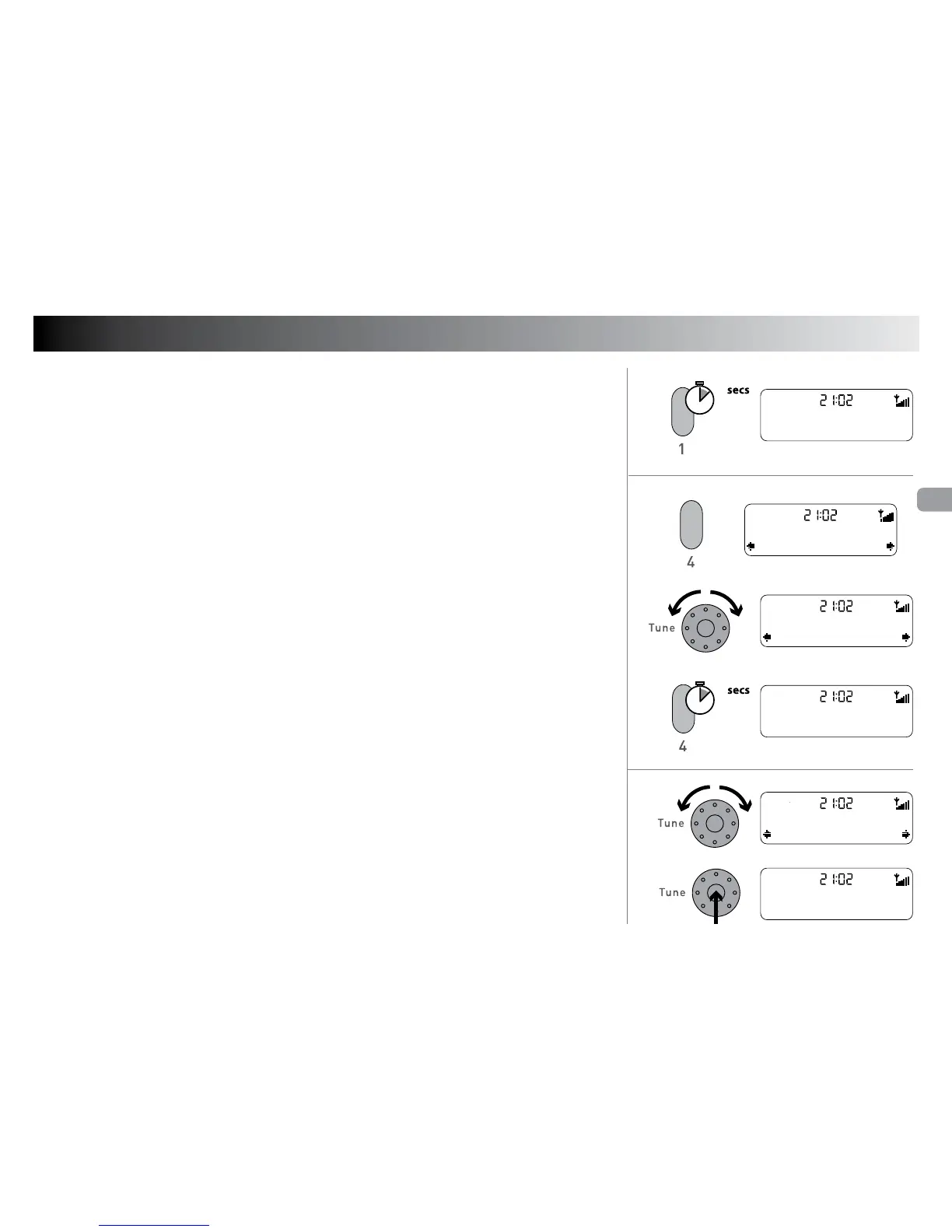
1. Tune to the station you want to store as a preset.
2. Press and hold preset button
[1], [2] or [3] to store the current DAB station to
that preset button. » A
To store a station to the preset list
1. Tune to the station you want to store as a preset.
2. Press the
[4+] button to enter the preset list. » B
3. Rotate the [Tune] dial to scroll to any preset number between 1 and 20. » C
4. Press and hold the [4+] button until you see the ‘Preset saved’ message. » D
Selecting station presets
To select presets 1 to 3
Press the corresponding preset button
[1], [2], or [3].
To select presets from the preset list
1. Press the
[4+] button to enter the preset list. » B
2. Rotate the [Tune] dial to scroll to the preset you want to listen to and press the
[Tune] button to select the preset. » E
If you do not select a preset, press [Menu] to return to the DAB screen.
A
B
C
D
E
+
2
2
Preset 01 saved
BBC Radio 4
+
Classic FM
Preset 04
Empty preset
Preset 06
Preset 06 saved
XFM
XFM
Preset 06
04-02-2008
XFM


 To Next Page