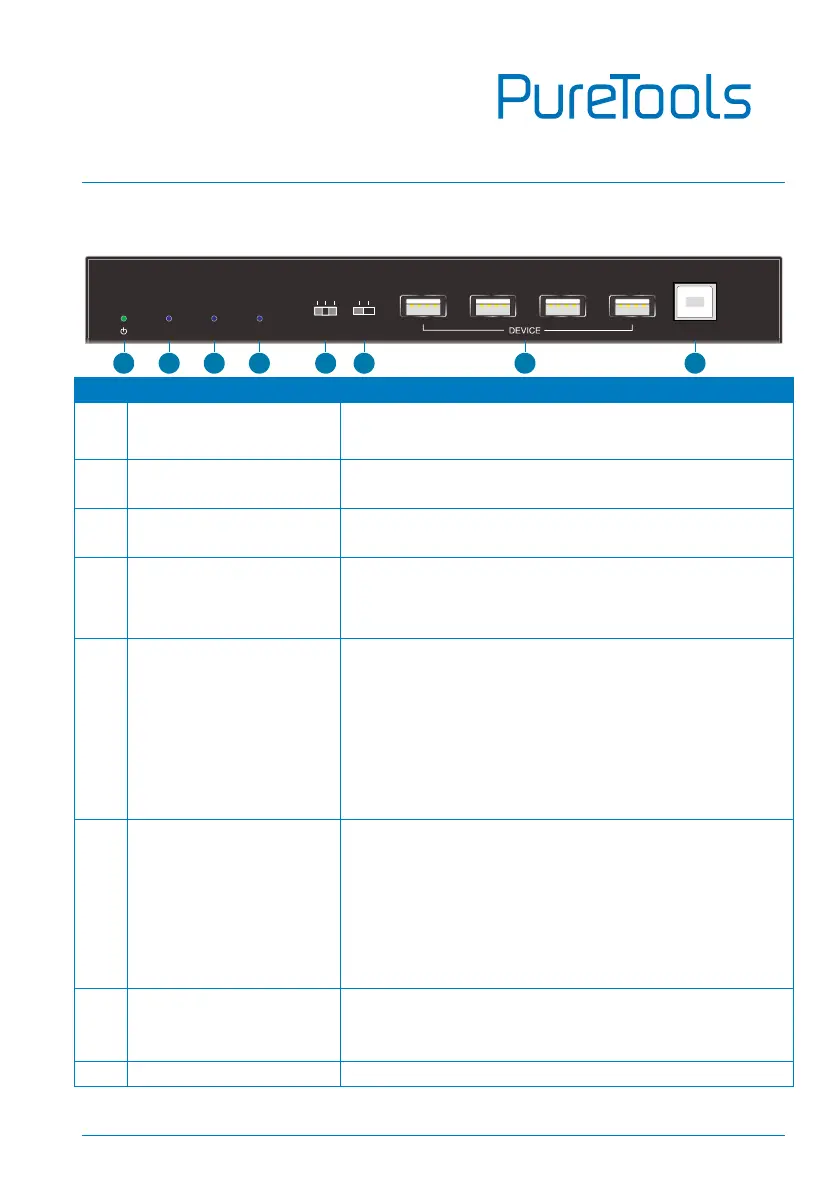
Illuminates green when power is applied, or blinks
when in firmware upgrade mode.
Illuminates when there is a valid HDBaseT link
between the transmitter and the receiver.
Illuminates when the video contains HDCP content,
or blinks when the video has no HDCP content.
Illuminates when there is a HDMI display device is
connected to HDMI output port and when input
source is detected.
DIP switch for ARC mode selection
HDMI: The ARC input via HDMI output port of
receiver.
PASS: Supports CEC & ARC pass-through.
SPDIF: The ARC input via SPDIF input port of
receiver.
DIP switch for DEVICE or HOST mode selection.
DEVICE: The USB devices at receiver position
are used to control the HOST PC at transmitter
position.
HOST: The HOST PC at receiver position is
controlled by the USB devices at transmitter
position.
Four type-A USB 2.0 port for USB devices (e.g. Mouse,
Keyboard and Camera) connection to control the PC
which is connected to the HOST port of transmitter.
T Type-B USB 2.0 ports for PC connection. The PC can
HDCPLINK
DEVICE
USBDISPLAY ARC
SPDIF
HDMI
PASS
HOST
HOST
6
4
8
1 2
3
5
7



 To Next Page