26
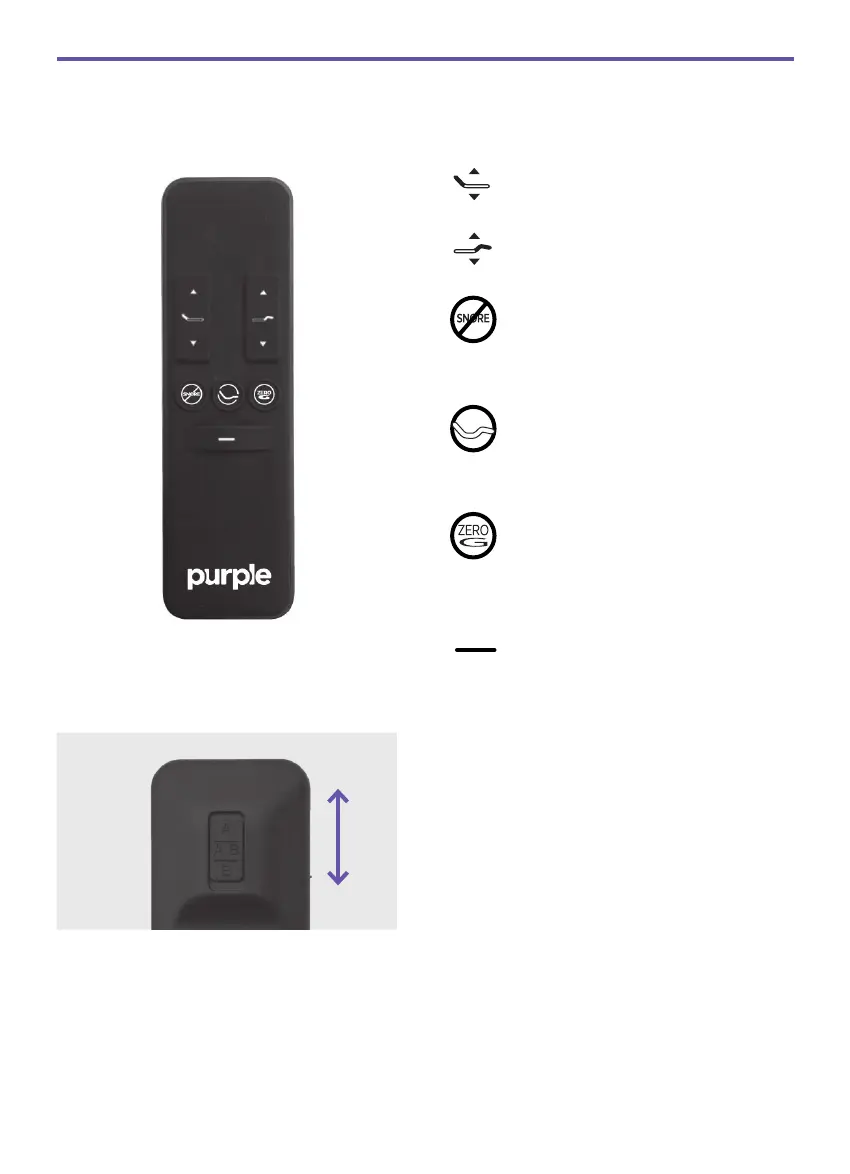
REMOTE OVERVIEW
The HEADarrows lift and
lower the head section of the base.
The FOOTarrows lift and
lower the foot section of the base.
The ANTI-SNORE preset posi-
tion* will elevate the head section
slightly and may help reduce
snoring.
The SITTING preset position* will
adjust the head and foot section
to a comfortable position ideal for
reading or watching television.
The one-touch ZERO-G® preset
position adjusts your legs to a high-
er level than your heart, helping to
relieve pressure off the lower back
and promote circulation.
The one-touch FLAT preset
position returns the base to a fully
horizontal position.
Articulate the head and foot to your
desired position.
Press and hold one of the Memory
Preset buttons (ANTI-SNORE or
SITTING) for 5 seconds. Position is
now saved.
NOTE: To restore the preset buttons
back to their original factory settings,
hold FLAT and ZERO-G® simul-
taneously for at least 5 seconds. The
original presets will be restored.
1
2
3
A/AB/B SIDE CONTROL
*SAVE A NEW PRESET POSITION
If using a split King (two Twin XL’s side-
by-side), slide the toggle button on the
back of the remote to select which side(s)
of the base to control.



 To Next Page