Hornet Instruction Guide - 2009-2018 Dodge Ram
7
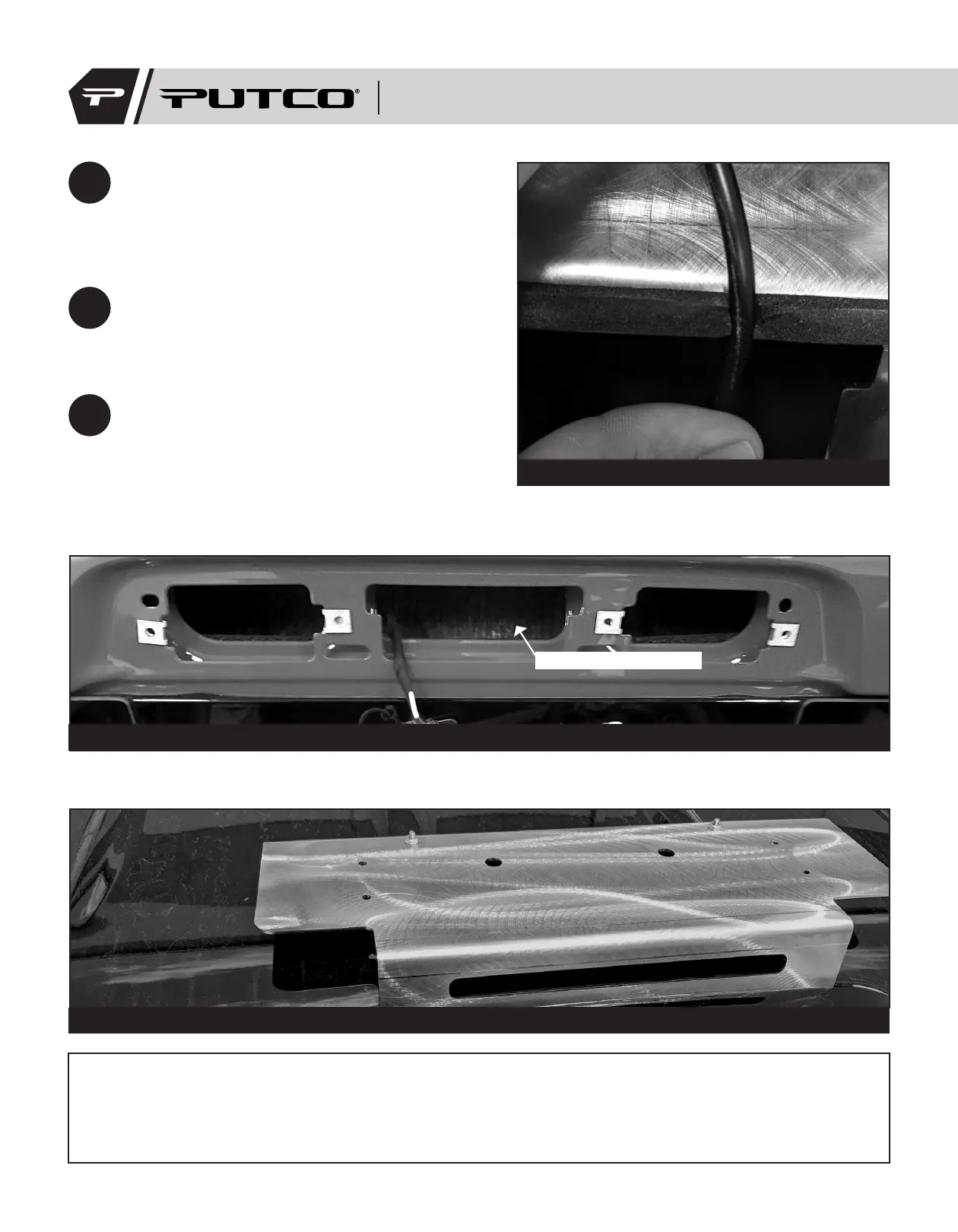
Cut a small slot in the gasket to allow for the
wire to feed through. Holding the bracket up to
the truck will give a good idea where to cut the
slot to avoid pinching the wire. (Figure 4)
8
Feed the wire through the hole behind the 3rd
brake light and route it through the cab to a
suitable switch mounting location. (Figure 4)
9
Position the 3rd brake light on the bracket
and reinstall the brake light taking care to
reconnect the harness and not pinch the
Hornet light cable. Installing and slightly
tightening the two inside screws first aids in
ease of installation. (Figure 5)
Figure 4: Cutting slot in gasket.
Figure 6: Example of installed bracket.
Figure 5: Wire routing.
Route wire through here
Putco guarantees its Stainless Steel and Aluminum products against defects in workmanship and material for
as long as you own your vehicle. All painted products have a 90 day warranty on the painted surface. Any defects
resulting from faulty material or workmanship will be warranted by Putco and repaired or replaced at our discretion.
Putco assumes no extra labor costs. Damages caused by freight carriers, improper installation, misuse, collision, or
neglect will not be warranted by Putco.
950004I


 To Next Page