英文/English
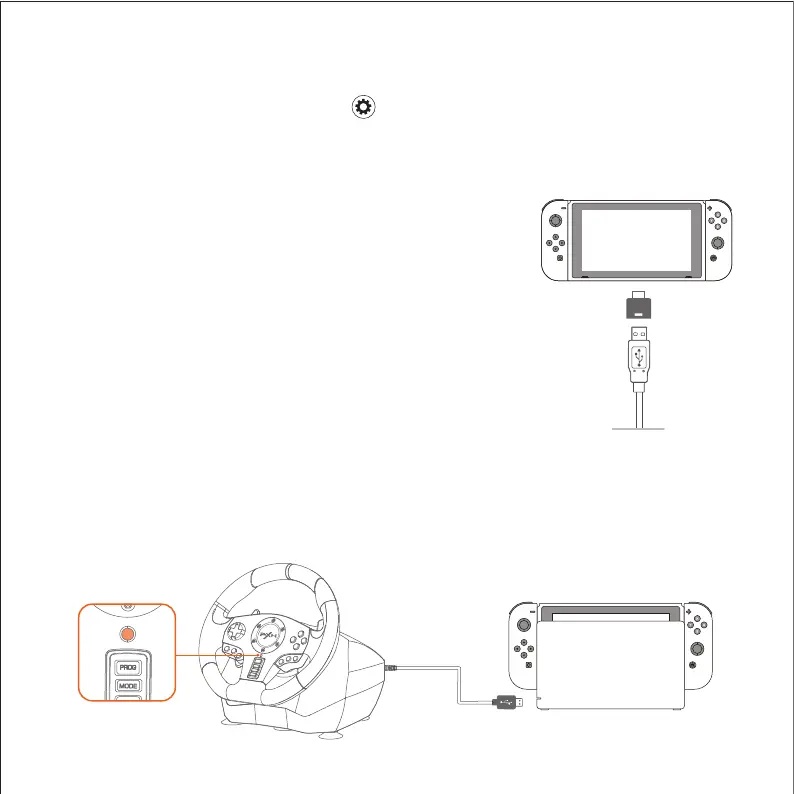
Connect With Switch Console
Step 1 Connect the TYPE-C OTG with the USB of
Racing Wheel.
Step 2 Connect the USB main cable of the Racing
Wheel to Switch Console.
Step 3 Power on switch console to play.
Connect With Switch dock
Step 1 Place the Switch dock and ensure successful connection.
Step 2 Plug the USB of Racing Wheel into Switch dock and power on Switch
console.
* Enter homepage of SWITCH, select Setting → Controllers and Sensors → select
Pro Controller Wired Connection. Please make sure that the option state is ON.
Using for Nintendo Switch
OTG
Adapter
USB Port of SWITCH Dock


 To Next Page