英文/English
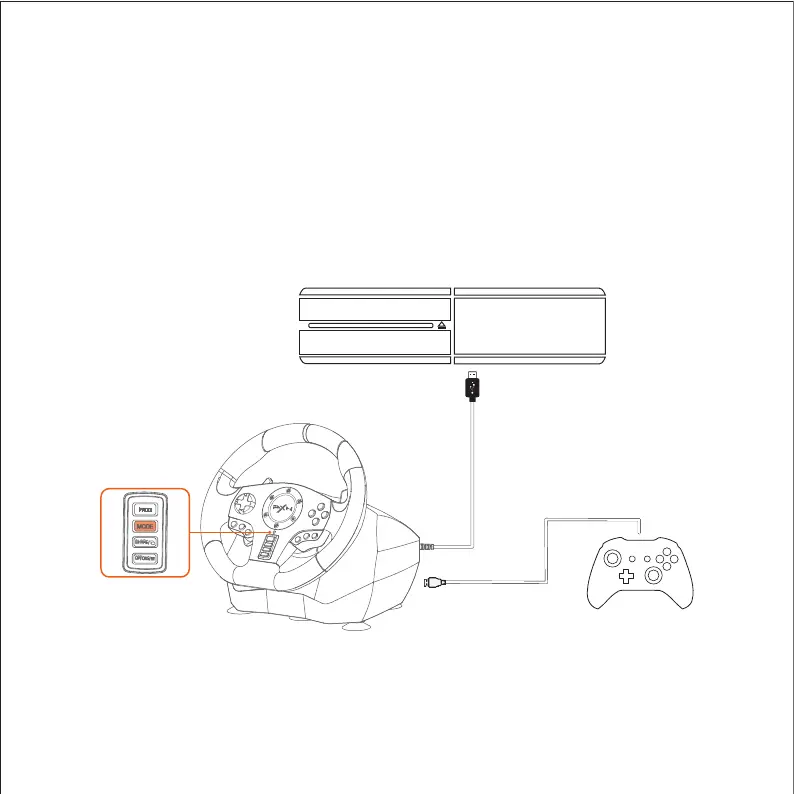
Step 1 Power off the original controller of XBOX ONE/XBOX SERIES X&S.
Step 2 Connect the Racing Wheel with console controller by Micro USB cable.
Step 3 Plug the USB of Racing Wheel into console USB interface.
Step 4 Press the button of "MODE". After that the Racing Wheel can start to
play game and setting.
Diagram of XBOX ONE Connection
Using for XBOX ONE /XBOX SERIES X&S Console
❶
❷
❸
XBOX ONE
X BOX ONE
❹
SS
HH
AA
RR
EE
//
OO
PP
TT
I
I
O
O
N
SS
//


 To Next Page