9
EN
Recording Playing discs EditingGetting started
Changing the
Setup menu
Others Español
Before you start
Connections
Functional overview (cont’d)
Before you start
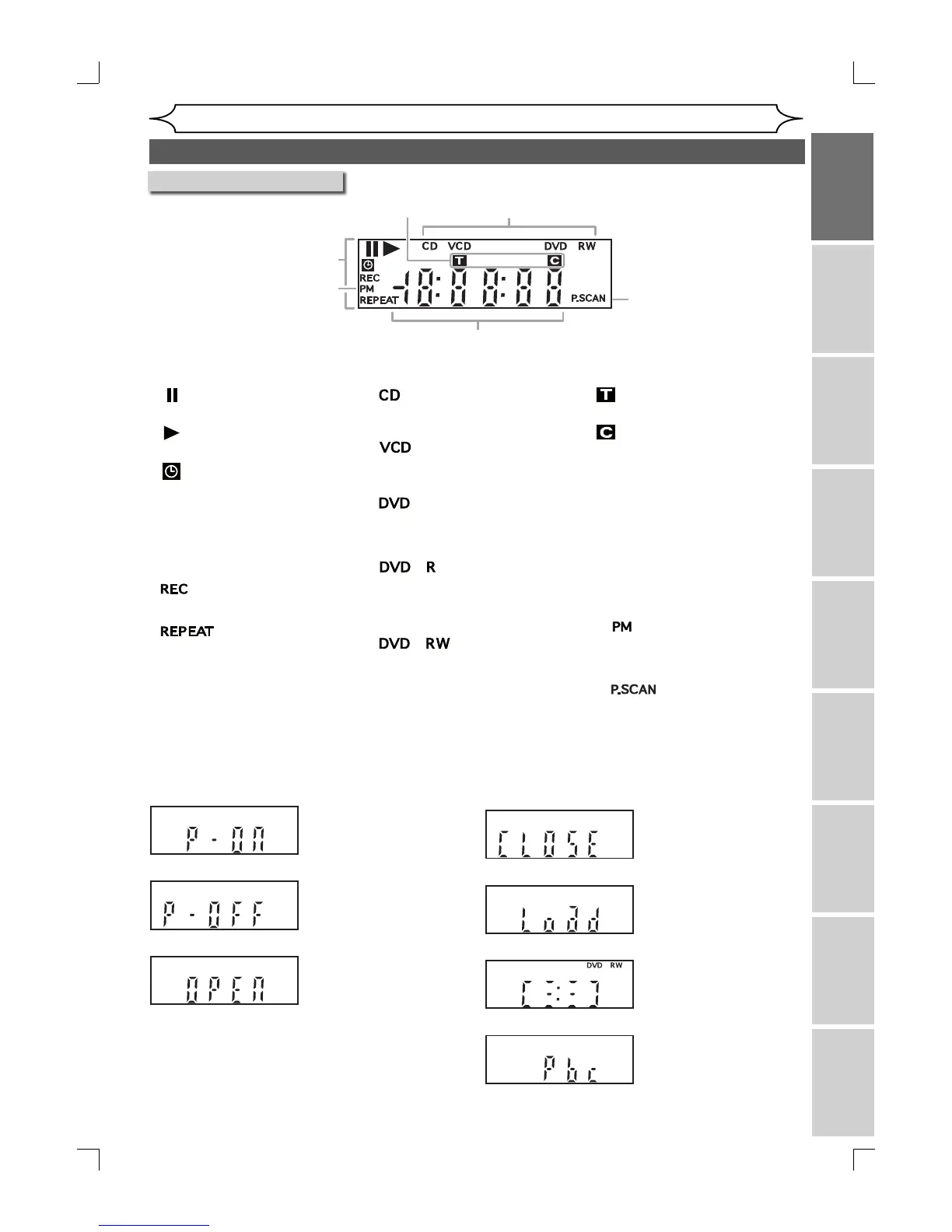
Front Panel Display Guide
Display message
Appears when data is
being recorded on a disc.
1
5
6
4
2
3
Appears when the disc
tray is opening.
Appears when the unit is
turned on.
Appears when the unit is
turned off.
Appears when the disc
tray is closing.
Appears when a disc is
loaded on the disc tray.
1. Current Status of the unit
:Appears when disc
playback is paused.
:Appears when playing a
disc.
:Appears when the timer
programming has been set
and is proceeding. Flashes
when all Timer Recordings
have been finished, or
when a program cannot be
performed by some reason.
:Appears during recording
process.
:Appears during repeat
play.
2. Disc type
:Appears when an Audio
CD / MP3 / WMA is
inserted in the disc tray.
:Appears when a Video
CD is inserted in the disc
tray.
:Appears when a DVD
disc is inserted in the
disc tray.
:Appears when a DVD+R
/ DVD-R disc is inserted
in the disc tray.
:Appears when a
DVD+RW / DVD-RW disc
is inserted in the disc
tray.
3. Title / Track and Chapter mark
:Appears when indicating a
title/track number.
:Appears when indicating a
chapter number.
4. Displays the following
• Playing time
• Current title / chapter / track
number
• Recording time/ remaining time
• Clock
• Channel number
• OTR (One-touch Timer
Recording) remaining time
5.
:Appears in the afternoon
with the clock displaying.
6.
:Appears when the
progressive scan system is
activated.
Appears when the PBC
function is activated.
(Video CD playback only.
Refer to page 70.)
E7A02UD_PY90DG_p1-37.indd.indd 9E7A02UD_PY90DG_p1-37.indd.indd 9 2006/04/24 18:43:462006/04/24 18:43:46


 To Next Page