www.PyleUSA.com www.PyleUSA.com
12 13
Troubleshooting
CHECK POINT
When a disc is brought from a cold environment to a warm one, there may be
moisture on the disc, or condensation will appear on the pickup lens. It will
aect the disc playback.
1. Remove the disc from the Multimedia player.
2. Turn
ON the power and leave it ON for an hour to vaporize the condensation.
3. You can now operate the Multimedia player without any problem.
PLRD146
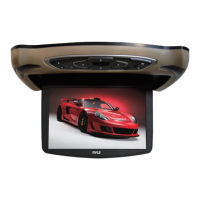
Roof Mount LCD Monitor
13.3'' Roof Mount TFT LCD Monitor Built In Multimedia Disc/USB/SD Player
with Wireless FM/IR Transmitter & Included 3 Color Skins (Gry/Blk/Tan)
Features:
•
13.3'' Wide Screen Hi Resolution TFT-LCD Monitor
• Overhead Console with Dual LED Dome Lights
• On Screen Menu Control
• Full Function wireless remote control
• IR Transmitter Ready for Wireless Headphone
• Overhead Console with Dual LED Dome Lights
• TouchButton Dual Function Front Mounted Controls
• Side Mount Slot-Load DVD Player
• DVD CD/CD/CD-R/CDRW/MP3 Compatible
• Built in Speaker’s and audible button indicators
• Built in Anti-Skip Mechanism & Last position memory
• Wireless FM Transmitter to broadcast to a existing FM stereo (Portable/Car/Etc.)
• 3 sets of interchangeable 2pc snap-on color skins.
Choose from Grey, Black, or Tan
Whats’ in the Box:
•
LCD Monitor
• One wireless remote control
• User of manual
• One small release key
• 2 sets of interchangeable housings
• Fix Screws x 4 pcs
Technical Specications:
•
Resolution: 1280 x 800
• Brightness: 450 Cd/Sq.M
• Contrast Ratio: 500:1
• Power Source: DC 12 Volt
• Multi System: NTSC/PAL Auto Switch
• Dimensions (LxWxH): 16.2'' x 13.0'' x 2.15'' Closed (9.75'' Open)
TROUBLE ACTION
No power
Check and see if the power cable is
properly connected.
No picture
Make sure that the equipment is properly
connected. Check and see if the connected
monitor is turned on
Stopped picture
Check and see if the video cable is properly
connected and if the monitor is turned on.
Poor playback picture Clean the disc
No color The color system of this unit does not match
the color system of the monitor.
Check the color system of the unit.
Distorted sound Adjust the video system by pressing the TV
system button. (PAL, NTSC)
The remote control doesnt work
properly
Remove any obstacles between the remote
control unit and the remote control sensor.
Operate the remote control at a shorter distance.
DISC ERROR is displayed on
the screen
Set the power button to OFF and then back to
ON alternatively. Turn OFF the power,
disconnect the power plug and then
reconnect it.


 To Previous Page