Need help?
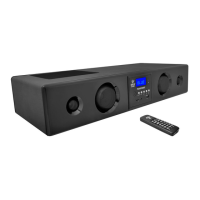
Do you have a question about the Pyle PSBV400 and is the answer not in the manual?
All safety and operating instructions should be read and followed before product use.
Avoid water, heat sources, blocked ventilation, and protect the power cord.
Clean only with a dry cloth and refer all servicing to qualified personnel.
Position the sound bar for optimal SRS stereo technology and surround sound effects.
Detailed steps and diagrams for marking, drilling, installing the wall plate, and hanging the sound bar.
Connect the power supply and link to PCs or MP3 players using provided cables.
Connect the sound bar to televisions and DVD/CD/VCR players via audio/video inputs.
Description of power, standby, mute, volume, input selection, USB, and SD/MMC ports on the front panel.
Overview of AC power, FM antenna, audio/video inputs/outputs, and wall mount provision.
Detailed functions of buttons for power, input, tone, volume, mute, SRS, setup, search, and playback.
Steps for powering on/off, standby mode, input selection, and volume adjustment.
Connect the FM antenna, tune stations, use auto-search, and store presets.
Accessing the media player, selecting modes like Movie, Music, Picture, Explore, and Settings.
Playing video files, selecting audio tracks, subtitles, and navigating playback options.
Browsing and playing image files, adjusting picture operations, and playing music files with EQ.
Exploring files, configuring system settings such as output, language, and restoring defaults.
Details on power, impedance, frequency response, size, and weight of the speakers.
Lists supported video, audio, photo file formats, codecs, bit rates, and sampling rates.
 General
| Brand | Pyle |
|---|---|
| Model | PSBV400 |
| Category | Speaker System |
| Language | English |

 To Next Page