8
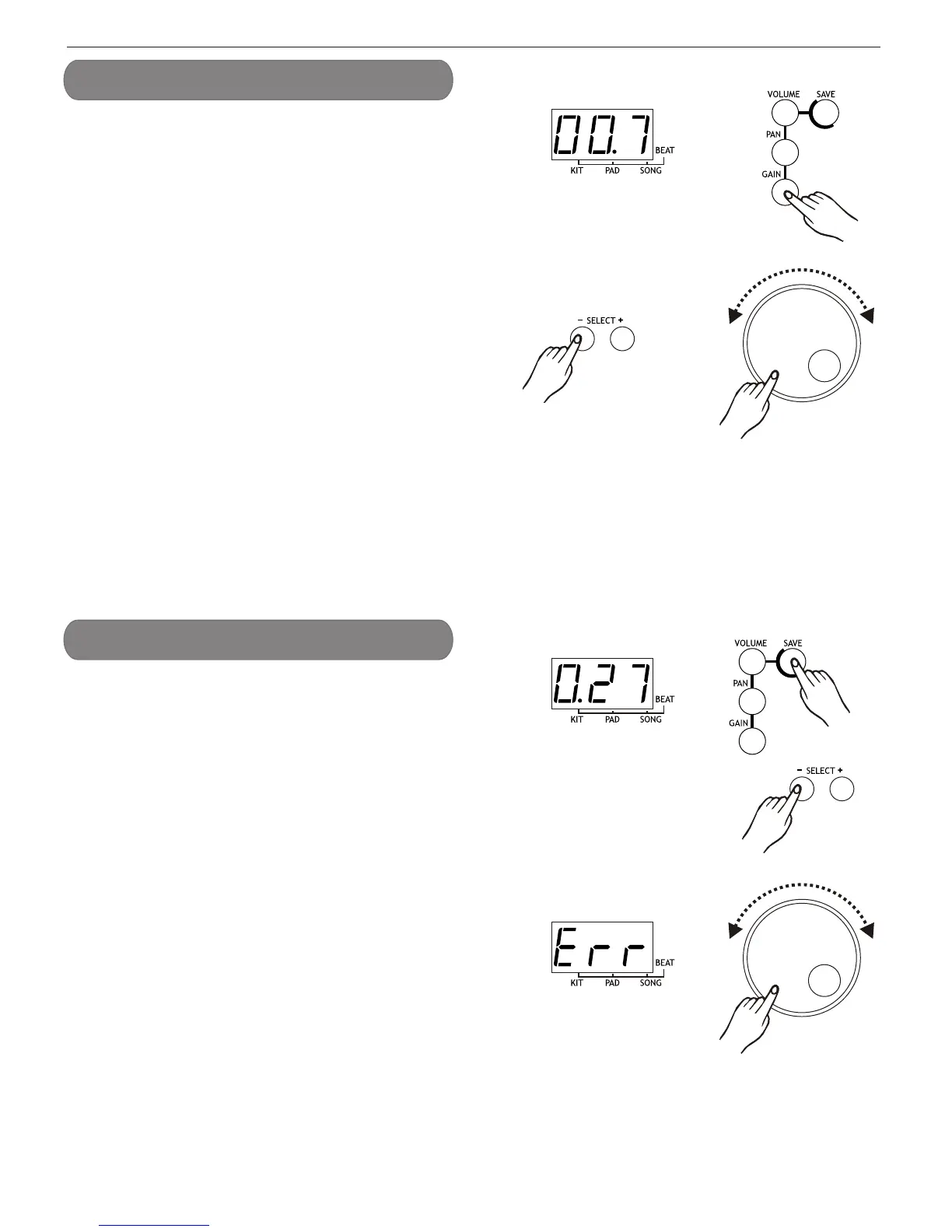
Press [gain] button to enter pad assign menu. If pad assign
menu is selected, the corresponding menu indicator will be
lit up.
In this menu, the 3-digit LED will show the gain of current
pad, which can be selected by pressing pad assign button
on the top panel or by pad hitting. The button select [+] /
[ ] or [ dial ] can be used to select the gain (0-9, loop) for
current pad.
-
Press [save] button to enter the kit save menu.The button
select or [ dial ] can be used to select a user kit
( 21-30, loop) current kit setting. During kit selecting the
user kit number will keep flashing.
Press [ save ] button again, the current kit setting will be
saved to the selected kit. The machine will quit to the kit
menu and select this user kit as the current one, if all the
data has been saved successfully.
If saving is failed due to error, an Err will appear on the
LED.
[+] / [ ] -
''
NOTE:
The unsaved kit setting will be lost after kit changing.
Set pad gain
Save Kit


 To Next Page