EasyManua.ls Logo

Pyramid 5000+ - Troubleshooting; Try Again Message; Impaired Printing; Master Reset

Pyramid 5000+
20 pages
Print Icon
To Next Page IconTo Next Page
To Previous Page IconTo Previous Page
Loading...
AUTO TOTALING TIME CLOCK INSTRUCTIONS
Model 5000
+
/5000
+
HD
Unplug time clock.
Press & hold (UP) button while plugging unit back in.
Release (UP) button when PTR5000 VER displays.
TIME NOT SET flashes on display screen.
Re-program time clock.
Distribute new time cards.
TROUBLESHOOTING
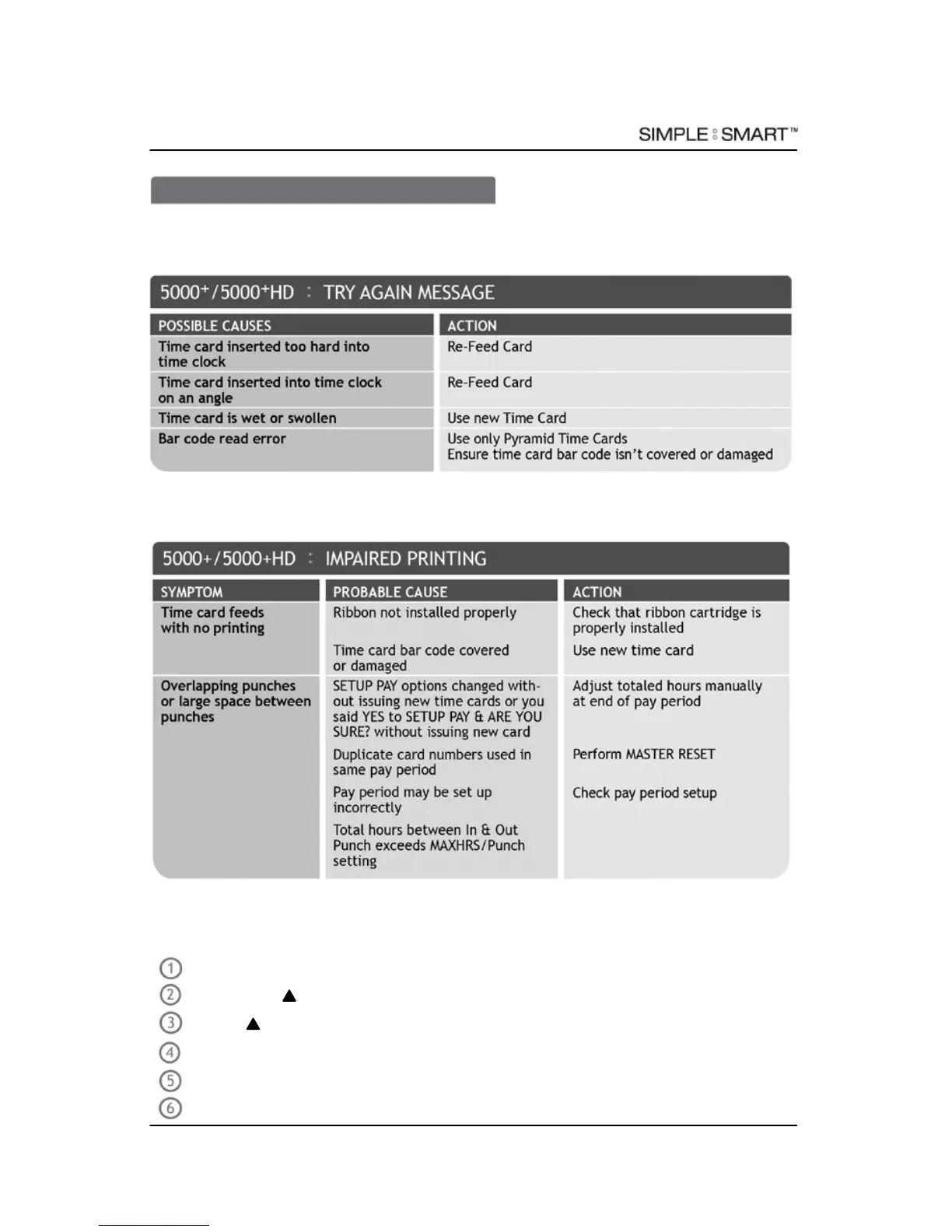
TRY AGAIN MESSAGE
In the event the time clock displays “TRY AGAIN”, re-feed the time card. If “TRY AGAIN
persists, please check list for possible causes:
IMPAIRED PRINTING
In the event the time clock printing is impaired, please check list for possible causes:
MASTER RESET
Erases time clock’s memory & restores default factory settings:
12 TROUBLESHOOTING
888.479.7264

Related product manuals