This document is a user guide for the Pyronix Enforcer X security system. It provides comprehensive instructions on how to operate and manage the system, including arming/disarming, advanced functions, and integration with the HomeControl2.0 smart device app.
Function Description:
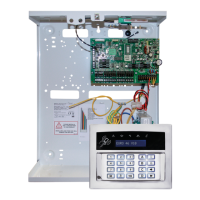
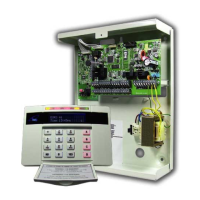
The Pyronix Enforcer X is an intruder alarm system designed for security and control. It supports both wired and wireless components, offering flexibility in installation and usage. The system can be managed via wired keypads, wireless keyfobs, proximity tags, and a smart device application (HomeControl2.0). It is capable of monitoring multiple areas and zones, providing detailed event logs, and offering various notification methods including SMS and voice messages. The system also includes features for user management, output control for home automation, and system diagnostics.
Important Technical Specifications:
- User Capacity: Up to 500 users can be programmed, each allocated a code, tag, or wireless keyfob.
- Wireless Keyfob Capacity: A maximum of 32 users can have a wireless keyfob allocated with the addition of a wireless ZEM (Zone Expander Module).
- Time & Date: All log entries are date and time stamped. The system can prompt for manual time updates after a power outage if configured.
- Wi-Fi Connectivity: Supports Wi-Fi setup via WPS or manual SSID and password entry. Includes a Wi-Fi signal strength indicator.
- Communication: Supports SMS and voice phonebook for alarm notifications (requires a cellular module for SMS/voice).
- Compliance:
- Suitable for installations meeting European Security Grade 3 and Environmental Class II requirements.
- Meets ATS5 requirements for IP communication when all parts are working normally.
- Complies with various EN and ETSI standards, including EN 62368-1 (Safety), EN 61000-6-3 (EMC Emission), EN 50131 series (Intrusion Systems), ETSI EN 301 489 series (EMC for Radio Equipment), ETSI EN 300 220-2 (SRD 25-1000 MHz), ETSI EN 300 330 (SRD 9 kHz-30 MHz, including 125kHz prox reader).
- Complies with PD 6662: 2017 (Application of European Standards) and Radio Equipment Directive (RED) 2014/53/EU.
- Complies with Directive (EU) 2017/2102 amending 2011/65/EU AND 2015/863/EU (RoHS).
- External arm/disarm readers and wireless sirens meet Environmental Class 4.
- Keypad Security: After 30 key presses without a valid code, keys are disabled for 90 seconds. This repeats after every 7 invalid key presses until a valid code is entered.
- Proximity Tag Reader Security: After 6 presentations of an invalid tag, the reader is disabled for 90 seconds. This repeats for each invalid tag until a valid tag is used.
Usage Features:
- Arming/Disarming:
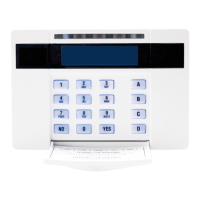
- Wired Keypads: Uses PIN codes or proximity tags. Supports arming all areas or individual areas/levels (A, B, C, D). Directional buttons, YES/NO buttons, and numerical keys are used for navigation and selection. Keypad LEDs indicate system status (Alert, Alarm, Tamper, Fault, Disarmed, Proximity tag).
- Wireless Keyfobs: Four programmable buttons for specific purposes. Quick arming by pressing and holding a button for less than 2 seconds. Keyfob LED indicates arming status (green flashing for arming, red for armed). Keyfobs can be locked to prevent accidental presses by holding two specific buttons for 5 seconds.
- Proximity Tags: Presenting a tag to a reader initiates the exit time and arms the system based on user permissions.
- Disarming After Alarm: Requires a PIN code or proximity tag. The alarm/tamper symbol flashes, and the keypad displays the activated zone. Pressing NO resets the system. Disarming with a keyfob is possible if enabled by the installer.
- HomeControl2.0 Smart Device App:
- Downloading: Available on Apple App Store and Google Play Store.
- Adding System: Via QR code scan (found on the metal casing) or short code (from Master Manager menu). Requires creating or logging into a HomeControl Cloud account and assigning a system name.
- Biometric Authorization: Supports Face ID/Touch ID (iOS) and Android equivalents for login if enabled and user code is saved.
- Homescreen: Displays system status, areas, zones, and quick actions.
- Action Buttons: Indicate alarm status, armed/disarmed status, or faults. Used to arm/disarm levels or silence alarms.
- Area Information: Shows area alias and last user to arm/disarm.
- Zones in Area: View all zones allocated to an area.
- Geofencing: Setup, view, or edit geofences for the system.
- History: Displays recent important events.
- Automate: Operate programmed outputs (e.g., lights).
- About: Displays system information (firmware, number of zones).
- App Icons: Visual indicators for system status (disarmed, arming, armed, triggered, issue) and individual zone status (normal, triggered armed, triggered fault, active, omitted).
- Advanced Functions (Master Manager Mode):
- Entering/Exiting: Accessed by pressing 'D' and entering the Master Manager code/tag. Exited by scrolling to 'EXIT MANAGER MODE?' and pressing YES, or pressing 'A' from a main menu item.
- Omit Zones: Temporarily bypass zones (except PA and fire zones) for the next arming procedure.
- Operate User Outputs: Activate/deactivate user automation outputs (e.g., electronic gates, lights).
- Date & Time: Program system date and time, including timezone.
- Learn User Codes Keyfobs & Tags: Add, edit, or delete user PIN codes, tags, and keyfobs. Change Master Manager code.
- Review Logs: Monitor operational information (arming/disarming, alarm activations). Includes Panel Log, Access/Ctrl Log, and Voice Log.
- Wi-Fi Setup: Configure Wi-Fi connection.
- SMS Phonebook: Program up to 10 mobile numbers for SMS alarm notifications (requires cellular module).
- Voice Phonebook: Edit telephone numbers for voice messages.
- Walk Test: Test each zone.
- Bell Test: Test all external sounders.
- Allow Engineer Menu: Enable/disable engineer access.
- Block Remote Arming: Prevent remote arming via web browser.
- Setup App: Display short code for HomeControl2.0 app integration.
- Block UDL: Prevent uploading/downloading from web browser.
- System Sounds Demo: Demonstrate alarm system sounds.
- Chime: Enable/disable chime for any zone, cycling through 'c' (keypad chime), 'C' (keypad and speakers chime), and nothing.
- Keypad PA (Panic Alarm): Generated by pressing and holding '1' and '7' for 2 seconds (programmable duration). Keyfobs can also be programmed for panic alarms.
Maintenance Features:
- Fault Indications: Flashing ALERT LED indicates system faults. Entering a PIN code/tag or pressing a keyfob button displays the fault. The system may be armed with a fault if programmed, but performance may be affected.
- Unable to Arm: If 'unable to arm' is displayed, it indicates an open zone. Users should check for open windows, movement, etc., or omit the zone.
- Installation Information: Section for recording alarm company details, installation date, site reference, engineer name, contact number, grade, and environmental class.
- System Reset: Pressing NO on the keypad after an alarm resets the system.
- Time & Date Reset: Powering down the system will reset time and date information unless communications are configured and the system reconnects to the data path on power up.

 Need help?
 General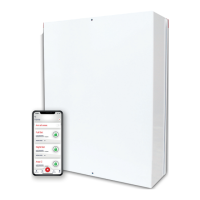


 To Next Page