Need help?
Do you have a question about the QAcoustics Q M4 and is the answer not in the manual?
Important precautions for safe operation, including avoiding water, cleaning, ventilation, and heat sources.
Warnings regarding electric shock, unauthorized modifications, and servicing by qualified personnel.
Instructions for responsible and environmentally safe disposal of the product.
A welcome message and explanation of the user manual's aim to guide setup and operation.
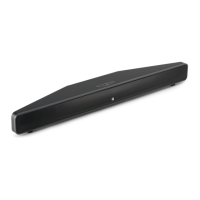
Highlights the key technical specifications and capabilities of the Q Acoustics Q M4 soundbar.
Details the soundbar's design, audio quality, and integration into a home environment.
Step-by-step instructions for securely mounting the soundbar onto a wall.
Instructions for attaching the anti-vibration feet to the base of the soundbar.
Details the buttons (Power, Volume, Source) and their functions on the soundbar's top panel.
Explains the different colours and patterns of the status LED for various modes and inputs.
Specifies the location of the IR sensor for proper remote control operation.
Details the functions and labels of all connections and controls on the rear panel.
How to connect the soundbar using a TOSLINK digital optical audio cable for superior audio quality.
Instructions for connecting audio sources via Line In 1 (RCA) and Line In 2 (3.5mm) inputs.
How to connect external audio sources using the 3.5mm jack input for Line In 2.
Details Subwoofer Out, Power Switch, AC Input, and Bluetooth Pair Button functions.
Explains the functions of the remote control buttons for power, source, volume, and mute.
Step-by-step guide on how to correctly replace the battery in the remote control.
How to turn the unit on/off and manage standby mode with LED indicators.
Explains the auto-on feature and the priority order for automatic audio source selection.
Guides for manually pairing Bluetooth devices and using NFC for quick connection.
Covers auto-source behavior, out-of-range, pairing multiple devices, and standby connections.
Guides for setting up programmable remote controls for the soundbar, including satellite remotes.
Specific instructions for programming cable remote controls for the soundbar.
Technical details on power output, frequency response, and S/N ratio.
Details the BMR drivers and the twin coil subwoofer used in the soundbar.
Information on standby and idle power usage, and line ratings.
Technical details including Bluetooth version, latency, and supported codecs.
Measurements for width, height, depth, and overall weight of the soundbar.
 General
| Type | Soundbar |
|---|---|
| Subwoofer | Built-in |
| Bluetooth | Yes |
| Impedance | 6 Ohms |
| Inputs | Optical |
| Bluetooth Version | 4.0 |

 To Next Page