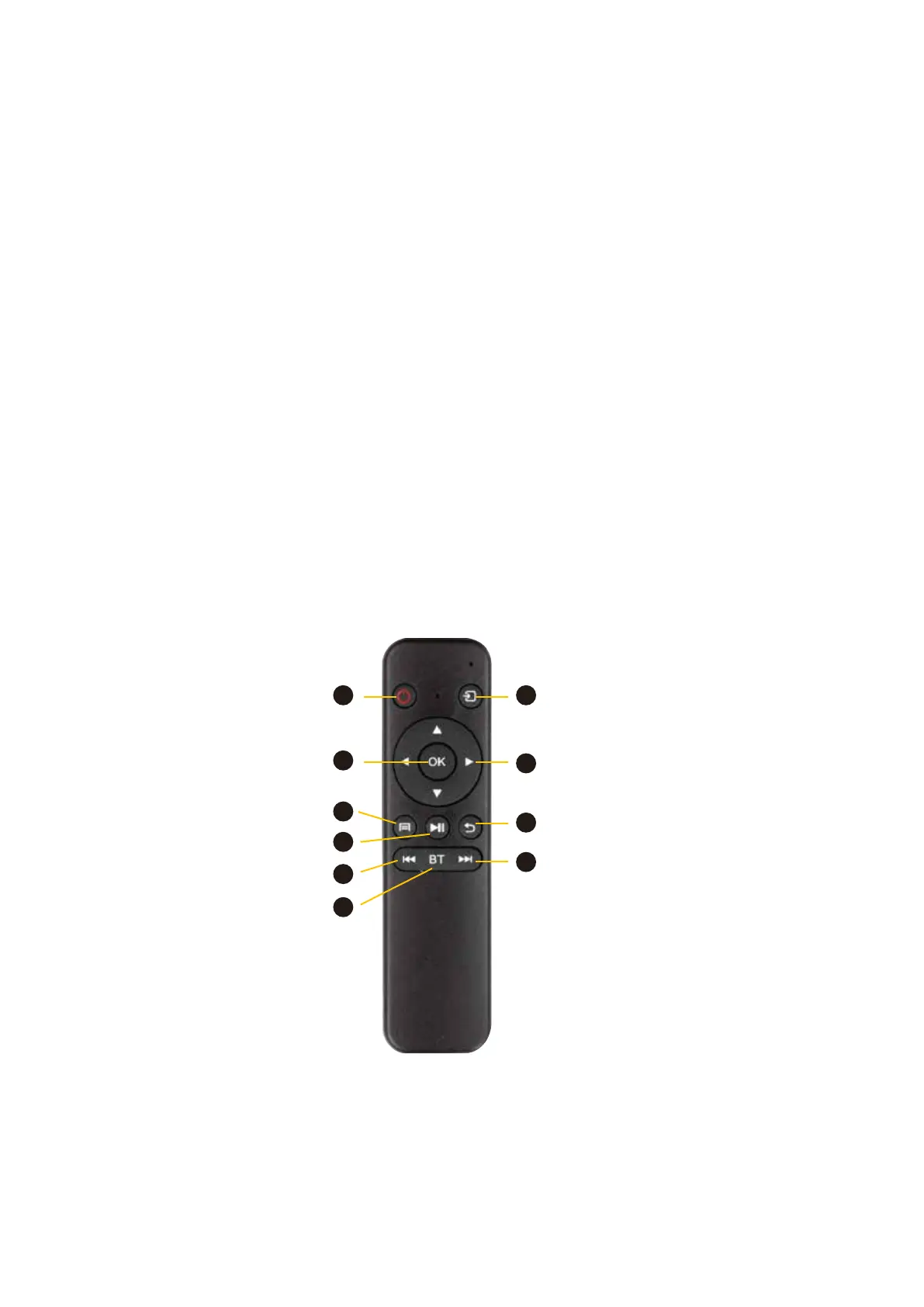
Remote Control
1. ON/OFF
2. INPUT Use this to switch between HDMI and
USB input sources.
3. ENTER Select on screen options
4. DIRECTIONAL KEY This is used to navi-
gate menus and to make selections
5. MENU This is used to make selections of
play: video, music, photo, text.
6. PLAY/ PAUSE
7. RETURN Returns to the home screen
8. PREVIOUS/ REWIND
9. BLUETOOTH Selects Bluetooth mode
10. NEXT/ FAST FORWARD
Remote Control Code Matching
1. Press and hold the up and down of remote control at the same time.
2. The indicator light on the remote control will be on, then release, and the light will flash.
3. The indicator light will be off after a few seconds, and the code matching is successful.
7
5
2
3
10
9
6
8
4
1
ON/OFF
Input/Projector or Light
Directional Key
Return
Next/Fast Forward
Enter
Menu
Play/Pause
Previous Rewind
Bluetooth



 To Next Page