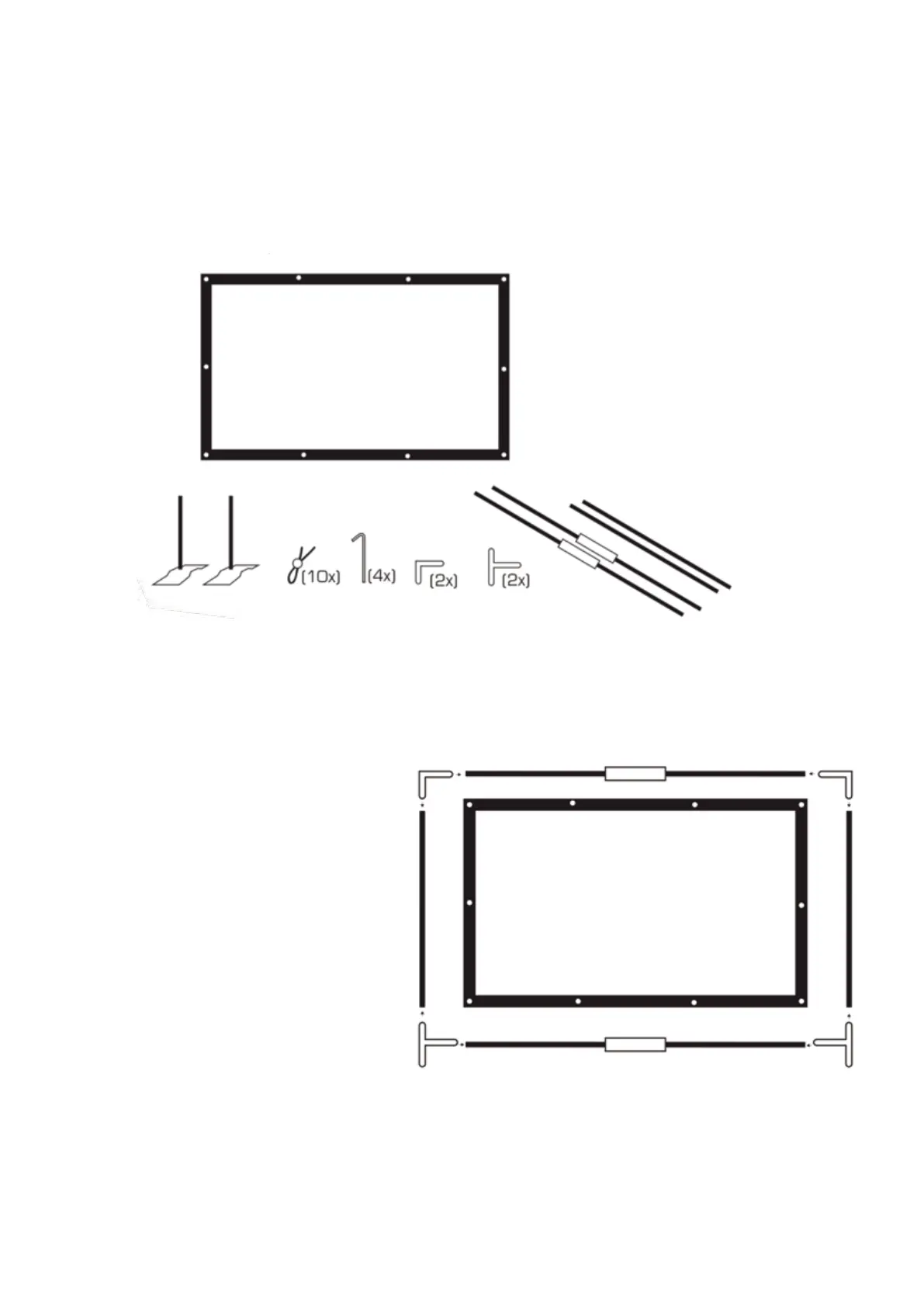
• 1 Screen
• 2 Short Poles
• 2 Long Poles
• 2 Poles with Metal Collars
• 4 Outdoor Metal Stakes
• 4 Metal Brackets (2 L-Brackets and 2 T-Brackets) 10 Elastic Ties)
SCREEN ASSEMBLY
The PBX-6000 includes a projection screen to better show the image.
The projection screen includes 6 poles and plastic ties that fit together, with the screen held to the
poles by elastic ties.
Before starting, identify:
STEP 1
• Lay the four metal brackets on the floor
• Insert one short pole into one of the metal
collared poles and lay it between the two
T-brackets on the bottom.
• Insert one short pole into one of the metal
collared poles and lay in between the two
L-brackets on the top.
• Lay one long pole on the left side.
• Lay one long pole on the right side.
• Lay the screen across the rectangle that is
formed by the poles
• Push the poles, L-brackets, and
T-brackets together so they fit snugly.



 To Next Page