Expansion Unit Model Description Required Accessories
TR-002 • Uses a USB 3.2 Gen 2 Type-C
interface
• Supports SATA
USB 3.2 Gen 2 Type-A to Type-C
cable
TR-004 • Uses a USB 3.2 Gen 1 Type-C
interface
• Supports SATA
USB 3.2 Gen 1 Type-A to Type-C
cable
TL-D800C • Uses a USB 3.2 Gen 2 Type-C
interface
• Supports SATA
USB 3.2 Gen 2 Type-A to Type-C
cable
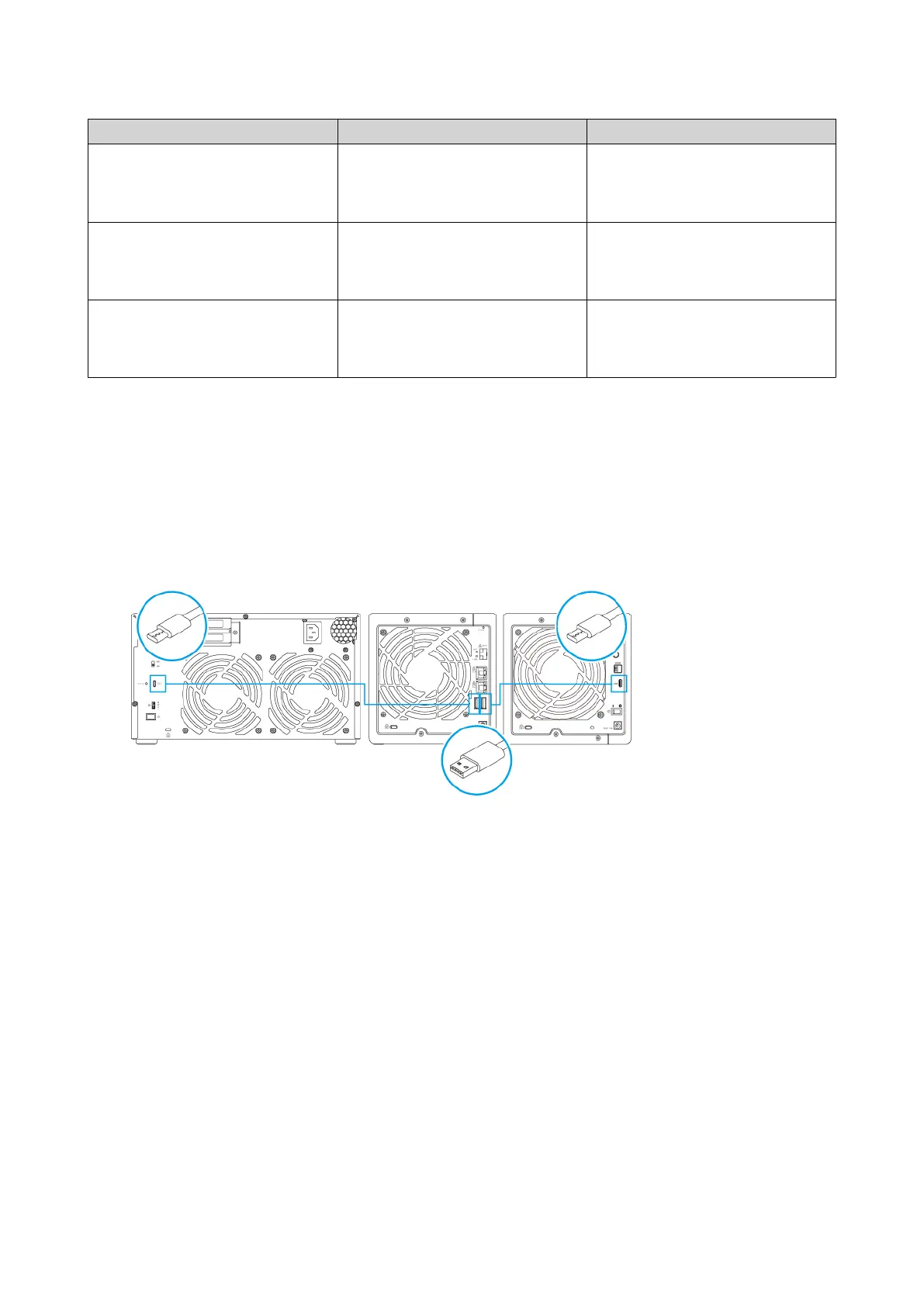
1. Connect the expansion unit to the NAS.
a. Connect the USB cable to the USB Type-B or USB Type-C port on the expansion unit.
b. Connect the USB cable to a USB 3.2 Gen 1 Type-A port on the NAS.
2. Power on the expansion units.
3. Verify that the expansion units are recognized by the NAS.
a. Log on to QTS as administrator.
b. Go to Main Menu > Storage & Snapshots > Overview > System .
c. Verify that the expansion units are listed.
TS-x31K User Guide
Installation and Configuration 22


 To Next Page
 Loading...