4
Step 2-Set the feeding time
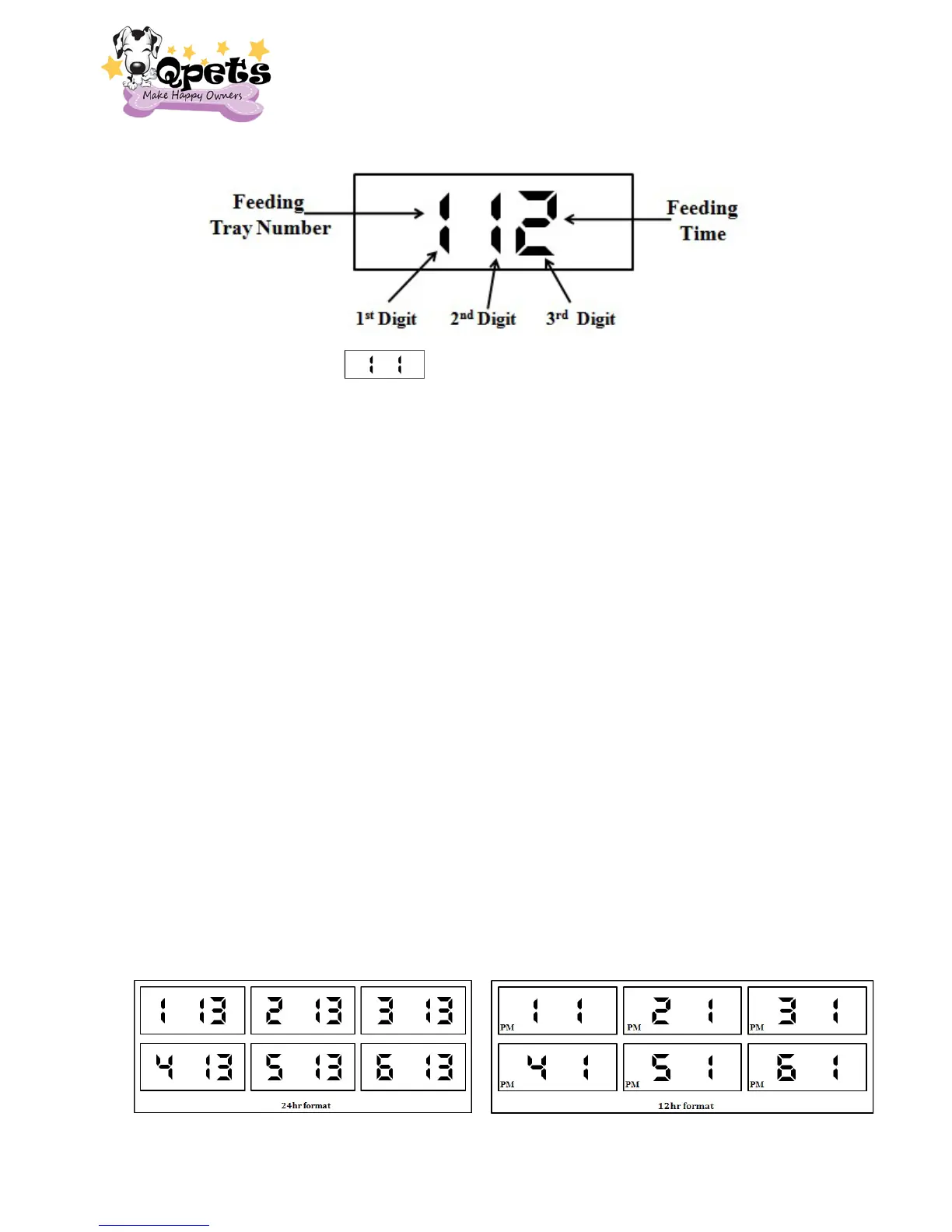
1. Press MODE key. ( ) will show on the LCD display. This is the feeding
time display mode.
2. Press and hold SET key for 2 seconds to enter the EDIT MODE. The 2
nd
digit & 3
rd
digit will be blinking now. ( The 1
st
Digit shows the feeding numbers and the
number of trays ; 2
nd
Digit and 3
rd
Digit show the feeding hours)
3. Press the MODE key to set the feeding time. (1= feed at 1:00; 2= feed at 2:00; 3=
feed at 3:00; and so on. If you use 12hr display, The PM will shows on the
bottom of left corner)
4. Press the SET key to set the feeding tray number. (1= 1
st
feeding/tray; 2= 2
nd
feeding/tray; 3= 3
rd
feeding/tray; 4
th
feeding/tray; 5
th
feeding/tray; 6 = 6
th
feeding/tray)
5. Press the SET key to confirm your feeding numbers and feeding time which you
set.
6. The feeding will start from the first feeding number & time.
Program Examples:
1. If you would like to feed your pet once a day at 13:00(1:00PM) and feed for 6
days.
The 1
st
Digit (Feeding Number) 1, 2, 3, 4, 5 &6 should set all the same Feeding Time
13 (1PM).


 To Next Page