6
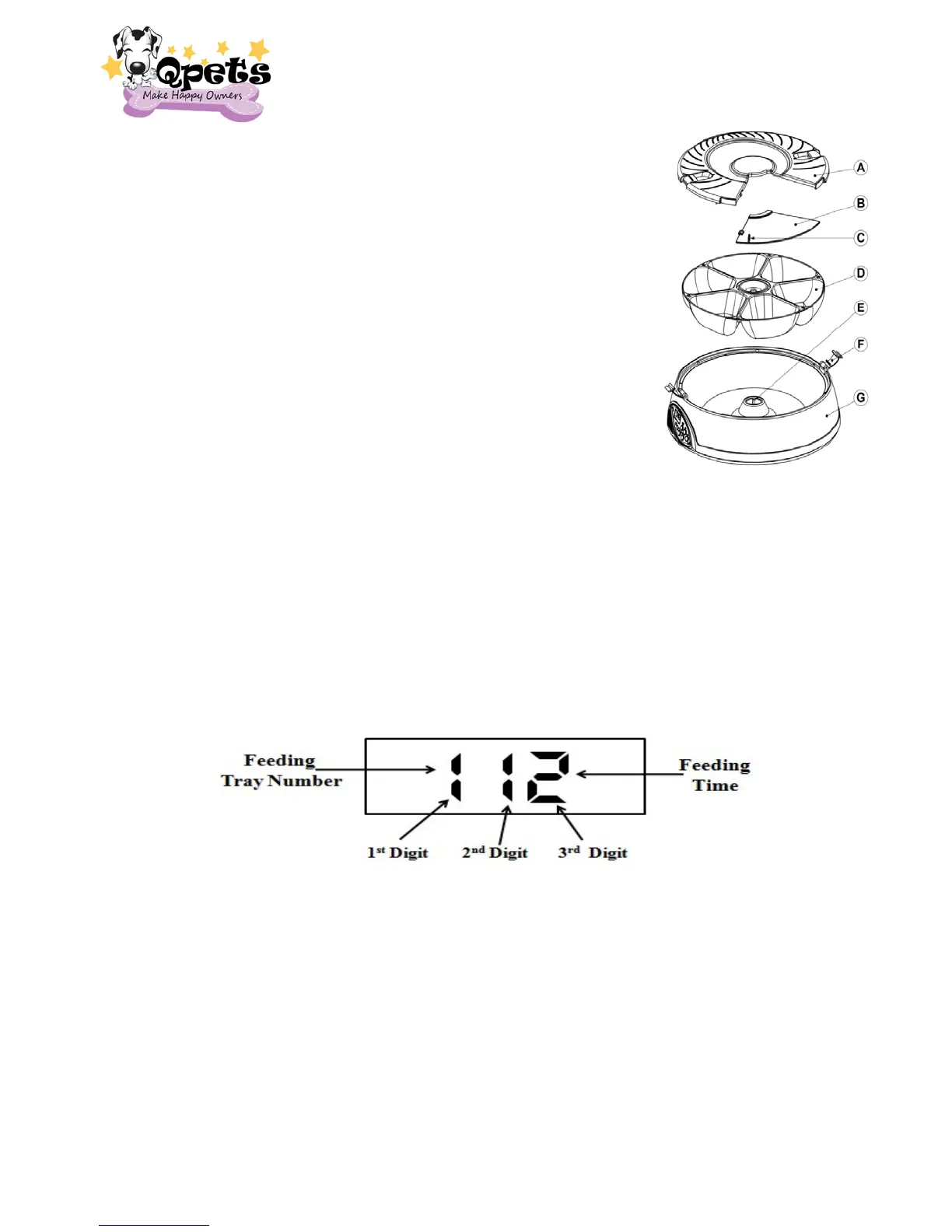
2. Fill your pet food into the FEEDER TRAY (D) (Tray 1 to Tray
6). Each FEEDER TRAY can fill up to 1 cup pet food, DO
NOT OVER FILL the pet food for each FEEDER TRAY as it
will jam the feeder or damage it.
3. Put the SLIDE COVER (B) back.
4. Put the LID (A) back onto the feeder.
5. Put the LOCK (F) on.
6. Make Sure the SLIDE COVER (B) locks into the position
with the LID (A).
NOTE: If you only want one feeding, you should only fill tray 1, if
you want two feedings, you should fill tray 1 & tray 2; if you
want three feedings, and you should fill tray 1, tray 2 & tray 3,
and so on…
General Operation
How to review the settings
Press the MODE key to cycle through and view the feeding times which you set. ( 1
st
Feeding time → 2
nd
Feeding time → 3
rd
Feeding time → 4
th
Feeding time → 5
th
Feeding
time → 6
th
Feeding time → Clock)
How to change a scheduled feeding time
1. If the feeding timer has begun already, press and hold START NOW key to reset
the FOOD TRAY. The FOOD TRAY will rotate back to the 1
st
Tray. (If you want
start from the current FOOD TRAY, please directly start from the 2 to reschedule
the feeding time)
2. Press MODE key to enter the FEEDING TIME DISPALY MODE. The Current
Feeding Time will show on the LCD display.
3. Press and hold SET key for 2 seconds to set the feeding time. The 2
nd
digit & 3
rd
digit will be blinking now.
4. Press the MODE key to set the feeding time.
5. Press the SET key to set the feeding number.


 To Next Page