14
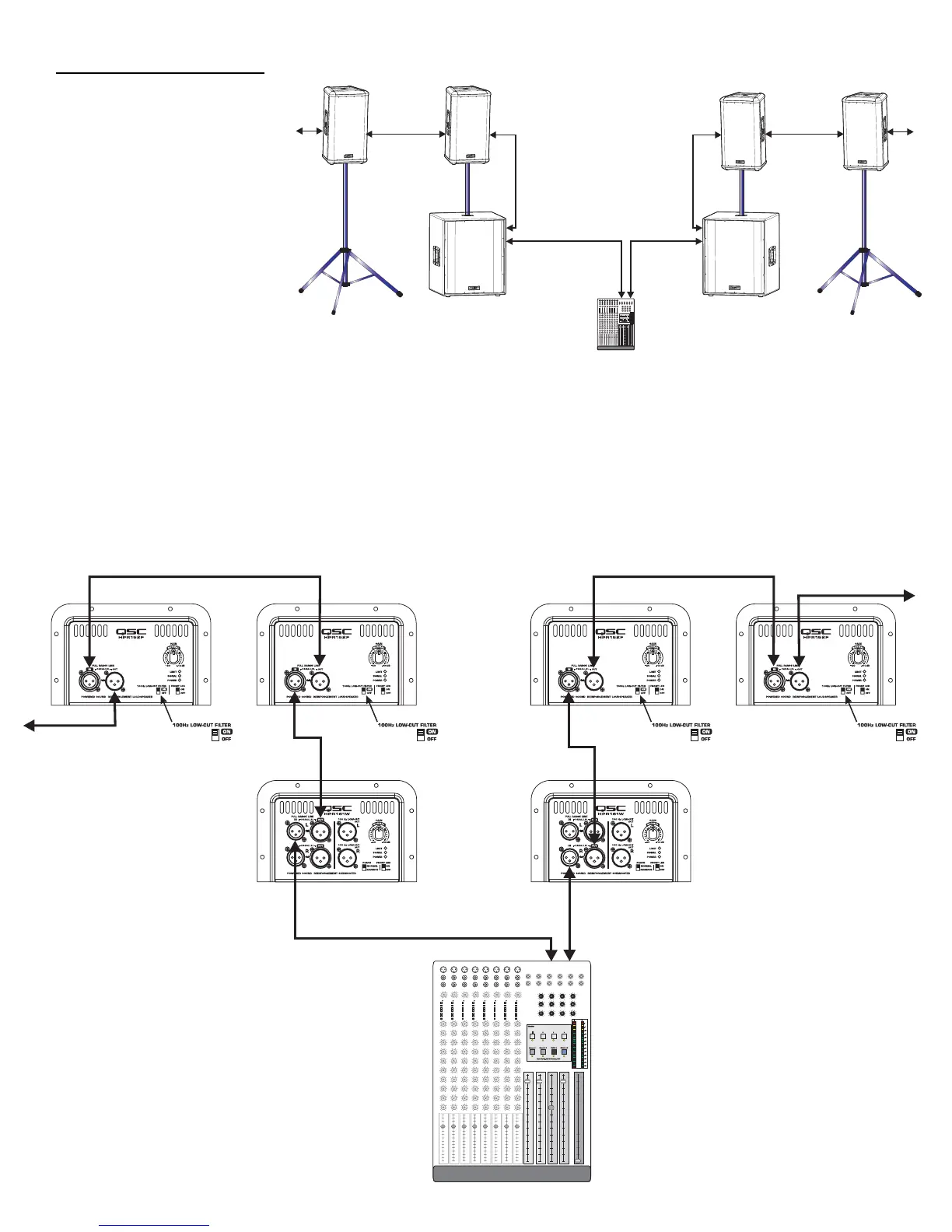
Application Example #4 hookup diagram.
Use only high-quality balanced cables for interconnecting the audio equipment.
Ensure the top-boxes have their 100 Hz LOW-CUT FILTER switched on when connecting to the subwoofer’s FULL RANGE LINE OUT as a signal source.
Also, be sure to use either the Left or Right (marked L or R) on the subwoofers. If the subwoofer’s input is connected to the Right (R) channel connec-
tor and the output to the top-boxes is connected to the Left (L) channel connector, no signal will reach the top-box (no sound from the top-box).
HPR152F or HPR153F
HPR152F or HPR153F
Mixer or Other Audio Source
Channel 1
or
Left Channel
Channel 2
or
Right Channel
Application Example #4
This example shows a two-channel
(stereo) setup utilizing two sub-
woofers and multiple top-boxes.
This is the same as Application
Example #3 except an additional
top-box has been added to each
channel (and more could be added).
To connect to additional top-boxes,
connect a cable from the last top
box’s FULL RANGE LINE OUT con-
nector to the next top-box’s FULL
RANGE LINE IN connector. Up to 20
top-boxes could be “daisy-chained”
without degrading signal quality.
HPR151W or HPR181W
HPR151W or HPR181W


 To Next Page