QSC,LLC 3
Application Guide
Disabling PTPv2 on LAN B in Q-SYS Designer
Software (5.4 to 7.0.1)
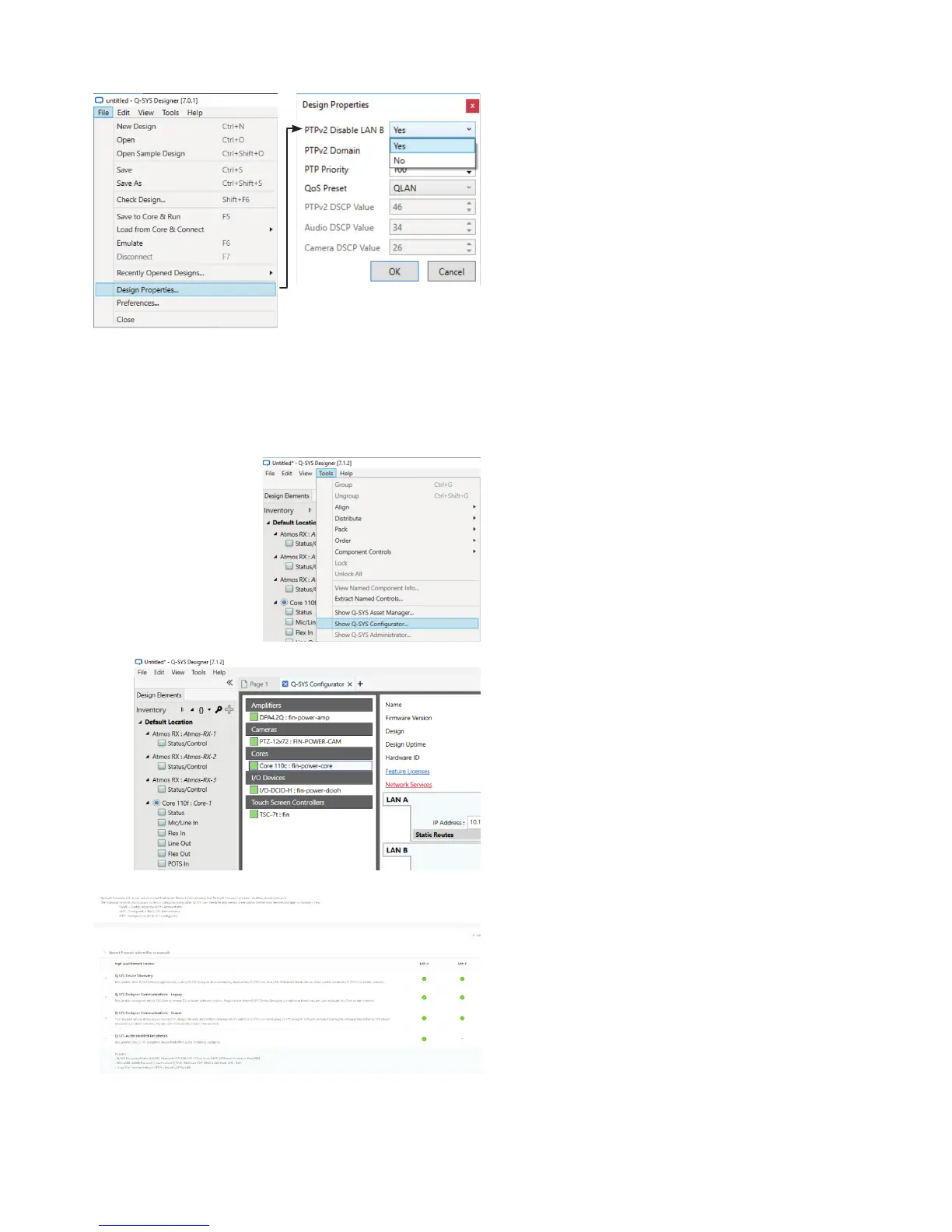
1. Go to File > Design Properties.
2. At PTPv2 Disable LAN B select Yes.
3. Match the setting in PTPv2 Domain to the setting
configured in the Dolby CP850.
4. Match the PTPv2 User Domain setting to the PTP
Domain Number configured into the Dolby CP850.
Disabling PTPv2 on LAN B in Q-SYS Designer
Software (7.1 and higher)
1. Open the design in Q-SYS Designer.
2. Select Tools > Show Q-SYS Configurator…
3. Click the core processor. Click Network Services.
4. A window will open showing all the network services
available for or configured for the core processor. Click
Edit and then clear Q-SYS Audio Enabled Peripherals
on LAN B. Click Save.






 To Next Page