151.597UK User Manual
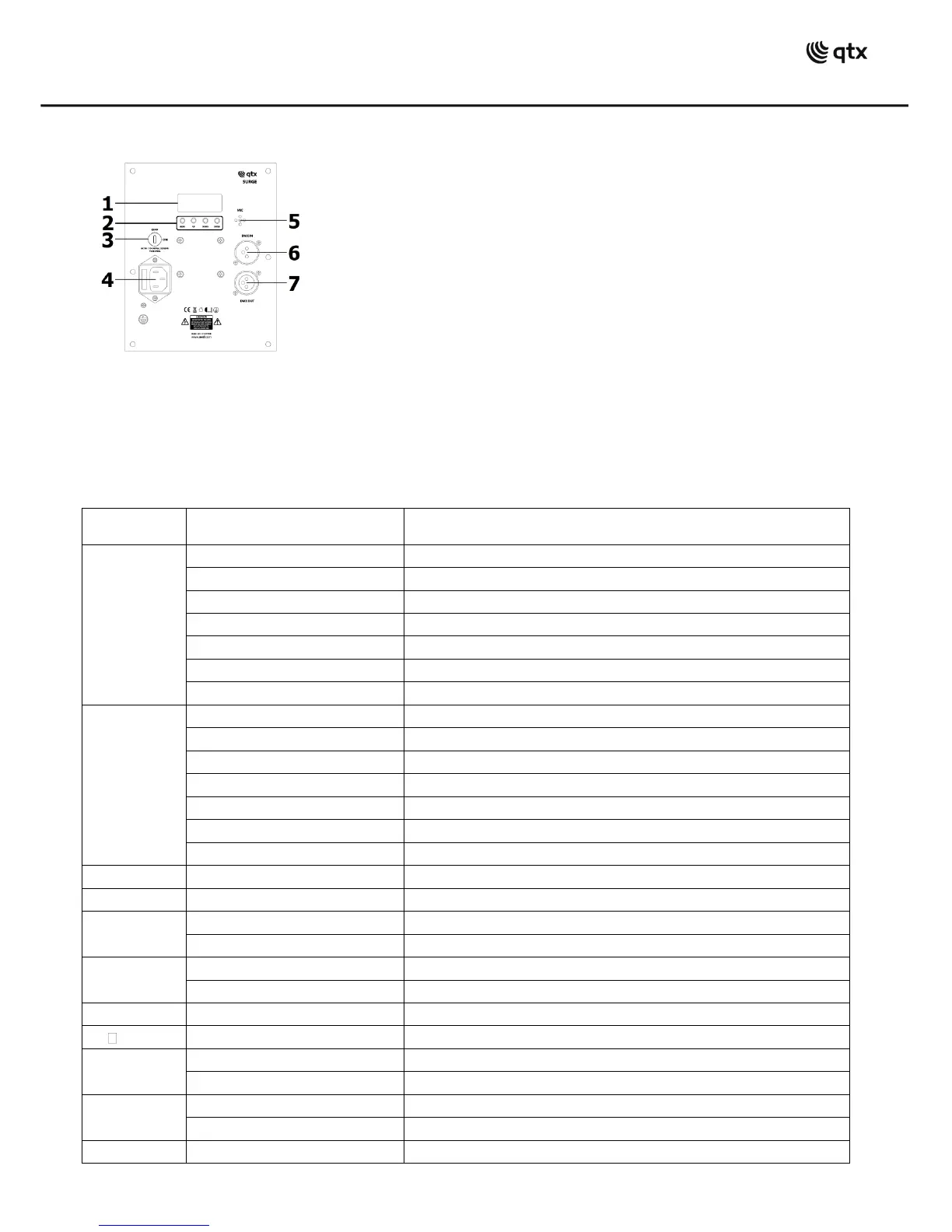
Rear panel
Internal Settings
Using the four control panel buttons (2), the SURGE can be set to various modes.
Press the MENU button to display the different functions (see table below). Use the UP/DOWN arrow buttons
to make your selection and press the ENTER button to [enter] a value or confirm the selection.
Note: for Laser effects to be enabled, the safety key switch (3) must be set to the ON position.
Laser auto colour change speed slow to fast
Laser strobe speed slow to fast
Derby auto mode (LE 4 - LE 5 - LE 6 sequence)
Speed adjustment for derby colour change
Speed adjustment for derby rotation
LED strobe speed slow to fast
UV LEDs on (also applies to , and modes)
Sound mode 1 (no sound = slow) beat count 1 to 20
Microphone sensitivity 1 - 9
Sound mode 2 (no sound = stop) beat count 1 to 20
Microphone sensitivity 1 - 9
DMX address 001 - 512 (slave mode = )
IEC mains inlet & fuse holder


 To Next Page