The Quantel Medical Pocket II is a portable pachymeter echograph designed for ophthalmic use. This service manual provides comprehensive information on its technical specifications, operation, and maintenance.
Function Description
The Pocket II is a pachymeter echograph used for measuring corneal thickness. It operates by emitting ultrasonic waves and analyzing their echoes to determine the thickness of the cornea. The device is designed for ease of use and portability, making it suitable for various clinical settings.
Important Technical Specifications
1. Frequency:
- Probe Transducer: 20 MHz, ensuring high-resolution measurements.
- Programmable Logic Device (PLD) Clock: 32 MHz, for precise timing and control.
- Microprocessor Clock: 8 MHz, managing overall device operations.
2. Anti-Interference:
- The Pocket II consumes very low current, minimizing the generation of significant electromagnetic interference (EMI).
- It is powered by direct current (DC) voltage, further contributing to its low EMI profile.
3. Power Supply:
- Internal Power: The device operates on four 1.5V AA alkaline batteries (LR6).
- External Power (Optional): An external power supply can be used, requiring 9V DC and 500 mA. It's crucial not to remove the batteries before connecting the external power supply to safeguard configuration data. The external power supply connector is located on the upper left side of the instrument.
4. Instrument Box:
- Material: The casing is made of ABS plastic, compliant with the UL94V0 Standard, indicating good flame retardancy.
- Dimensions:
- Width: 100 mm
- Depth: 200 mm
- Height: 45 mm
- Weight: 460 g, highlighting its portability.
5. Stickers and Markings:
- Plate with Serigraphy (Upper Panel):
- Size: 23 x 93 mm
- Indicates external power supply placement (9V DC), serial port to PC placement, and parallel port for printer placement.
- Identification Sticker (Rear Panel):
- Size: 60 x 50 mm
- Includes device model (POCKET-II), class (Class II), type (Type BF), CE mark (0459), manufacturer details (QUANTEL MEDICAL SA, 21, rue Newton, Z.I. du BREZET, 63039 Clermont-Ferrand Cedex 2 - FRANCE), contact information (Tel: +33 (0) 473 745 745, Fax: +33 (0) 473 745 700), and power supply details (6 Vdc from 4 Alkaline LR6 batteries, optional external power supply complying with IEC 065 standard, Maximum: 9 Vdc; 500 mA, does not recharge batteries).
- Serial Number Sticker (Rear Panel):
- Size: 33 x 12 mm
- Displays the serial number (e.g., SN 002).
- Type BF Symbol (Lower Panel):
- Size: 13 x 13 mm
- Indicates Type BF applied part, meaning it provides a particular degree of protection against electric shock, particularly regarding leakage current and reliability of the protective earth connection.
- Special Sticker for USA (Rear Panel):
- Size: 59 x 15 mm
- CAUTION: "FEDERAL USA LAW RESTRICTS THIS DEVICE TO SALE BY OR ON THE ORDER OF A PHYSICIAN OR AN OPTOMETRIST LICENCED BY THE LAW OF THE STATE IN WHICH HE PRACTISES TO USE OR ORDER THE USE OF THIS DEVICE."
- DANGER: "EXPLOSION HAZARD. DO NOT USE IN PRESENCE OF FLAMMABLE ANESTHETICS OR OXYGEN RICH ATMOSPHERE."
- CAUTION: "ELECTRIC SHOCK HAZARD. DO NOT OPEN. REFER SERVICING TO QUALIFIED SERVICE PERSONNEL."
Usage Features
The Pocket II is designed for straightforward operation. It includes a numerical display for showing measurement results and various control buttons for navigation and function selection. The device supports connectivity to a PC via a serial port and to a printer via a parallel port, allowing for data transfer and printing of results. A footswitch is available as an optional accessory for hands-free operation.
Maintenance Features
1. Opening the Device:
- To open the Pocket II plastic box, first unscrew the two large-headed metal screws on the underside to remove the back panel of the battery compartment.
- Next, unscrew the four remaining screws to remove the inferior part of the plastic box.
2. Pachymetry Probe Calibration:
- Preparation: Ensure the probe is connected, and its tip is clean and dry.
- Entering Calibration Mode: From the "Pres. MEAS M1" screen, press the "OK" button for 3 seconds. The "Freeze MEDIUM" screen will appear.
- Speed Selection: Simultaneously press the two specified keys for 3 seconds. The "Speed 1620 m/s" screen will appear. Press "OK".
- CalUnp Measurement: The screen will display "CalUnp 1878 2554". Simultaneously press the two specified keys. The message "Probe in water" will appear.
- Water Measurement: Plug the probe into the Pocket II and place it in a glass of water. Caution: Ensure the end of the probe is not in contact with the bottom of the container. Press "OK".
- CalWat Measurement: The screen will display "CalWat 2052 1842".
- Saving Calibration: Once calibration is done, press the "OK" button for 3 seconds to save the new parameters.
3. Checking Procedure (Measurement Acquisition):
- Test Block Preparation: Dampen the probe extremity with water.
- Placement: Place the probe perpendicularly on the Pocket II test block. Important: Do not put water on the test block itself.
- Measurement: Press "MEAS". The acquisition should be fast. If not, slightly change the probe's position. A repetitive sound indicates incorrect probe positioning. Ensure the probe is perpendicular (90°) to the test block.
- Results: For successful procedures with correct probe positioning, measurement readings should be repetitive to ± 20 μm.
- Influencing Factors: Very thin thickness measurements can be influenced by:
- Variation of thickness with ambient temperature.
- Possible dust.
- Incorrect positioning.
- Troubleshooting: If any problems are suspected, contact the Service department.
4. CPU Board:
- For safety reasons, Quantel Medical considers the instrument's CPU Board as a whole part.
- Defective CPU Boards will be replaced as a whole by Quantel Medical.
- Any faulty component will be replaced by a strictly identical component.
- Quantel Medical is not liable for any intervention or attempt to repair the "CPU Board" by unauthorized personnel.
- The equipment's guarantee will be void if it is opened (even partially), modified, or repaired by unauthorized persons.
5. Accessories and Spare Parts:
The manual lists various accessories and spare parts, including:
- Pachymetry probe (XE AAA PRB PK)
- User Manual (XE PCK2 ME)
- Technical Manual (XE PCK2 MT AN)
- Footswitch (XE AAA PED) - Optional
- Pocket-II plastic box (XE POC BOIT2)
- Pocket-II front panel + test block (XE POC LEXA N2)
- Pocket-II CPU board (XE POC CPU2)
- Pocket-II LCD screen and Board (XE POC LCD2)
- Pocket-II transport case (XE POC VALISE2)
This comprehensive overview ensures that users and service technicians have all the necessary information for the proper operation and maintenance of the Quantel Medical Pocket II.

 Need help?
 General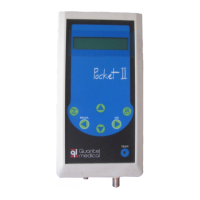

 To Next Page