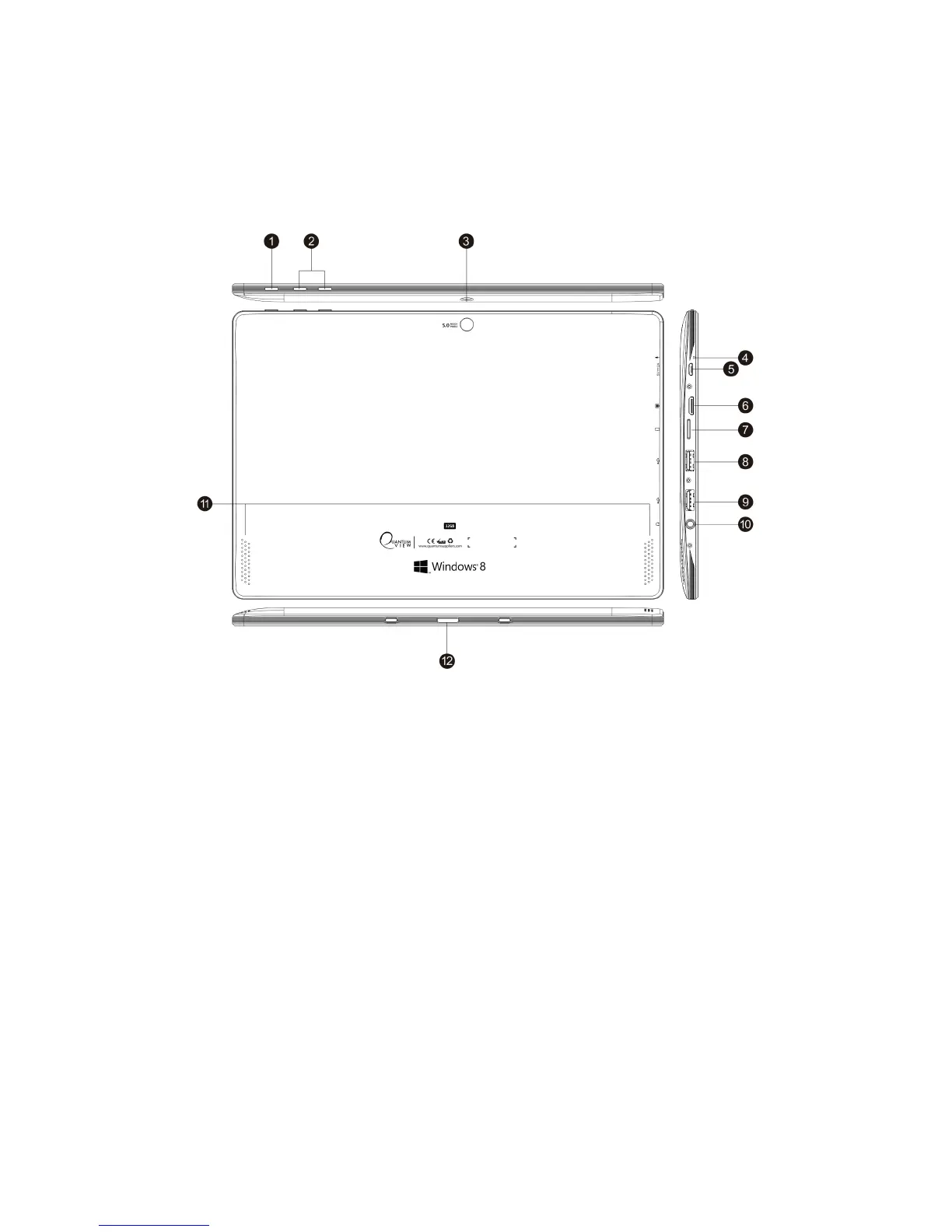
B. Key Layout and Definitions
1. Power button: Press it down to start or shutdown the touch screen panel. You can also let the
tablet go into sleep-mode through this button or remove it from sleep-mode.
2. Sound-/sound+: Lower/raise volume
3. Back camera: take photos and record videos
4. MIC
5. Power Micro USB port: Charge your Quantum View tablet through the Micro USB port.
6. High Definition Multimedia Slot: This socket can transmit the audio and video signals of the
Quantum View to your TV or Monitor.
7 .Card slot: The built-in storage card reader slot.
8-9. USB Interface x2: You can read the data through USB.
10. Headphones port: This socket can transmit the audio signals of the Quantum View to
loudspeaker or headphone.
11. Loudspeaker: The built-in loudspeaker enables you to hear sound without having to add
additional devices.
12. Removable keyboard base: This interface is magnetic, which is convenient for aligning and
firmly linking the Quantum View to the keyboard.


 To Next Page