13
COMFORT ADJUSTMENTS
Single Actuator Articulating Foot Platform
The single actuator articulating foot platform maintains
the correct knee-to-heel measurements when the user’s
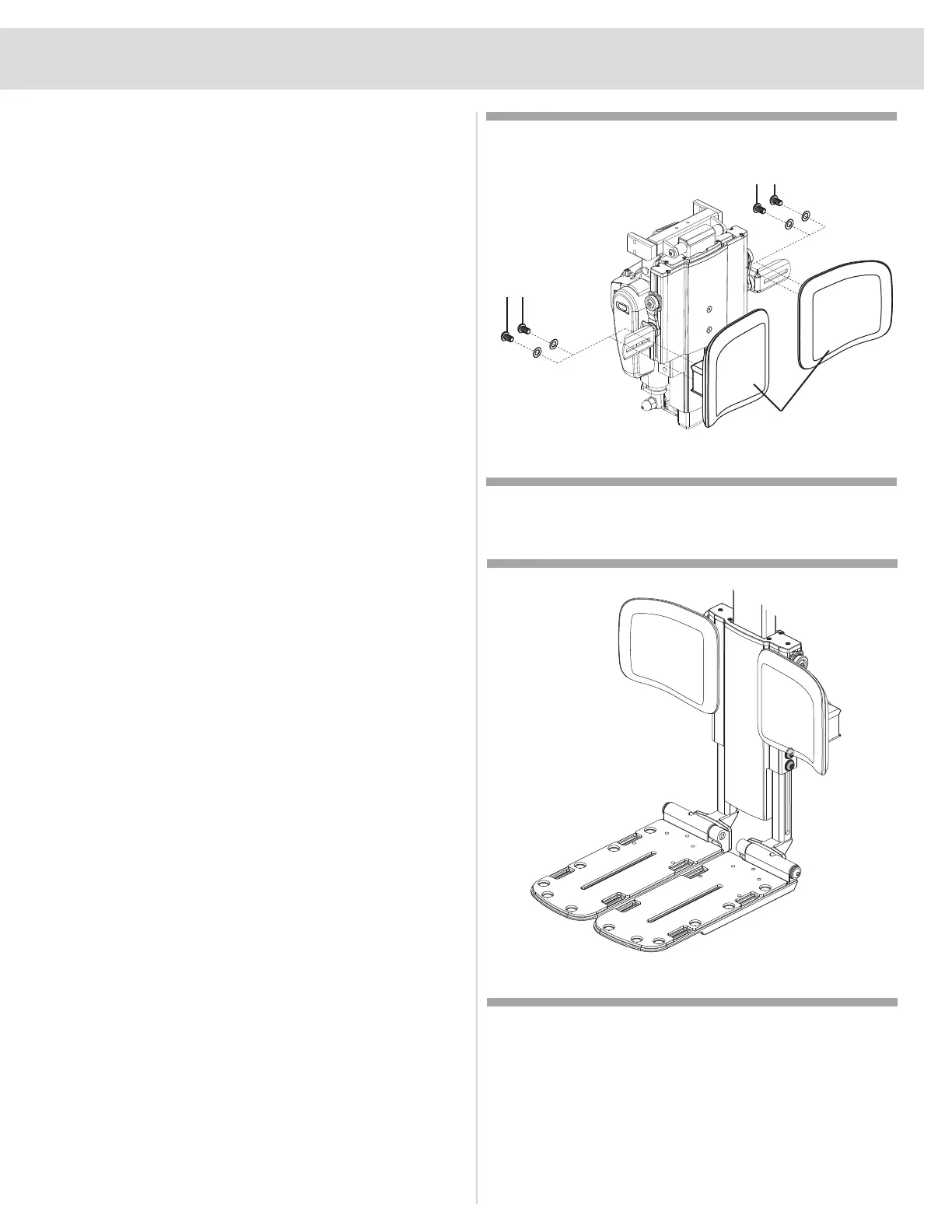
legs are being elevated. See gure 8. The single actuator
articulating foot platform elevates to 13°, has standard calf
pads that are depth and height adjustable (see gure 9),
has a maximum user weight capacity of 300 lbs. (136 kg),
and has an operating temperature of 40°F (4°C) to 105°F
(40°C). The articulating foot platform operates through the
power chair controller or toggle switch.
NOTE: Operation instructions using the joystick 4-way
toggles are discussed below. If you are using a dierent
toggle, the Attendant Control Module, or a dierent
operating device, please refer to the operation manual
supplied with that device and/or your power chair
owner’s manual.
NOTE: Independently adjusting the articulation or
elevation of your AFP may result in an invalid seat
position. This may require you to independently operate
the opposite function prior to proceeding with any
changes to additional seat position.
NOTE: If the AFP comes in contact with the ground
please contact a Quantum Rehab Provider so proper
adjustments can be made to your power chair.
Figure 8. Calf Pad Adjustment for the Articulating Foot
Platform
Screws
Screws
Calf Pads
NOTE: Please refer to the controller manual to operate
lift feature.
To adjust the angle of each foot plate:
1. Flip up the foot plate and locate the screw. See gure 9.
2. Turn the screw to raise or lower the front of the foot plate.
To adjust leg length:
1. Using a M5 hex key loosen the two button head bolts
located where the leg lower tube interfaces with the
extrusion of the Articulating Foot Platform (AFP) main
assembly.
2. Set leg lower to desired location and rmly retighten
both button head bolts.
To adjust calf pads height:
1. Using a M5 hex key loosen the button head located on
the side of the Articulating Foot Platform (AFP) directly
behind the calf pad.
2. Slide calf pad to desired height assuring it remains in the
extrusion channel.
3. Firmly retighten bolt.
Figure 9. Angle Adjustment for Foot Plate


 To Next Page