EasyManua.ls Logo

Quick Charge OB Series - User Manual

Quick Charge OB Series
12 pages
Print Icon
To Next Page IconTo Next Page
Loading...
O P E R A T I N G I N S T R U C T I O N S
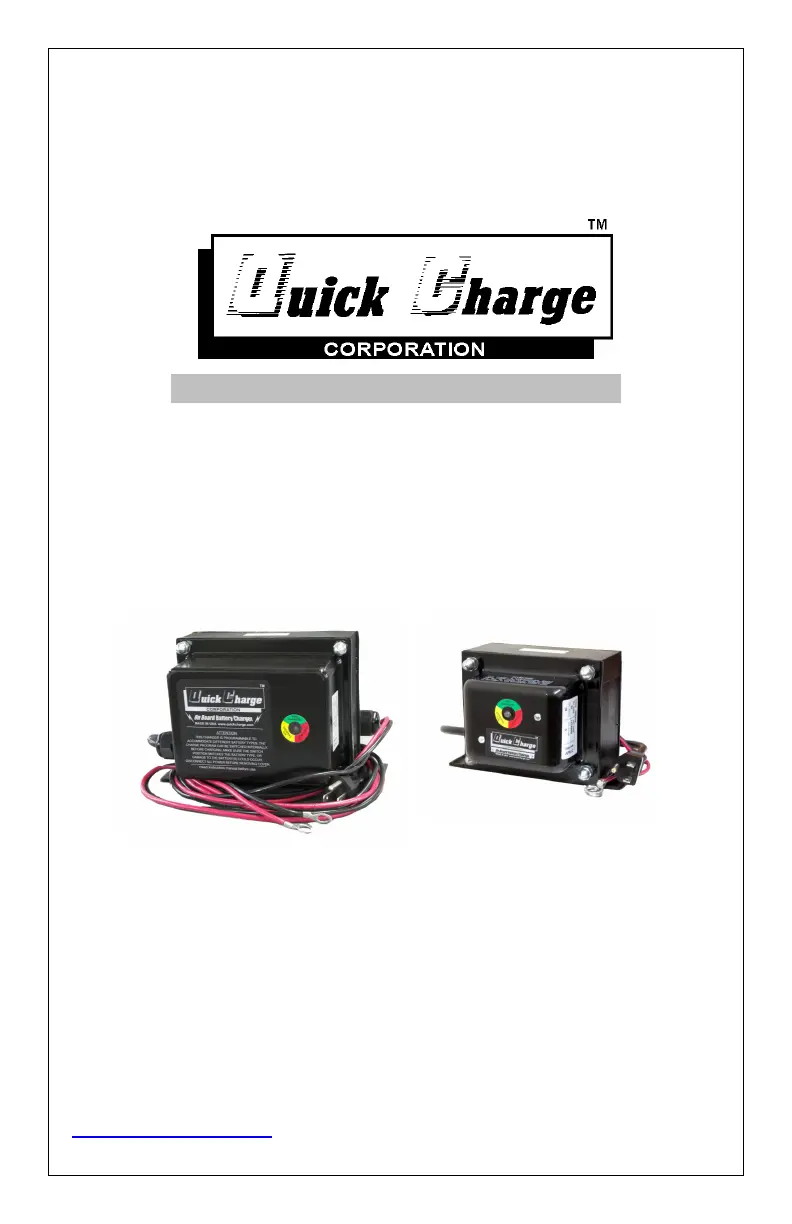
OB, OBXU, On Board Battery Chargers
Including: OB2425GN, OB2425SJ
For Industrial Use: Designed for gel, wet cell, AGM, and Lithium Ion Batteries
Quick Charge Corp.
800 658-2841
e-mail- info@quickcharge.com
www.quickcharge.com Made in the U.S.A
Ver. 7-21

Questions and Answers

  • A
    Angela HernandezAug 15, 2025
    Why does my Quick Charge Battery Charger blow the branch circuit fuse/circuit breaker a short while after being switched on?
    • J
      Jennifer RileyAug 15, 2025
      The branch circuit might be too small. Try relocating the Quick Charge Battery Charger to a branch circuit with a heavier rating, or remove other loads on the circuit.
  • C
    cynthia16Aug 18, 2025
    What to do if Quick Charge Battery Charger batteries use water, get hot, or smell?
    • S
      Stephanie StanleyAug 19, 2025
      This issue may occur due to one or more dead cells or an incorrect dip switch setting. Replace the batteries. If charging in a series string, it is best to replace all the batteries rather than mix new with old. If shallow discharging, check that the dip switch is not set to standard, or extended cycle.
  • N
    nicole06Aug 21, 2025
    What to do if my Quick Charge OB doesn't give a full charge?
    • K
      kevincastanedaAug 21, 2025
      The charger may be too small for the battery, the charge profile might not be set correctly, or the cycle needs more time. Verify that the charger’s output is about 10% of the amp hour rating of the battery. Recheck the dip switch setting. If in doubt, switch #1 ON.
  • W
    wbradshawAug 25, 2025
    What to do if Quick Charge Battery Charger LED is solid red with a yellow flash when powered up?
    • Y
      ymorganAug 25, 2025
      The battery is very low, and the charger is in a slow charge phase, or safe mode until the voltage rises to a safe level before full turn on. Leave it connected; it may take hours. If the voltage rises even a little bit, it should recover and turn the charger full on.
  • J
    Jonathon MartinezAug 27, 2025
    What does it mean if my Quick Charge OB Battery Charger LED flashes red/green?
    • Z
      Zachary NortonAug 27, 2025
      The LED flashes red/green when plugged into AC power due to a reversed connection to the battery, a disconnection from the battery, a break in the DC cord or connector, or a battery that is too dead to charge. Correct the polarity or connect to the battery. Have a qualified person make the repair, or replace the charger.
  • D
    Dr. Leah WallaceAug 30, 2025
    Why is my Quick Charge OB Battery Charger LED not coming on?
    • K
      Kim GordonAug 31, 2025
      The LED might not be coming on because there is no AC power. Check the circuit and the extension cord for breaks or damage.
  • F
    frodriguezSep 2, 2025
    Why is my Quick Charge Battery Charger LED flashing red/yellow when switched on?
    • R
      Ryan SilvaSep 3, 2025
      The charger and battery voltage may mismatch. Connect the charger to a battery(s) with the same voltage rating.
  • R
    Raymond RobinsonSep 5, 2025
    What to do if my Quick Charge Battery Charger shows green LED with a yellow flash after a full charge?
    • E
      Elizabeth VasquezSep 5, 2025
      The batteries may not have aged. Sometimes running a second cycle will achieve a full charge, but battery replacement, or a larger charger may be needed.
  • T
    Thomas JonesSep 8, 2025
    What to do if my Quick Charge Battery Charger batteries die quickly after a full charge?
    • H
      hodgedavidSep 8, 2025
      The batteries may be bad and need to be replaced.
  • R
    Robert MedinaSep 12, 2025
    What to do if there is no power coming out of my Quick Charge OB Battery Charger?
    • J
      Joel HatfieldSep 12, 2025
      The charger must be connected to a battery to turn on.

Summary

Operating Instructions for On Board Battery Chargers

Quick Start Instructions

Provides a brief overview of charger operation and LED indicators.

Safety Information: AC Wiring

Other Safety Information

Battery Safety and Care Information

Details precautions for handling batteries and electrolyte levels.

Pre-Charge Information

Parallel Battery Connections

Explains how parallel connections affect amp hour capacity and voltage.

Series Battery Connections

Explains how series connections affect voltage and amp hour capacity.

Drive Lockout Option

Remote LED Option

Details the installation of an optional remote LED indicator.

Reprogramming the Charger

Switch Settings (Pre-JUN21)

AGM & Lithium Ion: Standard Deep Cycling & Float

Setting for AGM/Lithium batteries, standard deep cycling with float.

AGM & Lithium Ion: Shallow Cycling & Float

Setting for AGM/Lithium batteries, shallow cycling with float.

Wet Cell Deep Cycle: Standard Deep Cycling & Float

Setting for wet cell deep cycle batteries, standard deep cycling with float.

Wet Cell Deep Cycle: Shallow Cycling & Float

Setting for wet cell deep cycle batteries, shallow cycling with float.

Wet Cell Deep Cycle: Standard Deep Cycling & Maintain

Setting for wet cell deep cycle batteries, standard deep cycling with maintain.

Wet Cell Deep Cycle: Shallow Cycling & Maintain

Setting for wet cell deep cycle batteries, shallow cycling with maintain.

Constant Voltage Setting

Setting for constant voltage charging applications.

Switch Settings (JULY21 & Newer)

AGM;Wet Cell Starting Battery Settings

Settings for float or maintain mode for starting batteries.

AGM Deep Cycle Battery Settings

Settings for float or maintain mode for AGM deep cycle batteries.

Wet Cell Deep Cycle Battery Settings

Settings for float or maintain mode for wet cell deep cycle batteries.

Lithium Ion Battery Settings

Settings for charging Lithium Ion batteries.

Constant Voltage Setting (Newer Models)

Single-stage profile for constant voltage applications.

Float Mode vs. Maintain Mode

Battery Brand Considerations

Equalization Charging

Troubleshooting

Limited Warranty

Quick Charge OB Series Specifications

General IconGeneral
BrandQuick Charge
ModelOB Series
CategoryBattery Charger
LanguageEnglish

Related product manuals