QM67 Dual Boiler Espresso Machine
Page 8
PID Controller W/ Shot Timer
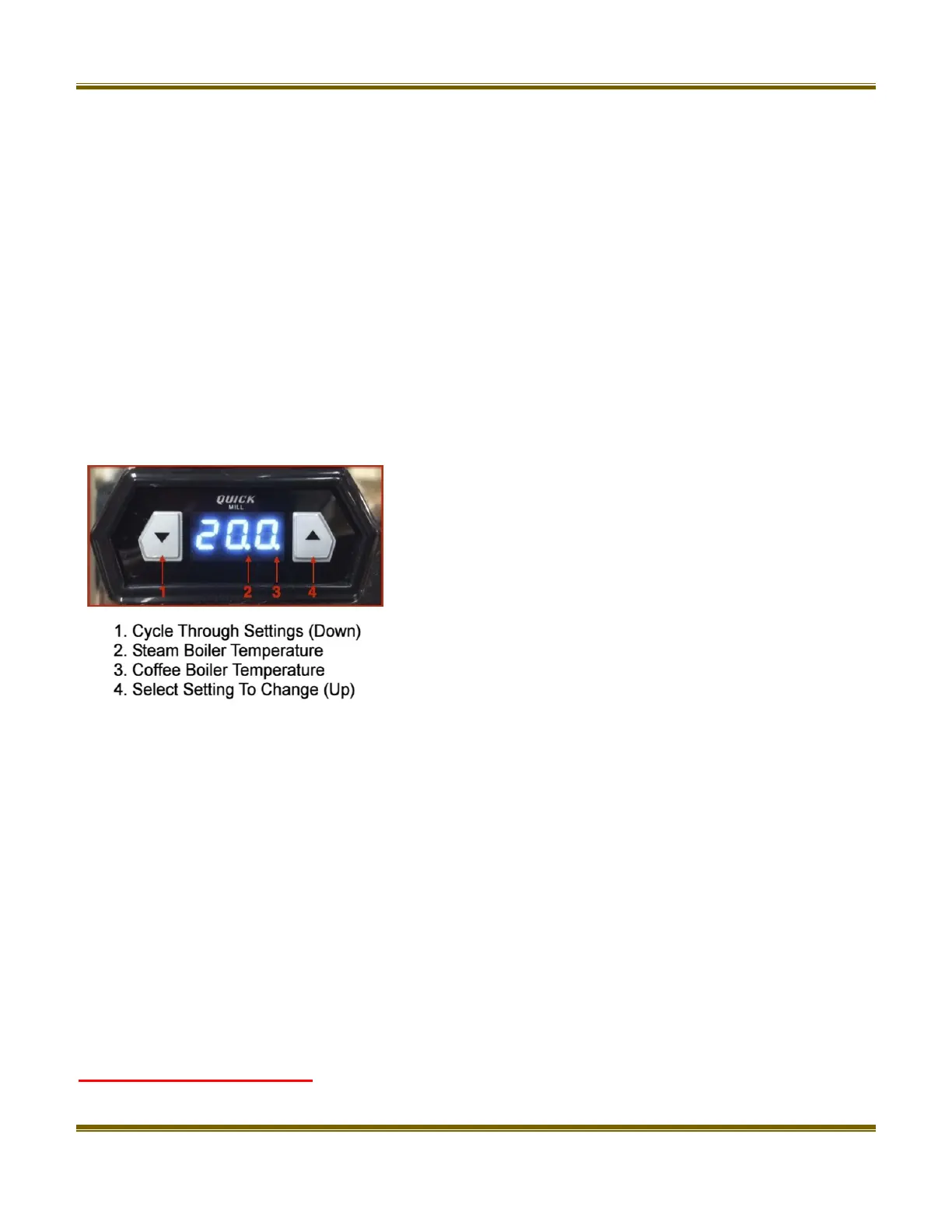
The PID controller’s display will cycle back and forth to
show the current temperature of each boiler. The
position of the decimal point (2+3) indicates which
boiler the temperature is being shown for at that time.
The picture to the right shows which boiler is
represented by which decimal point.
The down arrow is used to cycle through the various
settings and the up arrow allows you to select a setting
to change. After selecting a setting to change the
up/down arrows must be pressed within 2-3 seconds
or the display will revert back to the previous setting.
Setting Temperature
With the machine turned on press both arrow keys simultaneously until the display reads T1
then release the keys. T1 is the coffee boiler temperature. Press the up arrow key to see the
current temperature setting. While the temperature is still being displayed press either arrow key
to change the temperature.
After a few seconds the display will revert back to T1, then press the down arrow key to display
T2 which is your steam boiler temperature. Press the up arrow key to see the current
temperature setting. While the temperature is still being displayed press either arrow key to
change the temperature.
After the display reverts back to T2 then press the down arrow key to save the new temperature
settings and go back to normal operation.
Coffee Boiler Temperature - By default the coffee boiler temperature has been set to 200°F
The recommended brew range is between 195°- 205°F or 90°- 96°C. This can be easily





 To Next Page