Quicksilver 505CAB — System & Component Overview and Operaon
22
8. Instrumentaon Package
Depending on the type of engine installed on your boat, you will either have analog or SmartCra
TM
gauges installed. For boats with engines 60HP or less, analog gauges come standard. This gauge
package includes a tachometer, speedometer, fuel gauge and an engine trim gauge.
If the engine installed on your boat is larger than 60HP, the instrument package includes a
SmartCra
TM
tachometer and speedometer mul-gauge system. By pressing the “mode” buon on
the gauge, specic informaon vital to the safe operaon of the vessel can be displayed. Refer to your
SmartCra
TM
gauge owner’s manual for specic informaon on how to get the most out of the mul-
gauge display.
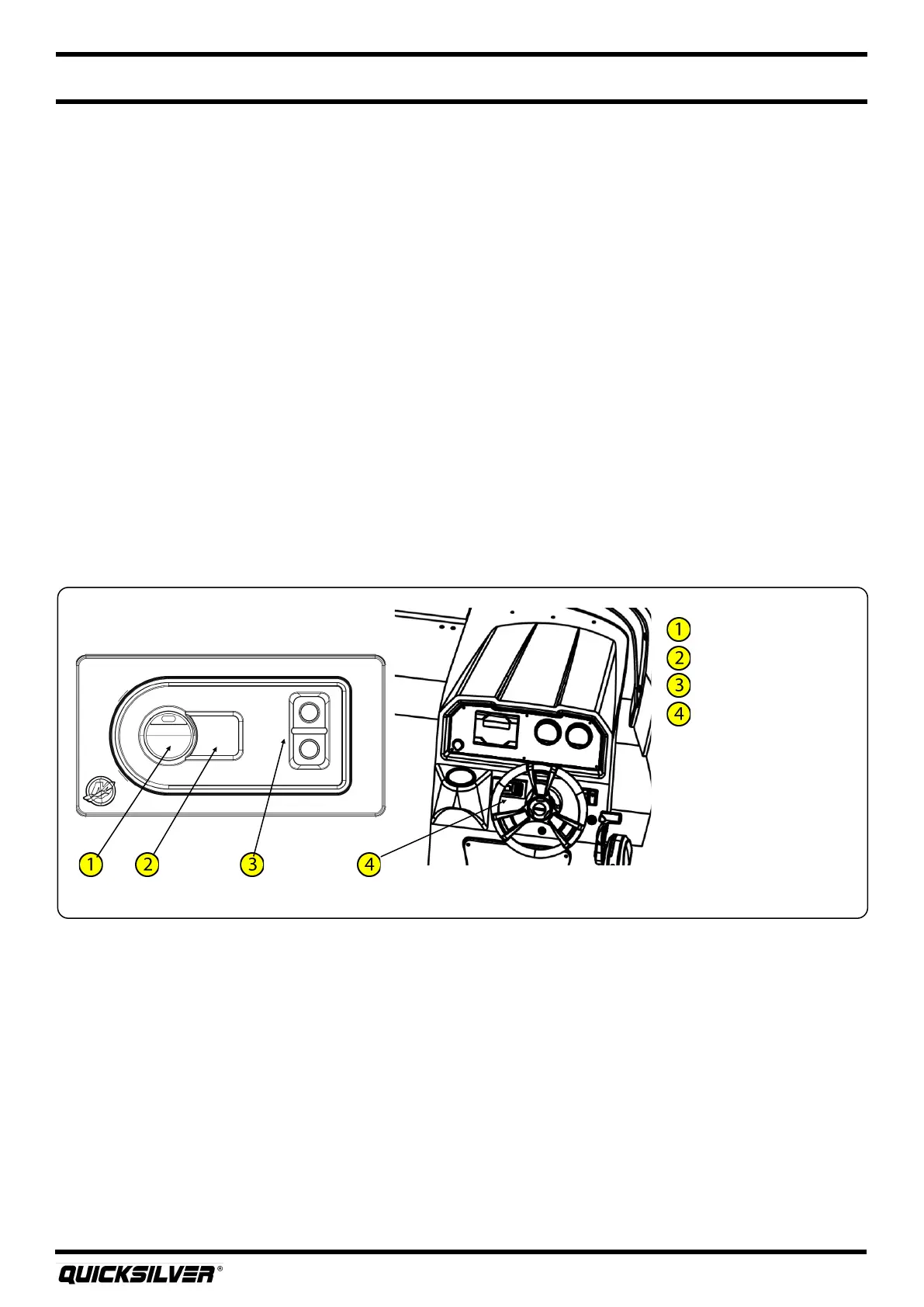
9. Acve Trim (oponal)
Your boat may come equipped with the Acve Trim system from Mercury. Acve Trim automacally
adjusts the engine trim based on boat speed to opmize performance and fuel economy. The system
allows for the owner to either use the default system programmed, or create their own trim prole.
At anyme the user can override the automac trim system by simply pressing the trim buon on the
shier.
The Acve Trim keypad is located on the port side of the dash. Refer to the manufacturer’s manual for
complete instrucons and warranty.
10. Cockpit Table
On your boat, a cockpit table is available for entertaining. This table and table leg are removable and
can be stored in brackets inside the forward cabin area. To install the table, rst remove the plasc
cover located in the table base plate. Next, screw and lock the table leg into the base plate. Finally,
screw the table onto the table leg.
On/resume buon
O buon
Prole selecon
Acve trim keypad
Acve Trim



 To Next Page