2. General information
2.1 Technical data
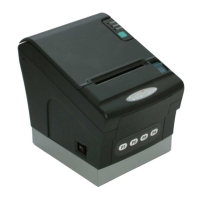
Technical Data of Printer:
Print principle: Thermal Printer Model „LK-T21“
Print width: 72mm
Paper width: 80mm
Print speed: 200mm/sec.
Sheet feeder: drop in
Life time: 100km
MCBF: 70 mill. lines
Cutter: Guillotine cutter
Max. Number o cuts: 1, 5 mills.
Technical Data of FM Electronic:
Processor: 32 bit ARM 966E
Type: STR912
Program memory: 1, 5 MB FLASH ROM
Operating memory: 600 KB SRAM
Data memory: up to 4 MB FLASH ROM
Electronic journal: SD-Card up to 1GByte
FM memory: especially protected flash 512kByte
Power supply: external power supply 24V/60W
Extern Interface of QPrint:
Port 1 (RS232) Communication with PC / extern Devices
Port 2 (RS232) (*1 Extern 2-Line-LCD Display (autom.scanned)
Port 3 (RS232) (*1 Extern Keyboard (autom.scanned)
Port 4 (RS232) Printer (intern/fix)
LAN 10/100 Mbit Communication with PC / Extern Devices
USB (*2 Communication with PC / Extern Devices
Direct keys 4 keys – Direct controlling (Front side)
Drawer Cash-Drawer (special Interface)
Power Power supply 24V/ 2, 5 A
Operating and Environmental Condition:
Safety character: CE, UL
Electrical security: EN 60 950
EMC: EN 55022 / EN 61000–3-2 / EN 55024
MTBF: > 5 years
Operating temperature: 5º – 45º C
Storage and transport temperature: -5º – 50º C
Noise level thermal printer: < 60 dB
Generally:
Application in the professional range: Working time > 8h/Tag
Reliability > 5 years
Process quality: According to DIN EN ISO 9001:2000
(*1 – Qprint scanned automatic Port 2, 3 with power on, sought after known external devices (display, keyboard, terminal) and used these. That is for
example the display can be connected with Port 2 or Port 3. When QPrint do not find such a device, QMP can used these ports (like the configuration).
(*2 – are used, when PC-Port is equal “16” (default is “1” – Port 1)


 To Next Page