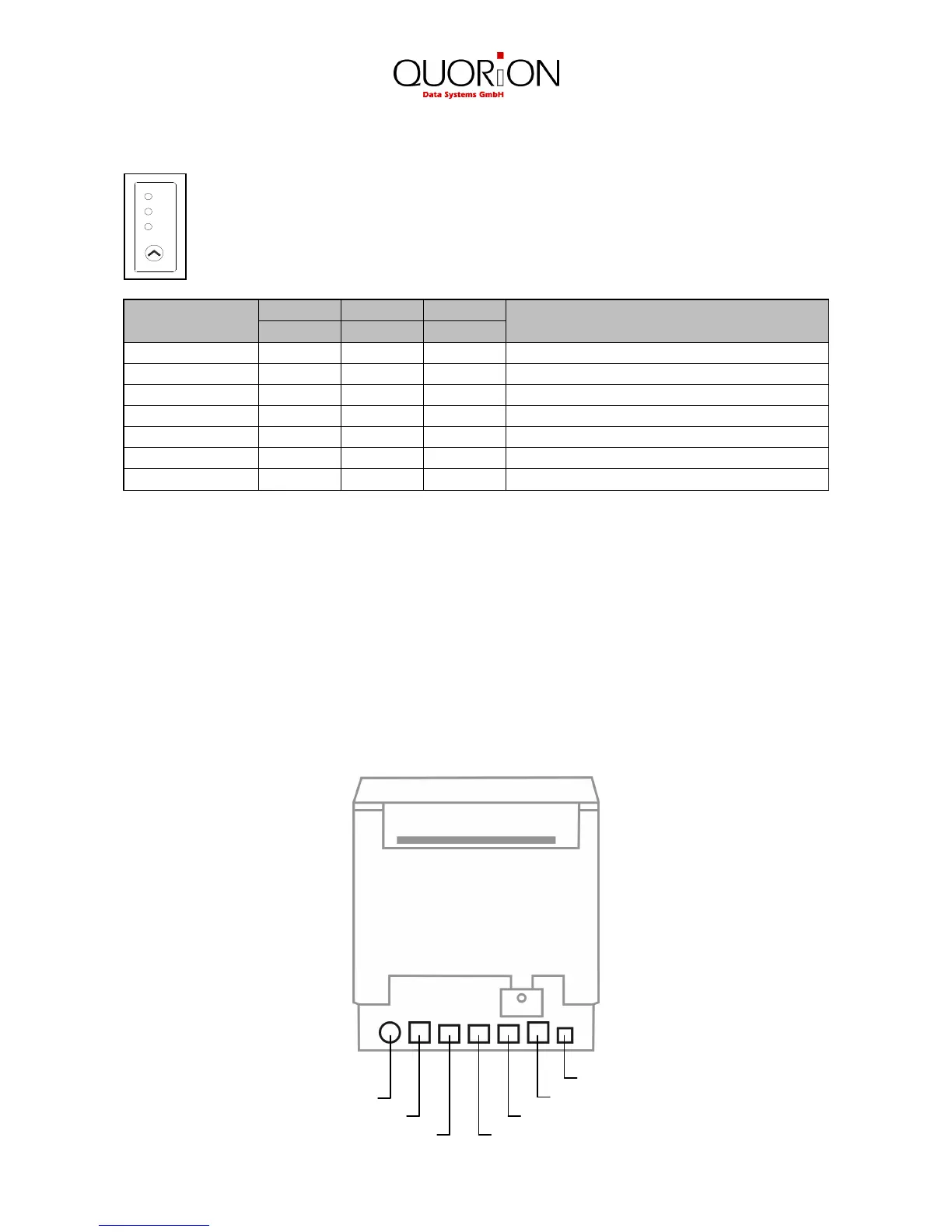
2.3 Control panel
You can control the basic paper feeding operations of the printer with the button on the
control panel. Press the FEED button once to advance paper one line. If you hold down
the FEED button the paper will be feed continuously.
The indicator lights help you to monitor the printer status. Please check the following
table for different patterns signaled by the three LED indicators
STATUS
Power off OFF OFF OFF Normal power is not supplied to the printer
Power on OFF OFF ON Normal power is supplied to the printer
On line OFF OFF ON Normal error-free mode
Cover open OFF ON ON Close cover
Paper empty OFF ON ON Insert new paper roll
Paper near end ON OFF ON Paper is low
Test mode OFF OFF ON Ignored error led
2.4 Function keys
The function keys are four special keys at the front side of the QPrint FM which allow operating the
fiscal printer without external PC or keyboard. They are especially used to program data, print out
the reports and perform special fiscal operations. For detailed information about the usage please
check chapter 4.
2.5 Interfaces
The QPrint FM is equipped with three serial RS232-interfaces to establish connections to PC,
external display and keyboard. Alternatively you may connect the PC by LAN or USB. Furthermore
there is a connection to a cash drawer installed.
USB
Power supply LAN
Cash drawer RS232 port 1 (PC)
RS232 port 3 (keyboard) RS232 port 2 (display)
PAP E R
POW E R
ERR O R
FEED


 To Next Page