EasyManua.ls Logo

Radial Engineering HotShot DM1 - User Manual

Radial Engineering HotShot DM1
2 pages
Print Icon
To Next Page IconTo Next Page
Loading...
www.radialeng.com
Radial Engineering
1638 Kebet Way, Port Coquitlam BC V3C 5W9
Tel: 604-942-1001 Fax: 604-942-1010
email: info@radialeng.com
HotShot DM1
Owner’s Manual
True to the Music
Radial Engineering is a division of C•TEC (JP CableTek Electronics Ltd.)
Radial HotShot DM1 users guide Sept.. 2005, V1.0 - Part #: R870 1100 00
Subject to change without notice
123
5
4
HotShot DM1 User Guide
Radial Engineering
RADIAL LIMITED THREE YEAR TRANSFERABLE WARRANTY
Radial Engineering - a division of JP Cabletek Electronics Ltd. warrants this product to be
free from defects in material and workmanship to the original owner and will remedy any
such defects free of charge according to the terms of this warranty. Radial Engineering
will repair or replace at its option any defective component(s) of this product, excluding the
finish, the footswitch (footswitch is warranted for 90 days) and wear and tear from normal
use, for a period of three (3) years from the original date of purchase. In the event that a
particular product is no longer available, Radial Engineering reserves the right to replace
the product with a similar product of equal or greater value. To make a request or claim
under this limited warranty, the product must be returned prepaid in the original shipping
container (or equivalent) to Radial Engineering or to an authorized repair centre and you
must assume the risk of loss or damage. A copy of the original invoice showing date of
purchase and the dealer name must accompany any request for work to be performed
under this limited warranty. This limited warranty shall not apply if the product has been
damaged due to abuse, misuse, misapplication, accident or as a result of service or
modification by any other than an authorized repair centre.
THERE ARE NO EXPRESSED WARRANTIES OTHER THAN THOSE ON THE FACE
HEREOF AND DESCRIBED ABOVE. NO WARRANTIES, WHETHER EXPRESSED
OR IMPLIED, INCLUDING BUT NOT LIMITED TO, ANY IMPLIED WARRANTIES OF
MERCHANTABILITY OR FITNESS FOR A PARTICULAR PURPOSE SHALL EXTEND
BEYOND THE RESPECTIVE WARRANTY PERIOD DESCRIBED ABOVE OF THREE
YEARS.
RADIAL ENGINEERING SHALL NOT BE RESPONSIBLE OR LIABLE FOR ANY SPE-
CIAL, INCIDENTAL OR CONSEQUENTIAL DAMAGES OR LOSS ARISING FROM THE
USE OF THIS PRODUCT. THIS WARRANTY GIVES YOU SPECIFIC LEGAL RIGHTS,
AND YOU MAY ALSO HAVE OTHER RIGHTS, WHICH MAY VARY DEPENDING ON
WHERE YOU LIVE.
HotShot DM1 User Guide
Radial Engineering
1
2
3
4
INPUT jack connects from a dynamic mic.
OUTPUT-1 connects to main console or 1st channel. This
output is normally active.
OUTPUT-2 connects to sub-mixer or main console
2nd channel. This output is active only when the toggle
footswitch is held down.
TOGGLE footswitch is momentary and routes the mic
signal to output-2 when depressed.
LIFT switch disconnects the ground on pin-1 of output-2.
14 gauge steel enclosure is compact and made for heavy-
duty stage use.
Rugged glass-filled nylon XLR connectors are 100%
isolated to help reduce ground loops.
7
6
5
CAUTION: PLEASE READ THE IMPORTANT NOTICE ON
THE BACK COVER BEFORE USING THE HOTSHOT DM1
FEATURE AND FUNCTIONS
7
6
IMPORTANT NOTICE!
The DM1 is designed for dynamic microphones and is not intended
for use with condenser microphones. Before you start it is impor-
tant that you understand that since there are literally thousands of
different sound system variables, we have no way of checking how
the HotShot DM1 is used in the field.
You are responsible to ensure the safe and proper use of the DM1.
Using the DM1 confirms you have taken full responsibility. If you
are not 100% sure of your actions, please consult a qualified tech-
nician for advice.
Order # R800 1500

Question and Answer IconNeed help?

Do you have a question about the Radial Engineering HotShot DM1 and is the answer not in the manual?

Summary

Radial Engineering Limited Three Year Transferable Warranty

Connecting the Radial HotShot DM1

Testing the Radial HotShot DM1

Instructions for testing the DM1 with the sound system off, ensuring phantom power is off and levels are at minimum.

Using the Radial HotShot DM1

Using the DM1 with a Sub-Mixer

Guide to using the DM1 with a sub-mixer for bands with in-ear monitoring systems or consolidating signals.

Using the DM1 as a Cough Mute

Method to use the DM1 as a cough mute by not connecting OUTPUT-2 for headset and lavalier mics.

Frequently Asked Questions (FAQ)

Microphone Compatibility

Clarifies that the DM1 is designed for dynamic mics and warns against phantom powered or battery mics.

Indicator Lights

Explains the absence of indicator lights for discreet operation and to prevent audience distraction.

Accidental Activation

Confirms the momentary switch design prevents accidental activation, eliminating need for indicator lights.

Sound System Popping Concerns

Addresses concerns about popping noise, advising low-level testing to avoid transients and potential damage.

Complex Sound Systems

Explains DM1 usage with splitter snakes connecting separate FOH and monitor mixers.

Overview

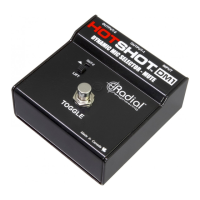
The Radial HotShot DM1 is a foot-controllable device designed to allow vocalists to mute their microphone and redirect the signal to a second output. This second output can be used for communication through a monitor system, in-ear wireless system, or intercom.

Function Description:

The DM1 is specifically designed for use with dynamic microphones and is completely passive, meaning it does not require any external power. This eliminates the need for batteries or external power supplies. The foot selector switch is momentary, which means that the switching action only occurs when the footswitch is depressed. This design choice also eliminates the need for indicator lights.

Typical applications for the HotShot DM1 include:

  • Muting the Front-Of-House (FOH) microphone to speak to other musicians through in-ear monitoring systems.
  • Muting the FOH microphone to communicate with technical staff.
  • Muting a microphone for a cough or brief interruption.

Important Technical Specifications:

  • Input: Connects from a dynamic microphone via a standard INPUT jack.
  • Output-1: Connects to the main console or the first channel of a mixer. This output is normally active.
  • Output-2: Connects to a sub-mixer or the second channel of a main console. This output becomes active only when the TOGGLE footswitch is held down.
  • TOGGLE Footswitch: A momentary footswitch that routes the microphone signal to Output-2 when depressed.
  • LIFT Switch: Disconnects the ground on pin-1 of Output-2. This can be useful for eliminating hum.
  • Enclosure: Made from 14-gauge steel, compact, and built for heavy-duty stage use.
  • Connectors: Features rugged, glass-filled nylon XLR connectors that are 100% isolated to help reduce ground loops.

Usage Features:

  • Connection Setup:
    1. Ensure the sound system is powered off and volume controls are turned down.
    2. Connect a dynamic microphone to the DM1's INPUT.
    3. Connect DM1's OUTPUT-1 to the first channel of your mixer. Route this channel to the main PA and monitors.
    4. Connect DM1's OUTPUT-2 to a second channel on your mixer. Route this second channel only to the monitors.
    5. With this setup, depressing the DM1's footswitch mutes the microphone signal from the main PA mix and redirects it to the monitors, allowing communication with other musicians or technical staff without the audience hearing.
  • Testing:
    1. Before testing, ensure the sound system is off and levels are at minimum.
    2. Crucially, ensure 48V phantom power is turned off on all channels connected to the DM1. Phantom power can cause loud pops when the DM1 is switched.
    3. Turn on the sound system. For first-time users, it's recommended to test with two mixer channels set identically, directing both outputs to the same speaker system. This helps minimize troubleshooting.
    4. Match the gain of the two mixer channels to ensure no noticeable level difference when switching.
    5. Always begin testing at a low volume to check for pops or clicks when the footswitch is depressed. If pops or clicks occur, verify phantom power is off. If hum is present, try engaging the ground lift switch.
  • Operation: When the footswitch is not depressed, the microphone functions normally, sending the signal to the main PA system and monitors via OUTPUT-1. When the footswitch is depressed, the DM1 mutes OUTPUT-1 and redirects the signal to OUTPUT-2. The microphone remains muted in the main PA system as long as the footswitch is held down. Releasing the footswitch returns to normal operation.
  • Using with a Sub-Mixer: If mixer channels are limited, the DM1 can be used with a sub-mixer. This is ideal for bands with in-ear monitoring systems. Connect OUTPUT-2 from each DM1 to a sub-mixer, which combines the signals to one channel on your main or monitor mixer. This consolidates 'intercom' channels, saving valuable inputs.
  • Cough Mute Functionality: The DM1 can function as a cough mute by simply not connecting OUTPUT-2. Connect OUTPUT-1 to the main PA system as usual, and leave OUTPUT-2 disconnected. Depressing the footswitch will then mute the microphone. This is a simple solution for headset and lavalier mic users.
  • Compatibility: The DM1 is designed for dynamic microphones and is not intended for use with condenser microphones. Using it with condenser mics may cause power on/off transients (pops) when switching.
  • No Light Indicators: The DM1 is designed to be discreet, allowing band members to communicate without distracting the audience with bright lights.
  • Momentary Footswitch: The footswitch is momentary, meaning it only works when physically depressed. This prevents accidental muting.
  • Safety: Always test at low volume levels to ensure no loud transients (pops or clicks) occur, which could potentially damage tweeters in the PA system.

Maintenance Features:

  • Warranty: Radial Engineering offers a three-year transferable warranty against defects in material and workmanship to the original owner.
  • Repair/Replacement: Radial Engineering will repair or replace defective components (excluding finish, footswitch – warranted for 90 days – and wear and tear from normal use) free of charge for three years from the original purchase date. If a product is unavailable, Radial Engineering reserves the right to replace it with a similar product of equal or greater value.
  • Warranty Claim: To make a claim, the product must be returned prepaid in its original shipping container (or equivalent) to Radial Engineering or an authorized repair center. A copy of the original invoice showing the purchase date and dealer name must accompany the request.
  • Warranty Exclusions: The warranty does not apply if the product has been damaged due to abuse, misuse, misapplication, accident, or as a result of service or modification by anyone other than an authorized repair center.
  • Disclaimer: There are no expressed warranties beyond those described. Implied warranties of merchantability or fitness for a particular purpose do not extend beyond the three-year warranty period. Radial Engineering is not responsible for special, incidental, or consequential damages or loss arising from the use of this product. The warranty provides specific legal rights, which may vary depending on location.

Radial Engineering HotShot DM1 Specifications

General IconGeneral
BrandRadial Engineering
ModelHotShot DM1
CategoryMusic Pedal
LanguageEnglish

Related product manuals