Need help?
Do you have a question about the Radial Engineering Voco-Loco and is the answer not in the manual?
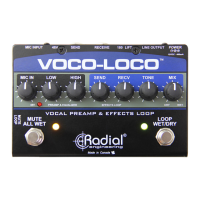
Explains the signal path from microphone preamp to EQ, effects loop, and final output.
Details how to engage the effects loop and adjust levels for wet signal processing.
Explains the function of the tone control for taming pedal harshness.
Describes how the left footswitch functions as a mute for the XLR output.
Explains the 'all-wet' mode, where only the effect signal is output.
Details how the left footswitch can override the right footswitch for flexible control.
Discusses using fuzz, distortion, and overdrive effects with the Voco-Loco.
Explains modulation effects like vibrato, tremolo, phasing, flanging, and chorus.
Common uses of delay and reverb effects to add depth and space to vocals or instruments.
Describes using octave dividing effects for 'monster' sounds or harmonics.
Explains wah-wah effects using envelope generators or foot controllers.
How EQs can be used to shape tone, create megaphone effects, or thin out sounds.
Discusses the use of multi-effects processors and digital modelers.
Tips on creatively combining multiple effects for unique sounds, like a telephone voice effect.
 General
| Brand | Radial Engineering |
|---|---|
| Model | Voco-Loco |
| Category | Music Pedal |
| Language | English |

 To Next Page