Radial Engineering JDI
™
User Guide
2
Part 2 – The JDI Feature Set
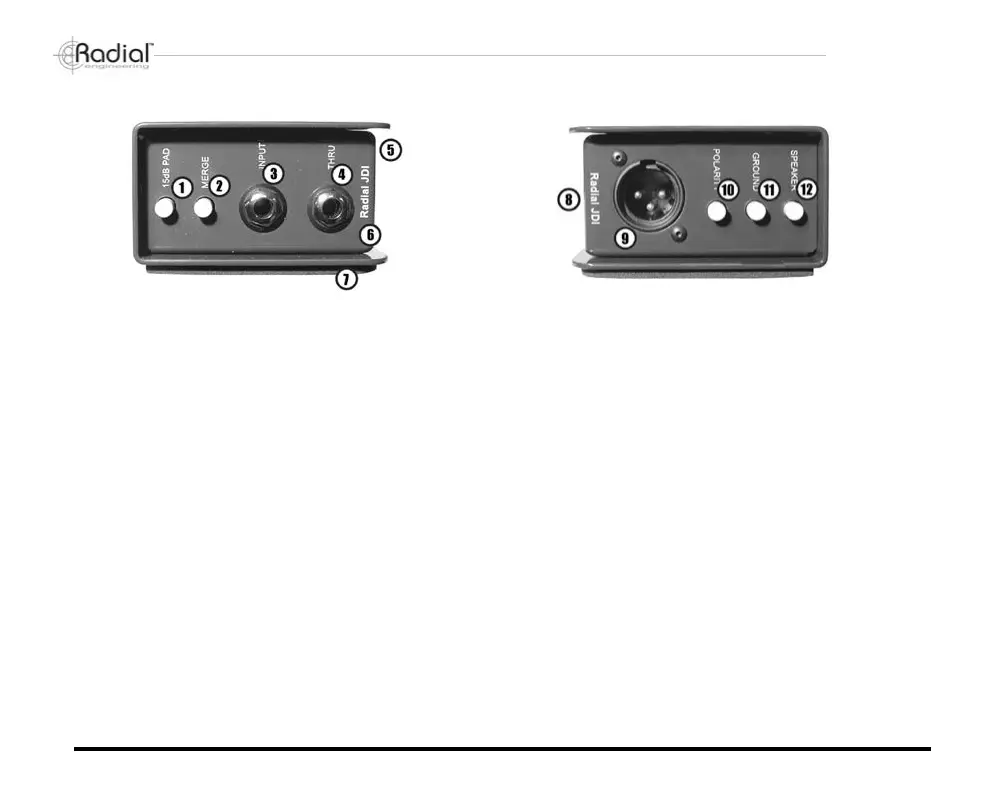
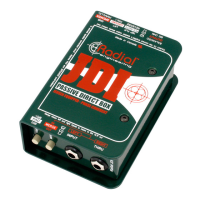
(1) 15dB PAD switch - a -15dB pad can be introduced to
reduce the input voltage and ensure a clean, distortion-
free signal.
(2) MERGE switch - left-right mix function turns the input
and thru-put connectors into a pair of left-right inputs with
a mono output at the XLR.
(3) INPUT - 1/4" jack, 130k Ohm instrument input.
(4) THRU - 1/4" jack, thru-put to send instrument signal
through to the instrument amplier.
(5) Protective bookend cover overhangs the chassis
providing protection for switches and connectors.
(6) Welded I-beam construction for maximum strength
and durability and a baked enamel nish offer years of
trouble free performance.
(7) Full bottom no-slip pad - reduces slipping in use and
provides mechanical and electrical isolation.
(8) Double sided PC board - military grade circuit board
features a full ground plane for maximum protection
against stray magnetic elds and RF noise.
(9) XLR output connector - wired to the AES standard
with pin-1 ground and pin-2 hot, provides a balanced
150 Ohm mic level signal.
(10) POLARITY switch - 180º polarity reverse toggles the
XLR pin-2 and pin-3 to interface with older equipment.
Also used when combining two sources such as a mic
and a DI.
(11) GROUND switch - lifts the XLR pin-1 ground at the
output to eliminate hum and noise caused by ground
loops.
(12) SPEAKER switch - a pad circuit that allows you to tap
the signal from a speaker cabinet. Features a band-pass
lter to emulate a 12" driver. Note: Only use in parallel
with a speaker cabinet or load box.
True to the Music


 To Next Page