Need help?
Do you have a question about the Radial Engineering JDI and is the answer not in the manual?
A -15dB pad to reduce input voltage and ensure a clean, distortion-free signal.
Mixes left and right inputs to a mono output at the XLR, supporting stereo to mono mixing.
1/4" jacks for instrument input (130k Ohm) and parallel thru-put to an amplifier.
Balanced XLR output (AES standard) and a 180° polarity reverse switch.
Ground lift switch to eliminate hum and a speaker switch for cabinet tapping.
Details basic procedures for connecting the instrument, amplifier, and mixer.
Explains the 180° POLARITY and GROUND switches for phase and noise control.
Details how the ground switch eliminates noise, especially in severe cases.
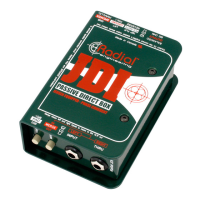
The Radial JDI is a passive direct box designed to provide a clean, uncolored signal from an instrument to a mixing console or recorder. It is highly acclaimed for its ability to retain natural tone and harmonic balance, ensuring that the essence of the instrument's sound is preserved. The JDI is particularly well-suited for acoustic guitars, basses, and keyboards, but can gracefully transform almost any audio signal without introducing artifacts.
The primary function of the Radial JDI is impedance matching and signal balancing. It converts the high-impedance output from instruments like guitars or keyboards into a low-impedance, balanced signal suitable for professional sound systems. This conversion allows for long cable runs without signal degradation or noise introduction, which is crucial in recording, broadcast, and live sound environments. The JDI achieves this through a high-quality Jensen JT-DBE transformer, which is central to its exceptional audio performance, noise rejection, and high signal handling capabilities.
The JDI operates as a passive device, meaning it does not require external power sources such as batteries or phantom power. Its design ensures electrical isolation between the input and output, effectively eliminating ground loops and significantly reducing common-mode noise, which often manifests as hum and buzz in audio systems. The signal is "transformed" from electrical energy to magnetic, then back to electrical, creating a "magnetic bridge" that prevents direct electrical connection between the primary and secondary circuits. This isolation is a key advantage over electronically balanced active circuits, which are less equipped to manage common mode noise.
The JDI's output is a mic-level, balanced signal via an XLR male connector, wired to the AES standard (pin-1 ground, pin-2 hot, pin-3 cold). This allows it to be used alongside other microphone signals without issues like cross-talk or transformer saturation when driving signals through splitter mic bridging transformers.
The JDI offers several features to enhance its versatility and ease of use:
15dB PAD Switch: This switch introduces a -15dB pad to reduce the input voltage. It is particularly useful when dealing with exceptionally high output levels from devices like CD players, mixer outputs, or headphone outs, preventing signal overdrive or transformer saturation and ensuring a clean, distortion-free signal. The JDI is designed to handle most instrument signal levels without distortion, but this pad provides an extra safeguard for extreme cases.
MERGE Switch: An innovative left-right mix function that transforms the input and thru-put connectors into a pair of left-right inputs with a mono output at the XLR. When activated, a resistive mixer circuit sums the two channels, allowing stereo sources like keyboards or CD players to be merged into a mono signal. This feature helps save valuable channels on snakes and mixers, especially when input availability is limited. The internal resistive mixer is designed to perform this merge without introducing phase cancellation issues.
INPUT and THRU Jacks: The JDI features two 1/4" jacks on the input panel. The left 1/4" input jack is typically connected to the source instrument (e.g., bass, guitar, keyboard). The right 1/4" jack serves as a parallel 'thru' connector, feeding the instrument signal to the musician's on-stage amplifier. This setup allows the musician to control their stage sound with their own EQ, while the audio engineer receives an unaltered signal for processing through the PA system. For instruments that don't use on-stage amplification (e.g., acoustic guitars directly to PA), the thru jack may not be used.
POLARITY Switch (180° Reverse): This switch toggles the XLR pin-2 and pin-3, reversing the polarity of the output signal. This is beneficial for interfacing with older mixing consoles that may have a pin-3 hot standard. It is also useful for correcting phase problems when combining two sources, such as a mic and a DI signal from the same instrument. On stage, polarity reverse can sometimes help reduce feedback from acoustic instruments, and in recording, it offers an additional "tonal palette" for engineers to experiment with.
GROUND Switch: This switch lifts the XLR pin-1 ground at the output, helping to eliminate hum and noise caused by ground loops. Ground loops often occur when two grounded AC-powered devices (e.g., a keyboard and a mixer) are connected to different AC outlets or have different ground reference potentials. When the ground is lifted, the JDI assumes its ground reference from the input side, typically through the instrument or its amplifier via the audio cable shield. When "going direct" without using the thru-put, the ground switch should be in the outward position to ground the JDI at the mixing console. If using the thru-put to a personal amp, and both the amp and mixer have ground paths, lifting the ground may be considered.
SPEAKER Switch: This feature allows the JDI to tap the "wet" signal from the output side of an amplifier. This is useful for capturing the EQ and compression settings of a bass amplifier, recording the distorted sound of a guitar amplifier, or combining a mic'd amplifier sound with a direct feed from the speaker. It's crucial to note that the JDI is NOT a load box. The amplifier must always be connected to its speaker load first, as connecting the JDI directly without a load can severely damage the equipment. Depressing both the -15dB PAD switch and the SPEAKER switch activates a special circuit that protects the JDI from overload and enables safe parallel speaker connection. The SPEAKER switch also introduces a band-pass filter circuit that emulates the performance of a typical 12" speaker driver by rolling off high and low frequencies.
Re-amping Capability: The JDI can be used "backwards" to convert a low-impedance mic-level signal back to a high-impedance guitar signal for re-amping. This involves connecting the recorder's output to a mixer, then the mixer's output to the JDI's XLR output using a female-to-female XLR turn-around adapter. The JDI's "input" is then connected to the guitar amplifier's input. Levels should be kept low to avoid overloading the JDI's transformer.
The Radial JDI is built with durability and long-term reliability in mind, minimizing the need for frequent maintenance:
Robust Construction: The JDI features a heavy-duty welded "I-beam" chassis that houses the circuit board, providing maximum strength and durability. An external "book-end" shell design protects the switches and jacks from the rigors of touring. Both the internal chassis and external shell are made from 14-gauge steel and protected by a baked enamel finish, ensuring years of trouble-free performance and a lasting aesthetic.
Military-Grade PC Board: The internal mil-spec PC board is double-sided, meaning all components are soldered twice. This rigid two-piece enclosure design prevents torque on the PC board, ensuring noise-free performance and preventing solder joint failures over time.
Full Bottom No-Slip Pad: The JDI is equipped with a full bottom no-slip pad. This serves two important purposes: it provides friction to keep the DI box stable on hectic stages, preventing it from sliding or falling when stacked. Additionally, it acts as an electrical isolator when the unit is placed on or around guitar amplifiers, helping to minimize the possibility of shock hazards, especially with older amplifiers that may have chassis or circuit connections to their handles or hardware.
High Reliability: The JDI has a strong track record of reliability, with failures being a rare occurrence. In the event of a malfunction, Radial Engineering provides a return authorization number for repairs. It is recommended to first check with the dealer where the unit was purchased, as often, issues can be traced to faulty cables rather than the JDI itself.
Warranty: The Radial JDI comes with a 3-year transferable warranty covering defects in material and workmanship. The Jensen® transformer inside carries an even longer 20-year warranty, with repairs possible through Radial or directly with Jensen Transformers.
Optional Mounting Kits: For permanent installations or rack integration, optional J-Rak and J-Clamp mounting kits are available. The J-Rak is a 2RU rack shelf that can hold up to eight Radial J-Class products, allowing for front or rear mounting. The J-Clamp is an adapter for permanently mounting J-Class products in locations like podiums, under boardroom tables, or inside amplifier and effect racks, featuring a heavy-duty steel shell with a built-in mounting flange and user-writable tabs.
 General
| Type | Passive Direct Box |
|---|---|
| Channels | 1 |
| Ground Lift | Yes |
| Input Impedance | 140k Ohms |
| Construction | Steel chassis |
| Output Connectors | XLR |
| Power Source | Passive (no power required) |
| Transformer | Jensen Transformer |
| Input Connectors | 1/4" TS (unbalanced) |
| THD | < 0.005% |

 To Next Page