EasyManua.ls Logo

Radio Shack NWR-SAME Weatheradio - User Manual

Radio Shack NWR-SAME Weatheradio
28 pages
Print Icon
To Next Page IconTo Next Page
Loading...
www.radioshack.com
SM
OWNER’S MANUAL
Please read before using this equipment.
© 2003 RadioShack Corporation. All Rights Reserved.
RadioShack and RadioShack.com are trademarks
used by RadioShack Corporation.
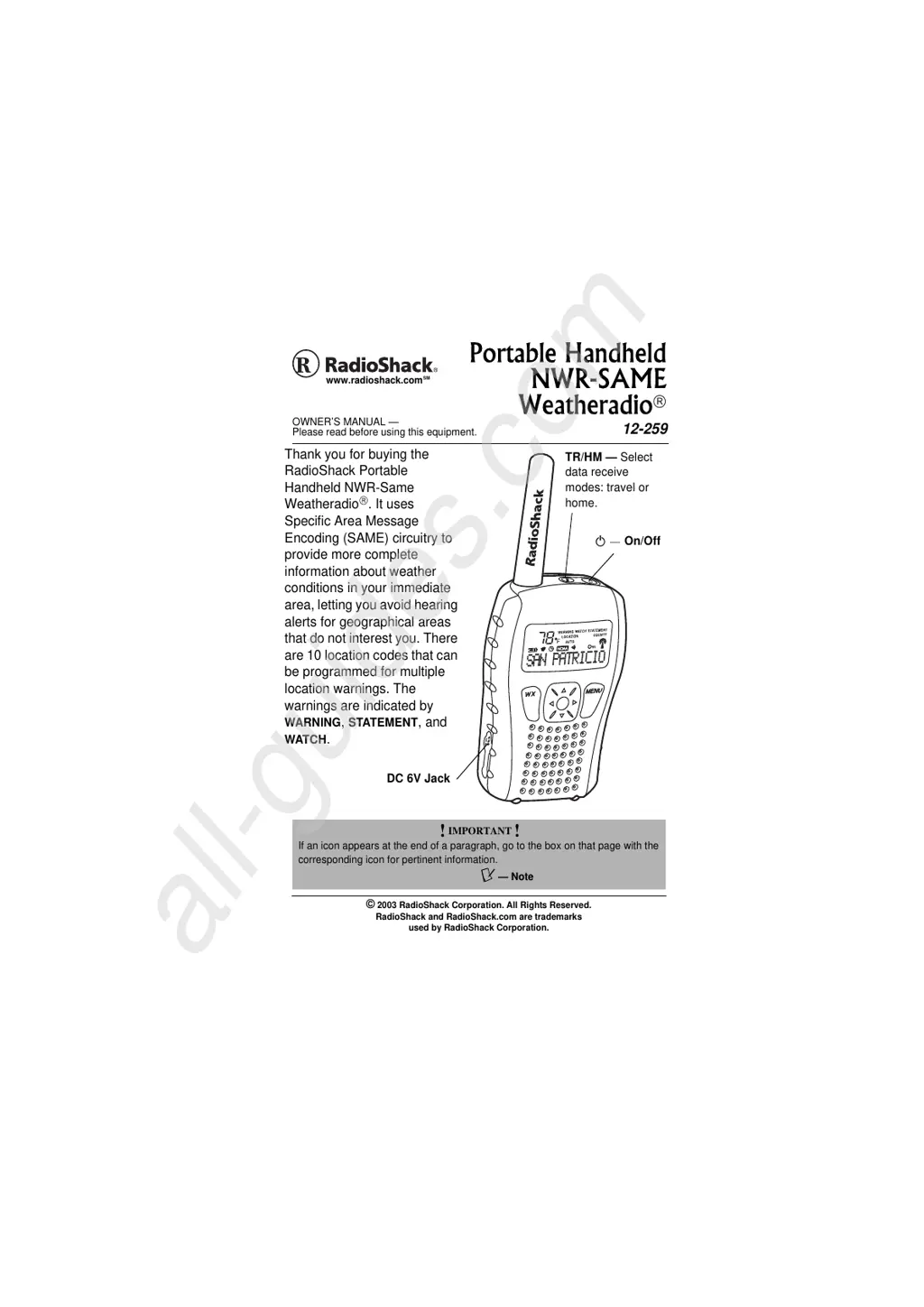
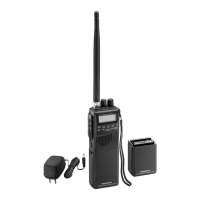
Thank you for buying the
RadioShack Portable
Handheld NWR-Same
Weatheradio
. It uses
Specific Area Message
Encoding (SAME) circuitry to
provide more complete
information about weather
conditions in your immediate
area, letting you avoid hearing
alerts for geographical areas
that do not interest you. There
are 10 location codes that can
be programmed for multiple
location warnings. The
warnings are indicated by
WARNING, STATEMENT, and
WATCH.
!
IMPORTANT
!
If an icon appears at the end of a paragraph, go to the box on that page with the
corresponding icon for pertinent information.
Ô — Note
Portable Handheld
NWR-SAME
Weatheradio
12-259
DC 6V Jack
º
On/Off
TR/HM Select
data receive
modes: travel or
home.
All manuals and user guides at all-guides.com
all-guides.com

Questions and Answers

  • J
    Jeffery KleinAug 10, 2025
    What to do if my Radio Shack NWR-SAME Weatheradio Radio is not responding properly to NWS weather alert broadcasts?
    • R
      rodriguezmichaelAug 10, 2025
      First, ensure that the correct FIPS codes are programmed into the memory. If possible, move the radio closer to the broadcast source. Also, make sure the radio is set to the NOAA channel being broadcast in your area. Finally, if the backup battery becomes weak, test your radio’s reception periodically, and replace the battery if the tone does not sound.
  • M
    Mr. James Obrien MDAug 15, 2025
    How to fix a Radio Shack NWR-SAME Weatheradio with no power?
    • S
      smithjeffreyAug 15, 2025
      Ensure that the AC adapter is correctly connected to the radio or that a backup battery is installed.
  • J
    joshuabruceAug 20, 2025
    What to do if my Radio Shack NWR-SAME Weatheradio displays 'CHECK OPERATION'?
    • C
      Chelsey LyonsAug 20, 2025
      If 'CHECK OPERATION' appears, it means the radio has not received a SAME alert signal for about one week. To resolve this, make sure the FIPS codes stored in memory are correct.
  • J
    jennagonzalezAug 26, 2025
    What to do if Radio Shack Radio responds to weather alerts for areas not covered by stored codes?
    • T
      Tom WilliamsAug 26, 2025
      Ensure the radio is not set to ALL LOCATION or TRAVEL mode.
  • M
    Maria EvansAug 30, 2025
    Why does my Radio Shack NWR-SAME Weatheradio Radio's alert tone sound intermittently?
    • M
      Mark MurrayAug 30, 2025
      The radio constantly monitors the channel you set it to. This is not a malfunction.
  • V
    vbrooksSep 4, 2025
    What to do if my Radio Shack NWR-SAME Weatheradio Radio only responds to one FIPS code?
    • B
      brittanyrussellSep 4, 2025
      Make sure the radio is set to MULTIPLE LOC mode and that the FIPS codes stored in memory are correct.

Radio Shack NWR-SAME Weatheradio Specifications

General IconGeneral
BrandRadio Shack
ModelNWR-SAME Weatheradio
CategoryRadio
TypeWeather Radio
Frequency Range162.400 - 162.550 MHz
Channels7
Battery TypeAA
SAME TechnologyYes
Display TypeLCD
BacklightYes
Power SourceAC Adapter or Battery
Alarm TypesAlert, Tone
AntennaTelescopic

Related product manuals