CB-500 CB Radio
7
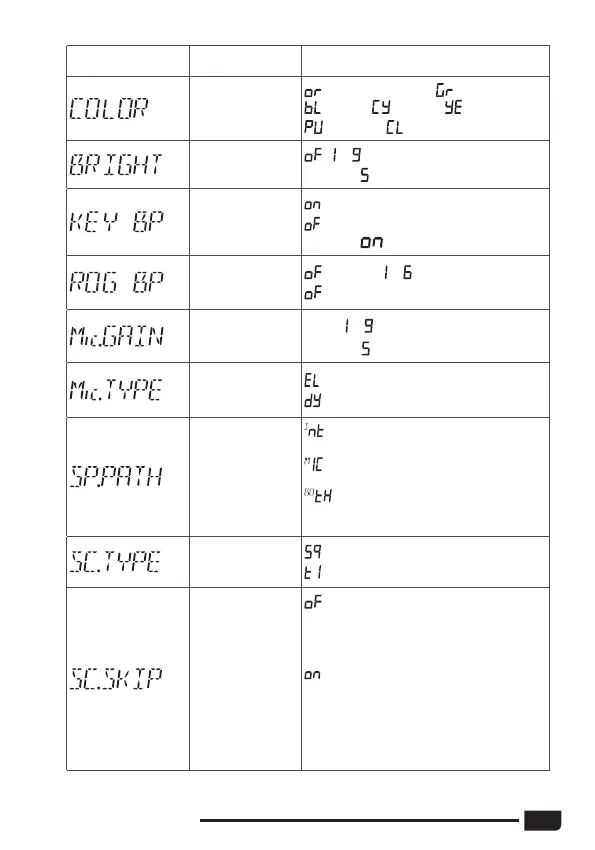
LCD display Function detail Setting details
Backlight color
setting
(orange/default), (green),
(blue), (cyan), (yellow),
(purple), (white)
Backlight
brighless setting
, ~
Default :
Beep sound
setting
: turn on beep sound
: turn off beep sound
Default :
Roger beep
sound setting
(default), ~
: turn off RB sound function.
Microphone gain
control
Level:
~
Default
:
Microphone type
setting
: electret (default)
: dynamic
Speaker volume
path setting
: the VOL knob affects the internal
speaker volume. (default)
: the VOL knob affects the
microphone built-in speaker volume.
: the VOL knob affects both the
internal speaker and microphone built-
in speaker volume.
Scan type setting
: squelch scan (default)
: time scan
Scan skip setting
: erase the current channel from the
SCAN SKIP memory, The dot between
the two channel digits disappears from
the LCD (default)
: memorize the current channel
into the SCAN SKIP memory. When
a channel is stored in the memory,
The dot between the two channel
digits appears on the LCD close to the
channel number



 To Next Page