EasyManua.ls Logo

Radiodetection spx RD8200 - User Manual

Radiodetection spx RD8200
68 pages
Print Icon
To Next Page IconTo Next Page
Loading...
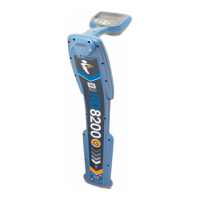
RD8200
Precision Multifunction Cable & Pipe Locator
Operation manual
90/RD8200-OPMAN-ENG/02

Table of Contents

Question and Answer IconNeed help?

Do you have a question about the Radiodetection spx RD8200 and is the answer not in the manual?

Radiodetection spx RD8200 Specifications

General IconGeneral
Frequencies512 Hz, 640 Hz, 8 kHz, 33 kHz
Current Measurement Accuracy±5%
Battery TypeAlkaline
Operating Temperature-20°C to +50°C
Storage Temperature+70°C

Summary

Section 1 - Preface

1.1 Important Notices and Safety Precautions

General and safety notices, including warnings and cautions for using the RD8200.

Section 1 - Preface (Continued)

Batteries, Disposal, and Bluetooth Notice

Guidelines for battery handling, product disposal, and Bluetooth usage notices.

1.2 Compliance

FCC and IC compliance statements for the equipment.

Section 1 - Preface (Continued)

Environmental, Manufacturing, and Intellectual Property

Information on environmental standards, manufacturing, and intellectual property.

Section 2 - Introduction

2.1 About this Manual, 2.2 About the RD8200, and 2.3 Extended Warranty

Introduction to the manual, the RD8200 system, and warranty information.

Section 2 - Introduction (Continued)

2.4 Manual Outline, 2.5 Safety, and 2.6 Training

Overview of manual sections, comprehensive safety, and training services.

Section 3 - System Overview

3.1 RD8200 Locator: Features, Keypad, and Icons

Identification of locator features, keypad layout, and screen icons.

Section 3 - System Overview (Continued)

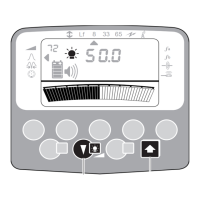
Locator Screen Icons and Features

Detailed descriptions of locator screen icons and their meanings.

Section 3 - System Overview (Continued)

3.2 Tx-5 and Tx-10 Transmitters: Features, Keypad, and Icons

Identification of transmitter features, keypad layout, and screen icons.

Section 3 - System Overview (Continued)

3.3 Using the Menu and Navigation

Instructions for navigating the locator and transmitter menus.

Section 3 - System Overview (Continued)

Menu Options and Navigation Tables

Tables detailing locator and transmitter menu options and navigation.

Section 4 - Operation

4.1 First Use: Power Options and Battery Insertion

How to power the RD8200 using batteries and insert them correctly.

Section 4 - Operation (Continued)

Battery Pack Removal and Installation

Step-by-step guide to removing and fitting battery packs for locator and transmitter.

Section 4 - Operation (Continued)

Charging the Battery Packs

Guidelines and warnings for charging the RD8200 battery packs safely.

Section 4 - Operation (Continued)

4.2 Power On;Off and 4.3 Keypad Actions;Shortcuts

Instructions for powering on/off and details of keypad functions and shortcuts.

Section 4 - Operation (Continued)

4.4 Antenna Modes and 4.5 System Setup

Description of antenna modes and how to configure system settings.

Section 4 - Operation (Continued)

System Settings: Units, Volume, Frequencies, and Protection

Configuration of units, volume, frequencies, DOP, and overload warnings.

4.8 TruDepth Measurement

How the RD8200 automatically measures depth and current.

Section 4 - Operation (Continued)

4.9 Passive Avoidance, 4.10 StrikeAlert, 4.11 Swing Warning, and 4.12 Vibration Warnings

Explanation of passive avoidance, strike alerts, swing warnings, and haptic feedback.

Section 4 - Operation (Continued)

4.13 Backlight, 4.14 Bluetooth Wireless, and 4.15 iLOC;SideStep

Details on backlights, Bluetooth connectivity, iLOC, and SideStep features.

Section 4 - Operation (Continued)

4.16 SideStepauto, 4.17 Transmitter Power Output, and 4.18 Transmitter Eco Mode

Using SideStepauto, adjusting transmitter power, and enabling Eco mode.

Section 4 - Operation (Continued)

4.19 Maximum Voltage and 4.20 Measure Mode

Setting transmitter voltage and using measure mode for impedance/voltage.

Section 4 - Operation (Continued)

4.21 CALSafe, 4.22 Usage-Logging, and 4.23 UTIL Mode

CALSafe feature, usage logging, and setting utility types in UTIL mode.

Section 5 - Locating Cables and Pipes

5.1 Frequencies and Power Filters

Overview of supported frequencies, passive frequencies, and Power Filters.

Section 5 - Locating Cables and Pipes (Continued)

5.2 Frequency Choice and Active Location Methods

Guidance on choosing frequencies and methods for active location (Direct Connection, Induction).

Section 5 - Locating Cables and Pipes (Continued)

Selecting Frequencies and 5.3 Antenna Modes

How to select frequencies and overview of the five antenna modes.

Section 5 - Locating Cables and Pipes (Continued)

Antenna Mode Details: Peak, Peak+, Guidance, Broad Peak, Null

In-depth explanation of each RD8200 antenna mode.

5.4 Compass, 5.5 Trace, and 5.6 Pinpoint

Using compass, tracing, and pinpointing techniques for locating utilities.

Section 5 - Locating Cables and Pipes (Continued)

5.7 Sweep and Search Techniques

Techniques for sweeping and searching for unknown buried lines.

Section 5 - Locating Cables and Pipes (Continued)

Inductive Search and 5.8 Nulling Out

Procedures for inductive search and using the Nulling Out technique.

Section 5 - Locating Cables and Pipes (Continued)

Nulling Out Techniques

Detailed explanation of one-person Nulling Out technique.

Section 6 - Depth and Current Readings

6.1 TruDepth Measurement and Orientation

How TruDepth measures depth and current, and the importance of orientation.

Section 6 - Depth and Current Readings (Continued)

Depth Measurement Verification and 6.3 Current Readings

Methods to verify depth accuracy and how to use current readings for identification.

Section 6 - Depth and Current Readings (Continued)

Current Reading Application and Interpretation

Applying transmitter signals for current readings and interpreting results.

Section 7 - Locating Techniques

7.1 Identifying Target Utilities

Techniques for identifying target utilities, including induction and unwanted coupling.

Section 7 - Locating Techniques (Continued)

7.2 Signal & Ground Connection and 7.3 Double-Ended Connections

Methods for signal/ground connections and using double-ended connections.

Section 8 - Fault-Finding

8.1 About Fault-Finding

Introduction to fault-finding capabilities and required equipment.

Section 8 - Fault-Finding (Continued)

8.2 Preparation and Reference Readings, and 8.3 How to Find a Fault

Preparation steps, reference readings, and locating cable sheath faults.

Section 9 - Current Direction (CD)

9.1 Understanding CD

Explanation of Current Direction recognition for line identification.

Section 9 - Current Direction (CD) (Continued)

9.2 CD Reset and 9.3 CD Clamps & Stethoscopes

Performing a CD reset and using CD clamps/stethoscopes.

Section 10 - Survey Measurements

10.1 Saving Measurements and 10.2 Pairing to Android

How to save measurements and pair the locator with an Android device.

Section 10 - Survey Measurements (Continued)

Bluetooth Data Transmission;Retrieval, USB Retrieval, and Troubleshooting

Managing survey data via Bluetooth/USB and troubleshooting wireless issues.

Section 11 - iLOC

11.1 Switching iLOC On, 11.2 Switching Bluetooth Off, and 11.3 Pairing

Enabling iLOC, disabling Bluetooth, and pairing locator/transmitter for iLOC.

Section 11 - iLOC (Continued)

11.4 Troubleshooting and 11.5 Using iLOC

Troubleshooting wireless issues and performance tips for iLOC.

Section 11 - iLOC (Continued)

11.6 iLOC Functions: Frequency;Power Control and 11.7 SideStep

Remotely controlling transmitter frequency/power and using SideStep.

Section 12 - Using Accessories

12.1 About Accessories, 12.2 Headphones, and 12.3 Locator Clamps

Overview of accessories, headphone set, and using locator clamps.

Section 12 - Using Accessories (Continued)

Clamp Types and Transmitter Clamps

Description of clamp types and how to use transmitter clamps.

Section 12 - Using Accessories (Continued)

Transmitter Clamp Range, External Power, and 12.6 Sondes

Transmitter clamp details, external power, and introduction to sondes.

Section 12 - Using Accessories (Continued)

Sonde Usage: Selection, Preparation, Propulsion, and Location

How to select, prepare, propel, and locate sondes effectively.

Section 12 - Using Accessories (Continued)

Sonde Depth Check, FlexiTrace, and 12.7 Stethoscopes

Checking sonde depth, using FlexiTrace, and utilizing stethoscope antennas.

Section 12 - Using Accessories (Continued)

Stethoscope Types and 12.8 Submersible Antenna

Description of stethoscope types and how to use the submersible antenna.

Section 12 - Using Accessories (Continued)

Submersible Antenna Usage and 12.9 Phone;Tablet Mount

Tips for submersible antenna use and mounting mobile devices.

Section 13 - Appendices

13.1 Care and Maintenance, 13.2 Enhanced Self-Test, and 13.3 RD Manager Online

Guidelines for care, self-testing, and using RD Manager Online software.

Section 13 - Appendices (Continued)

RD Manager Online Features, Warranty, Software Upgrades, eCert, and Error Messages

Managing software, warranty, upgrades, eCert, and understanding error messages.

Section 13 - Appendices (Continued)

13.8 TX5;TX10 Frequencies and 13.9 TX5 Fault Find Models

Tables detailing frequencies and fault find models for TX5/TX10 locators.

Section 13 - Appendices (Continued)

13.10 TX10 Fault Find Models and 13.11 TX10 CD Frequencies

Tables detailing fault find models and CD frequencies for TX10 locators.

Section 13 - Appendices (Continued)

13.12 TX10-B iLOC Frequencies and Modes

Table detailing operation modes and frequencies for TX10-B iLOC locators.

Section 13 - Appendices (Continued)

13.13 TX10-B Fault Find Models and 13.14 TX10-B iLOC CD Frequencies

Tables detailing fault find models and CD frequencies for TX10-B iLOC.

13.15 List of Supported Accessories

Locator Accessories

A comprehensive list of available locator accessories and their part numbers.

13.15 List of Supported Accessories (Continued)

Locator Accessories (Continued)

Continuation of the list of locator accessories and part numbers.

Transmitter Accessories

Transmitter Accessories

A comprehensive list of available transmitter accessories and their part numbers.

Transmitter Power Accessories and Spares

Transmitter Power Accessories and Spares

List of power accessories and spare parts for transmitters with part numbers.

Transmitter Power Accessories and Spares (Continued)

Transmitter Power Accessories, D Cell Batteries, and Mains Leads

Continuation of transmitter power accessories, plus D cell batteries and mains leads.

Transport and Storage Accessories

Transport and Storage Accessories

List of accessories for transporting and storing the equipment.

Calibration Certificates, Remote Calibration, and PC Software

Information on calibration certificates and RD Manager Online.

Related product manuals