18
M16MI325 A03_06/18
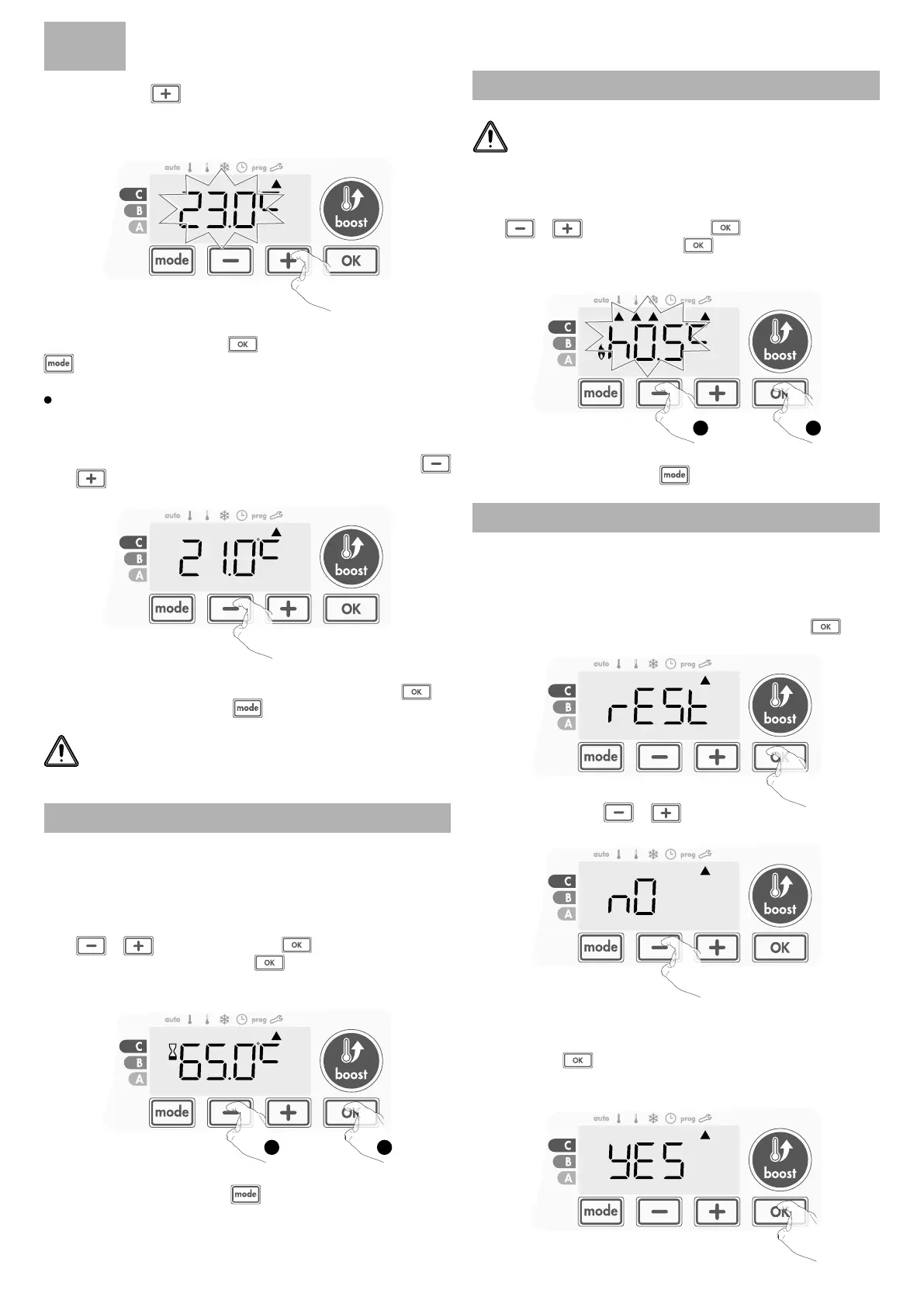
To validate the new value press . To exit the Expert settings, press
3 times
.
Increase the temperature measured by the ambient temperature sensor
by 2°C by pressing
.
In our example the measured temperature by the sensor goes
from 21°C to 23°C.
2- To save and move automatically to the next setting press
. To
exit the Expert settings, press
3 times
.
To exit the Expert settings, press
3 times
.
The reset to zero of the sensor calibration
To put the value of the correction to "0", do the following :
1- When the temperature measured by the sensor appears, press
or
for at least 3 seconds.
3 sec.
Important: These changes should be performed by a qualied
staff, it should be performed in production or on site during the
rst installation
An integrated overheating safety is present on our blower. It is acti-
vated when an internal temperature limit is reached: the blower and its
controller will stop immediately.
The maximum setting is preset to 65°C. You can adjust from 60°C to
90°C by intervals of 5°C.
Press
or then save by pressing .
If you do not want to change it, press
: the device changes automa-
tically to set the next setting.
INTERNAL TEMPERATURE MONITORING
1 2
RESTORING FACTORY SETTINGS
If the PIN code protection is disabled, the user, installer and expert set-
tings are re-initialized:
1- From the internal temperature monitoring setting, press . rest
appears on the display.
To exit the Expert settings, press
3 times
.
The hysteresis used by the controller can be adjusted.
The hysteresis setting is preset to 1°C. You can adjust from 0.5°C to 3°C
by intervals of 0.5°C.
Press
or then save by pressing .
If you do not want to change it, press
: the device changes automa-
tically to set the next setting.
HYSTERESIS ADJUSTMENT
1 2
Important: These changes should be performed by a qualied
staff.
2- NO appears. Press or to select YES.
yes = Factory settings reset
NO = Factory settings not reset
3- Press the key for 5 seconds. The device returns to its initial con-
guration and goes back automatically to the Auto mode.
5 sec.
EN


 To Next Page