3
M16MI325 A03_06/18
DIAGRAM
Important: In Auto, Comfort, Eco, Frost protection and Standby mode,
backlight turns off automatically after 20 seconds if no buttons are
pressed. It will be necessary to reactivate it by pressing one of the
keypad buttons before making settings.
OPERATION
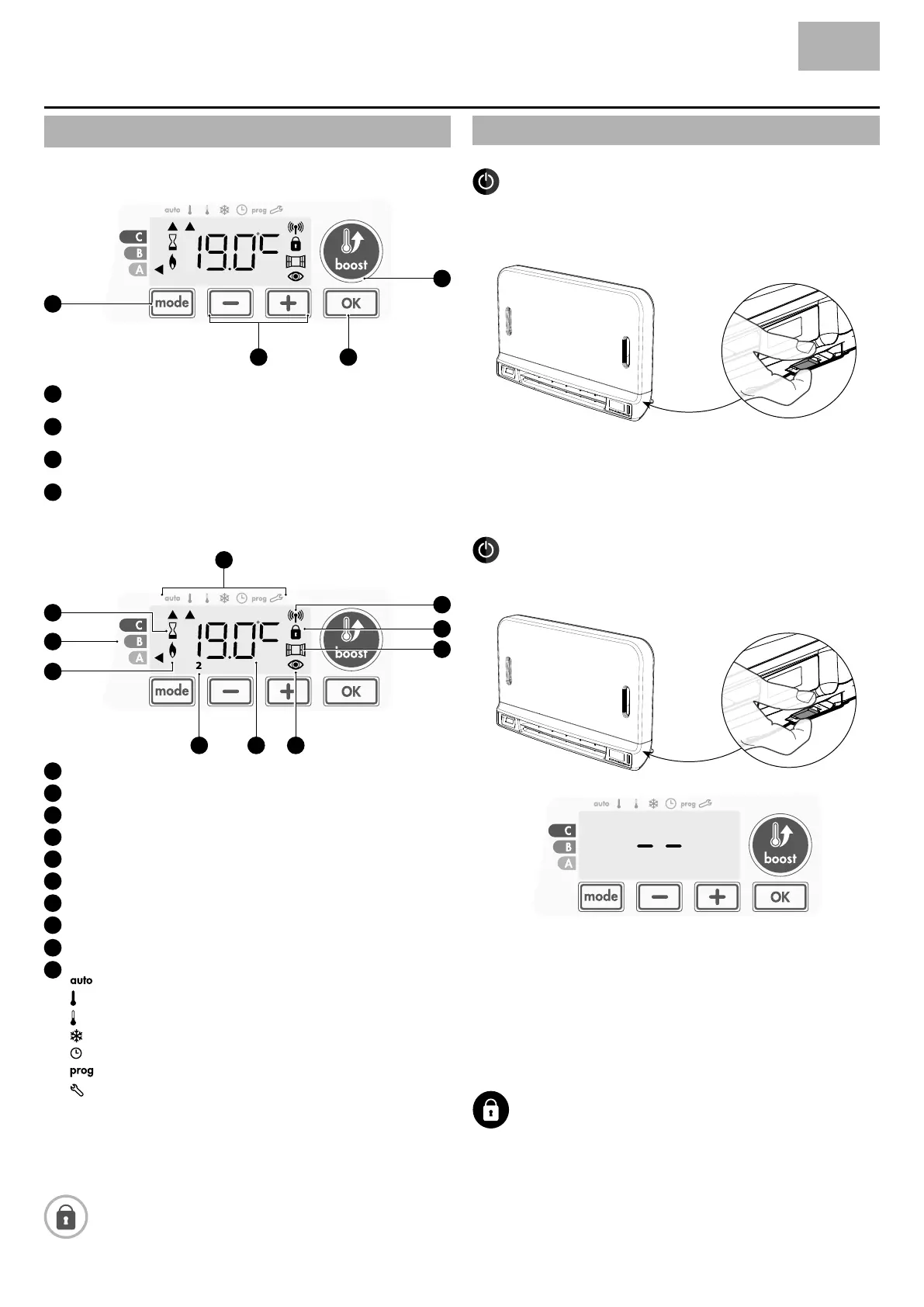
• Buttons overview
22
2
2
Gauge according boost duration
Boost indicator light
Heating indicator
Days of the week (1=Monday … 7= Sunday)
Setting temperature
Occupancy detection indicator
Open window detection indicator
Keypad locked
Radio transmission indicator
Operation modes:
Auto mode
Comfort mode
Eco mode
Frost protection mode
Time and date setting mode
Programming mode
Settings
Selecting operating modes
Save settings
Boost
Plus and minus buttons, used to set temperatures, time, date and
programmes
• Indicators overview
Before carrying out any setting procedures, ensure that the
keypad is indeed unlocked (see page 5).
POWER ON /STANDBY MODE
Power on feature
When this feature is rst used, press the button (switch) so that it swit-
ches to the I located below the blower to put the device in operation.
The device is in Auto mode by default.
Note: The heating indicator light will come on only if the measured
temperature is below the set temperature (see page 5 Comfort
temperature setting for further details).
Standby feature
Since the button (switch) is on I, press it to switch it to the other posi-
tion.
Note:
The settings that are adjusted during operation are automatically saved
and will be applied at the time of the next use.
E.g.: if the blower is operating and you want to switch the appliance to
standby, the next time the appliance is switched on, the boost feature
and the timer countdown will also be switched back on. Reversion to
the mode selected before the boost feature was switched on will apply
when the blower switches off.
Important:
Before carrying out any setting procedures, ensure that the
keypad is indeed unlocked (see page 5).
BWR SLIM IMH FR PM V
EN


 To Next Page