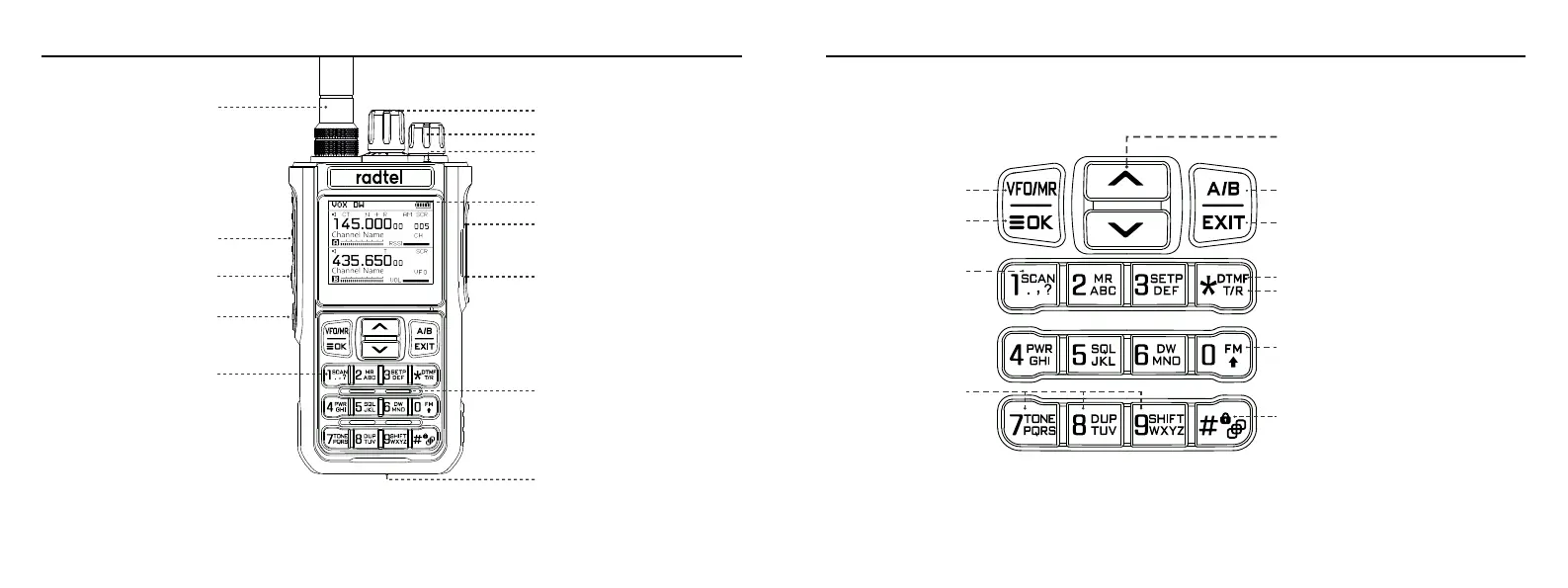
Keypad
Antenna
PTT Button
PF2
PF3
Numeric
Keypad
Channel Knob
Power Knob
Indicator Light
Screen
Headphone Jack
Microphone Jack
Speaker
Type-c charger port
PF2 button: Short press to turn on FM RADIO, long press to switch High/Middle/Low power
PF3 Button: Short press to SEEK frequency from nearby radio, long press to open squelch
Switch channel and
frequency mode
To change the freqyency step,
press and hold for more than 2 seconds
to go forward quickly;in scanning mode,
change the scanning direction.
Menu/Confirm button
Switching A/B Band
Exit/Back Button
Long press enter DTMF input
Short press to switch Reverse Frequency,
Talk Round, Normal Mode
Long press to
enter Scanning
Long press to enter
shortcut button
Long press to activate FM RADIO
Keypad lock
Radio Buttons & Knobs
01 02


 To Next Page