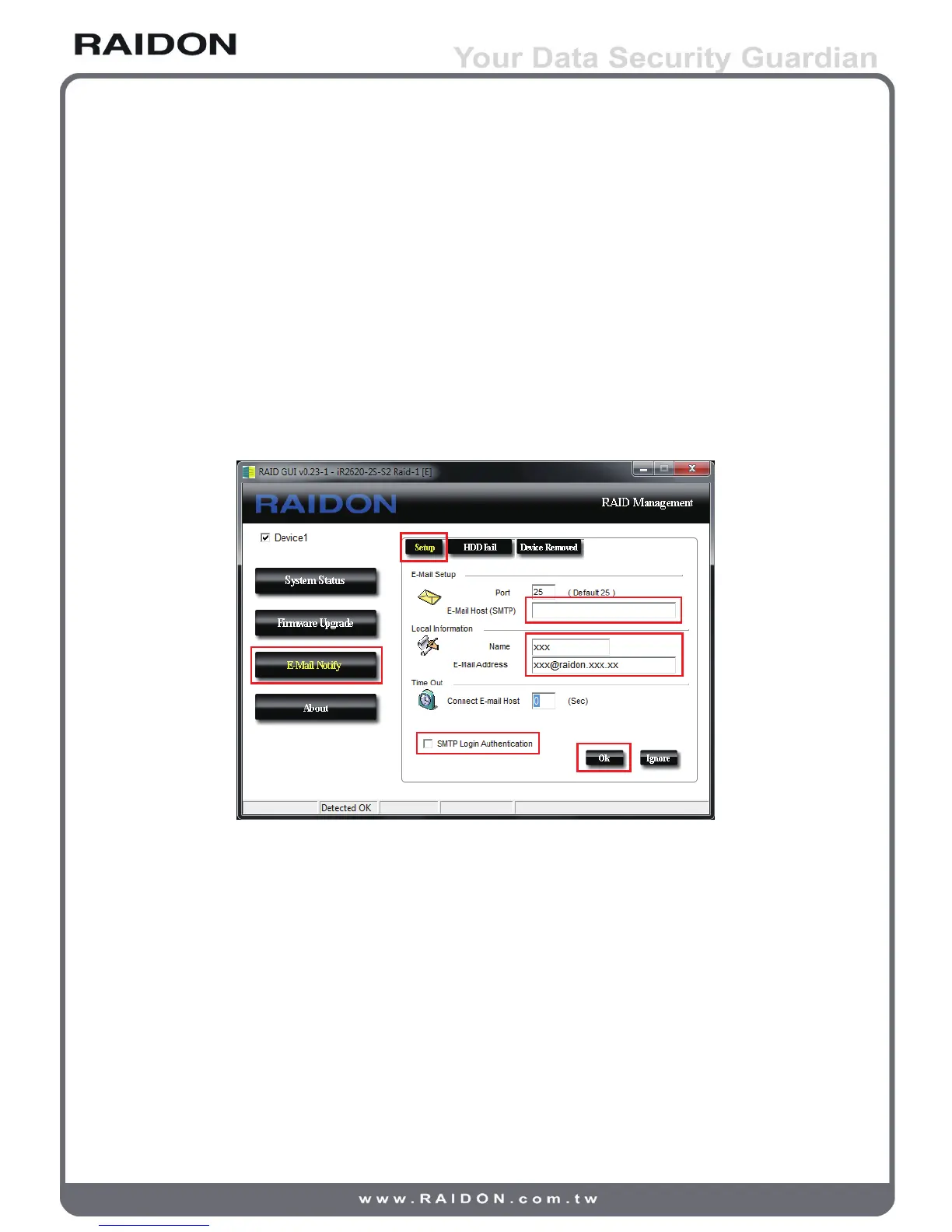
3. E-Mail Notify
Conguring an e-mail address for notication of drive malfunctioning or being removed.
3-1 Setup
1) Insert “Outgoing” SMTP and e-mail name and address.
2) If it is passwords required, select the option “SMTP Login Authentication” and
insert the passwords.
3) When the conguration completed, click on the “OK” button to save.
※ Device must be connected in operational states during congurations to take effects.
3-2 HDD Fail / Device Removed
1) Insert the e-mail address of the receiver for notication and click on “+” to add the
inserted e-mail address onto the notifying list.
(Maximum up to 10 e-mail addresses)
2) Insert the error message and descriptions from the columns of “Subject” and
“Contents”.
3) When the conguration completed, click on the “OK” button to save.
※ Device must be connected in operational states during congurations to take effects.
14 GUI Monitoring Software & FW Updating



 To Next Page