Chapter 2 Hardware Introduction
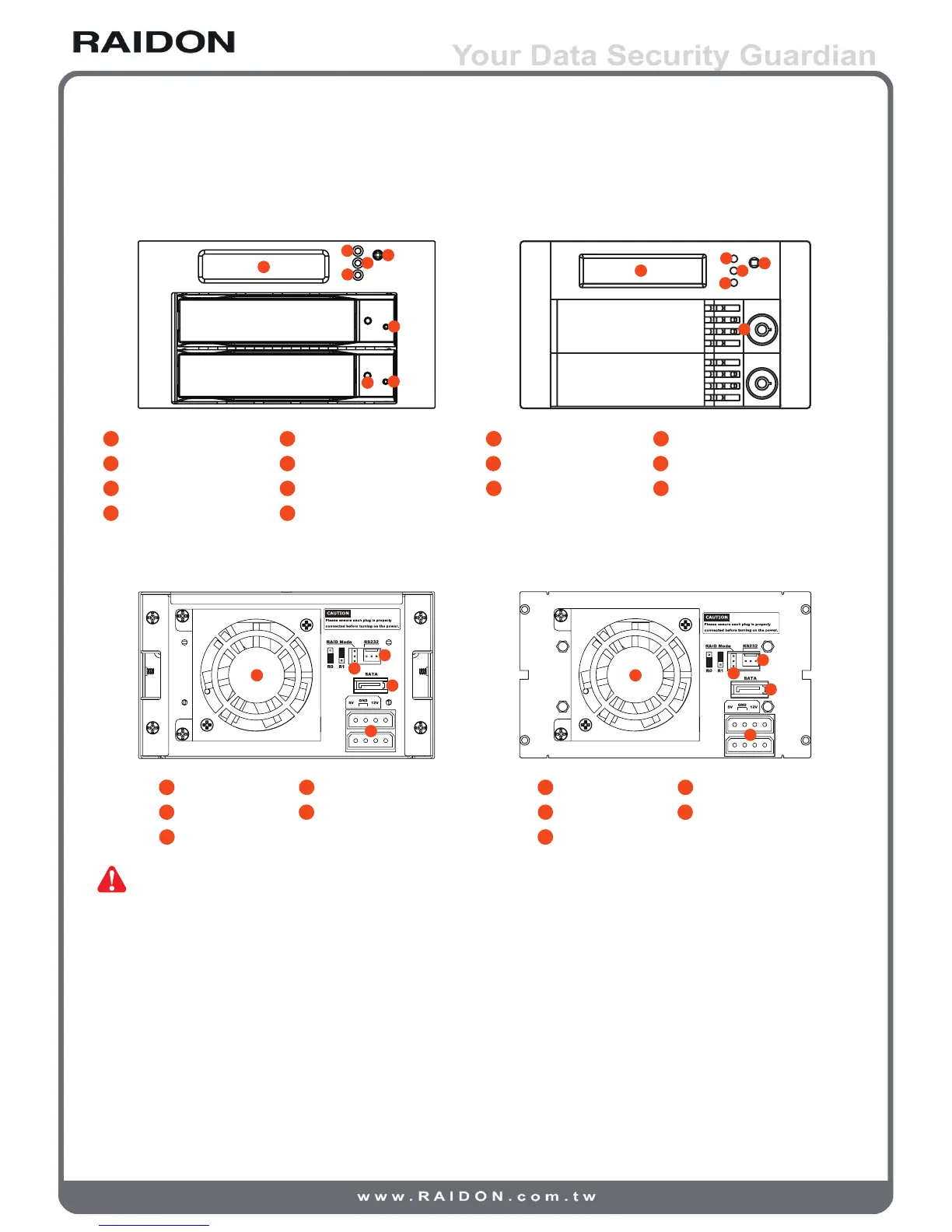
iR2620 Front Panel SR2611 Front Panel
1
LCD Display
2
LED of Failure Alarm
1
LCD Display
2
LED of Failure Alarm
3
LED of Pri HDD
4
LED of Sec HDD
3
LED of Pri HDD
4
LED of Sec HDD
5
Mute Button
6
LED of Pri HDD
5
Mute Button
6
Key Lock
7
LED of Sec HDD
8
Key Lock
iR2620 Real Panel SR2611 Real Panel
4 Pin Big Power Connector
Note : 1. Status Indications of LEDs:
1) iR2620:
A. LED of Pri / Sec HDD which near LCD display will ash yellow when the data is
accessed from the hard drive.
B. LED of Pri / Sec HDD on the HDD tray will ash blue when the data is accessed
from the hard drive.
C. LED of failure alarm will light red when HD failed, temperature is higher than 60ºC
or fan fails.
2
3
4



 To Next Page