7
PGM
A
/
C
STEP 1: Set current time and select program “A” or “C”
The PC-200 Series holds a seven day program which repeats after the sev-
enth day. The days of the week relate to a number as follows:
This timer displays in military time. To convert from AM/PM time to military time, see
the reference chart at the bottom of this page.
SET
CLOCK &
PROGRAM
Day of the week> Sun Mon Tue Wed Thur Fri Sat
Display Number> 1 2 3 4 5 6 7
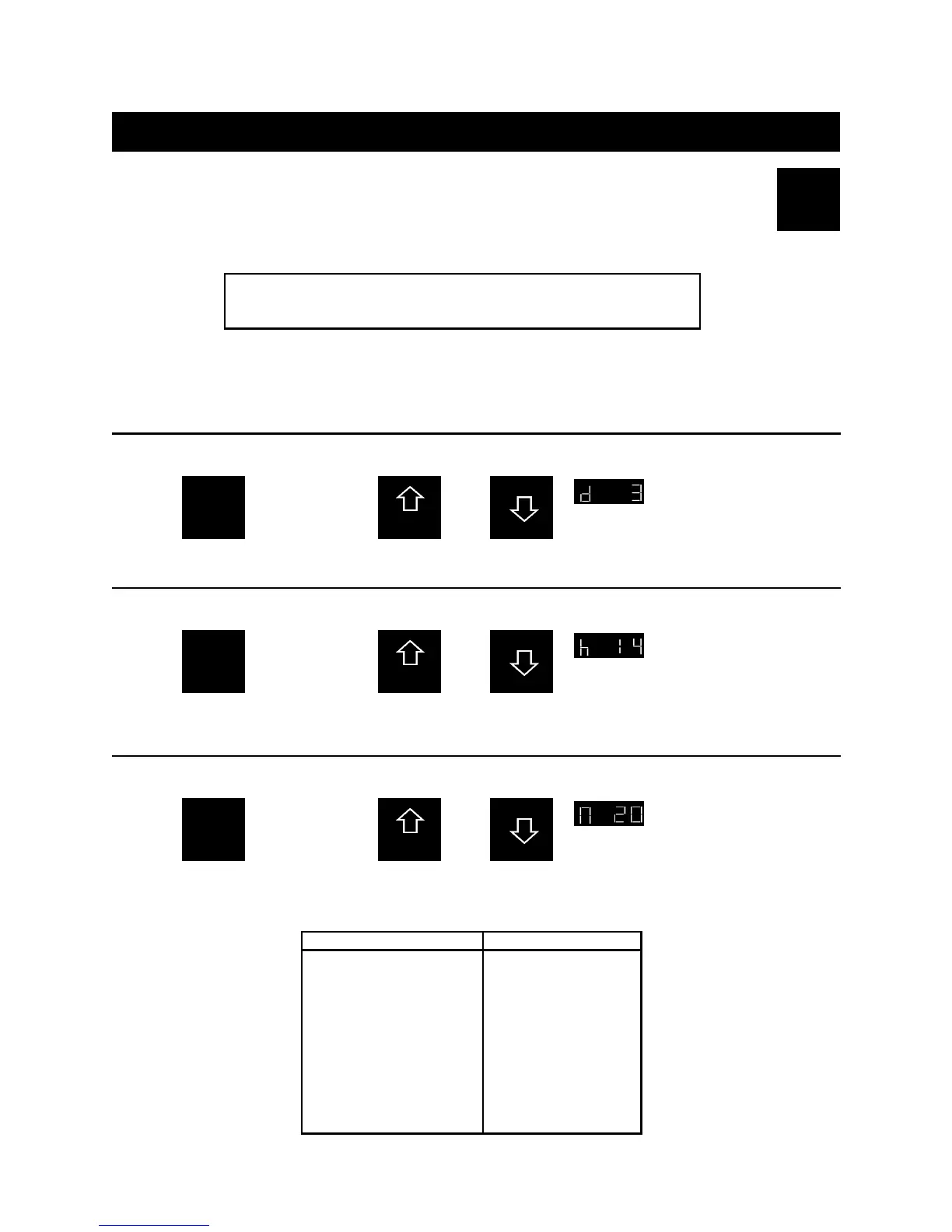
1-A: Set the current day of the week
Example To set today to Tuesday adjust the display to read “d 3.”
SET
CLOCK &
PROGRAM
Press
Once
and adjust
the right digit
by pressing:
OR
Day Tues.
PGM
A
/
C
1-B: Set the current hour of the day
Example To set the hour to 2:00 p.m. adjust the display to read “h 14.”
SET
CLOCK &
PROGRAM
Again
Press
and adjust
the right
two digits by
pressing:
OR
Hour 2:00 p.m.
PGM
A
/
C
1-C: Set the current minutes of the hour
Example To set the minutes to 20 adjust the display to read “n 20.”
SET
CLOCK &
PROGRAM
Again
Press
and adjust
the right
two digits by
pressing:
OR
Minutes :20
Normal Military Normal Military
12:00 Midnight 0000 12:00 Noon 1200
1:00 AM 0100 1:00 PM 1300
2:00 0200 2:00 1400
3:00 0300 3:00 1500
4:00 0400 4:00 1600
5:00 0500 5:00 1700
6:00 0600 6:00 1800
7:00 0700 7:00 1900
8:00 0800 8:00 2000
9:00 0900 9:00 2100
10:00 1000 10:00 2200
11:00 1100 11:00 2300
How to set the current time





 To Next Page