- 22 -
SMART AUTOMATION
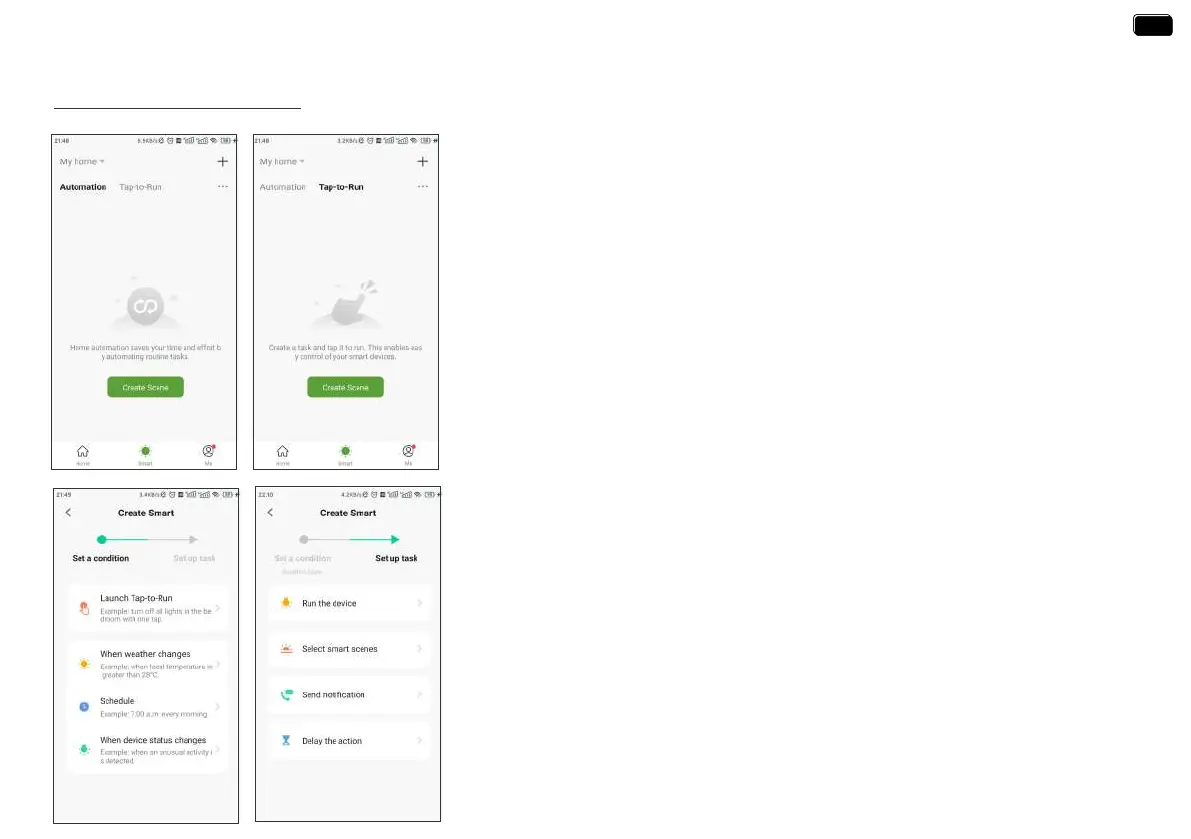
3 Steps To Set Automation Or Tap-To-Run
1. Set a condition: According to your needs, set the conditions for automation or tap-to-run.
2. Set tasks: Set the tasks that the device needs to peorm when the conditions are met
3. Save the settings: Please remember to save all the settings. The device will automatically
execute according to what you set.
Automation means the devices can execute automatically according to the set conditions
such as the local weather, device status and time.
For example, RAINPOINT APP can obtain the weather forecast information of your home
location. When you set the conditions for immediately delaying the watering plan when it
rains, the timer will automatically execute the watering delay when it rains in your local area.
When you travel, you don’t need to wor about whether the weather at home is raining.
Tap-to-Run means you can control multiple devices and plans with one tap.
Automation & Tap-to-Run
EN
EN



 To Next Page