Documentation Center
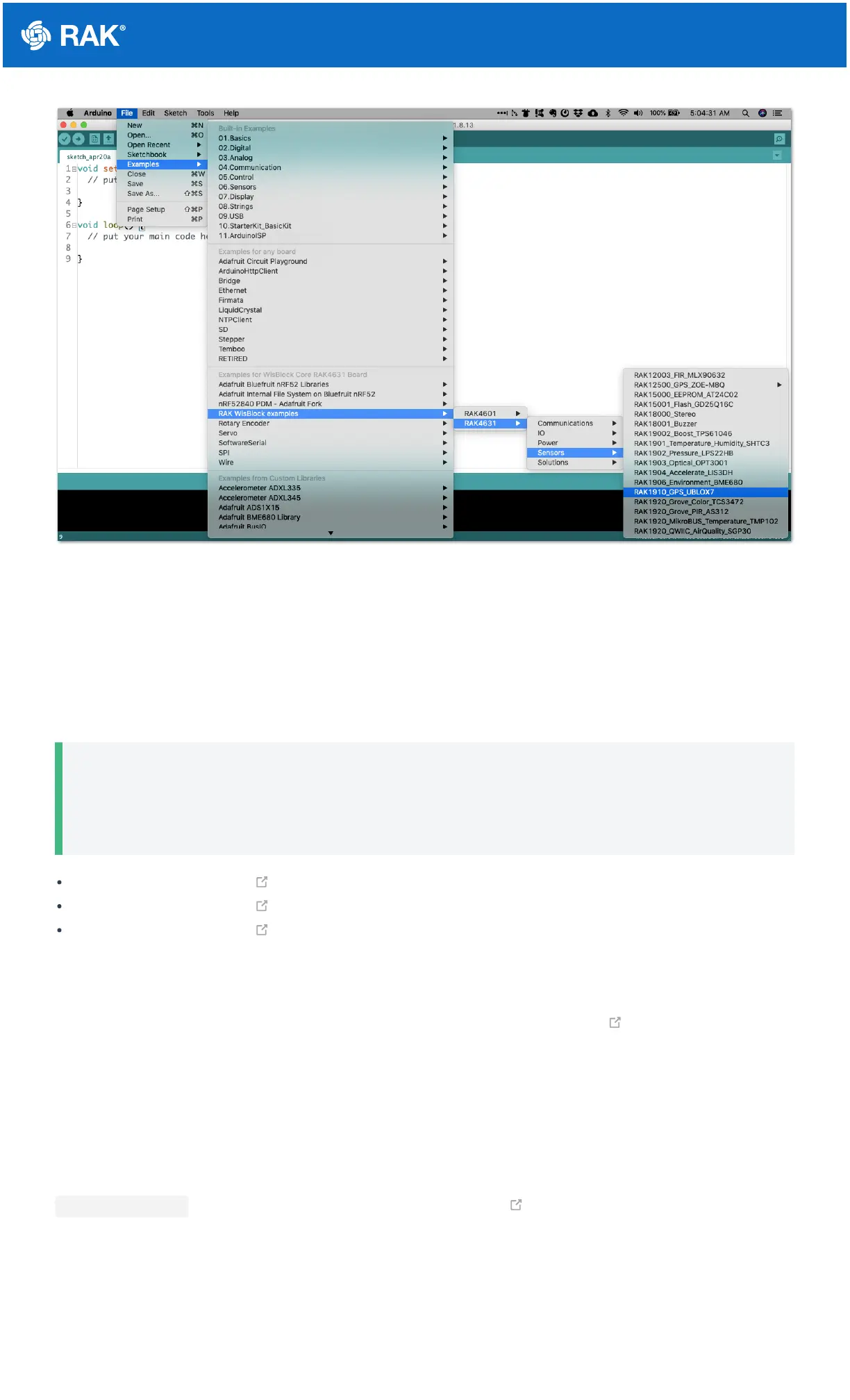
Figure 14: RAK4631 WisBlock Core Examples
It is highly recommended to also check the dedicated quick start guide that you can follow on various WisBlock
Modules. Each quick start guide of these modules contains the detailed steps on how to open the example codes
and upload them to the RAK4631.
Listed are the examples where you can check the Software Setup on the quick start guide of the following
WisBlock Modules:
📝
NOTE
The listed links are just examples. All WisBlock Modules have their own quick start guide that you can
use as a reference to get started on specific modules.
RAK1901 Quick Start Guide
RAK1902 Quick Start Guide
RAK1903 Quick Start Guide
RAK4631 on Platform IO
For the Platform IO, get the example codes on the WisBlock Example code repository and add the necessary
libraries individually. Then you can compile the example code.
Connecting RAK4631 to LoRaWAN
RAK4631 is the WisBlock Core capable of LoRaWAN connectivity.
There is an example on how to start with LoRaWAN in the RAK WisBlock examples in Arduino IDE named
LoRaWAN_OTAA_ABP . This is also available in the WisBlock Repository .


 To Next Page