Go Home
• A Home location must be saved in the system. From the Main Navigation menu,
press the “Where To?” button on the touchscreen, then press the “Go Home”
button on the touchscreen.
Your route is marked with a blue line on the map. If you depart from the original route,
your route is recalculated. A speed limit icon could appear as you travel on major
roadways.
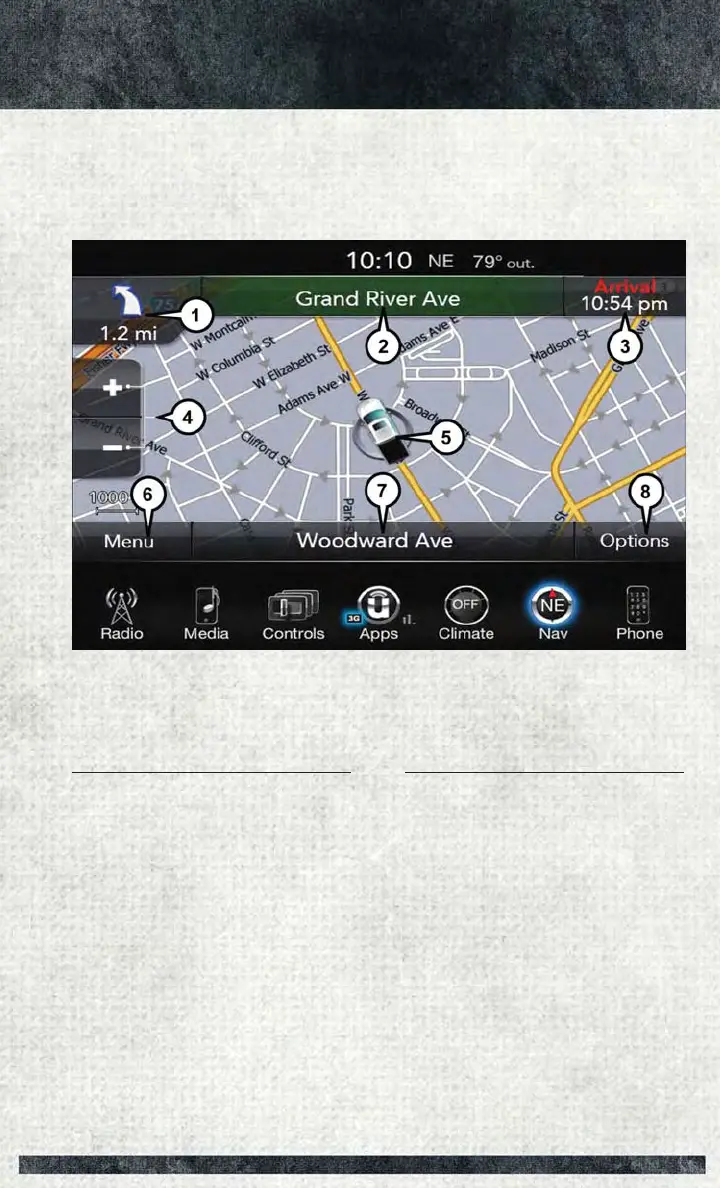
Uconnect 8.4 NAV Map
1 — Distance To Next Turn
2 — Next Turn Street
3 — Estimated Time Of Arrival
4 — Zoom In And Out
5 — Your Location On The Map
6 — Navigation Main Menu
7 — Current Street Location
8 — Navigation Routing Options
ELECTRONICS
163



 To Next Page