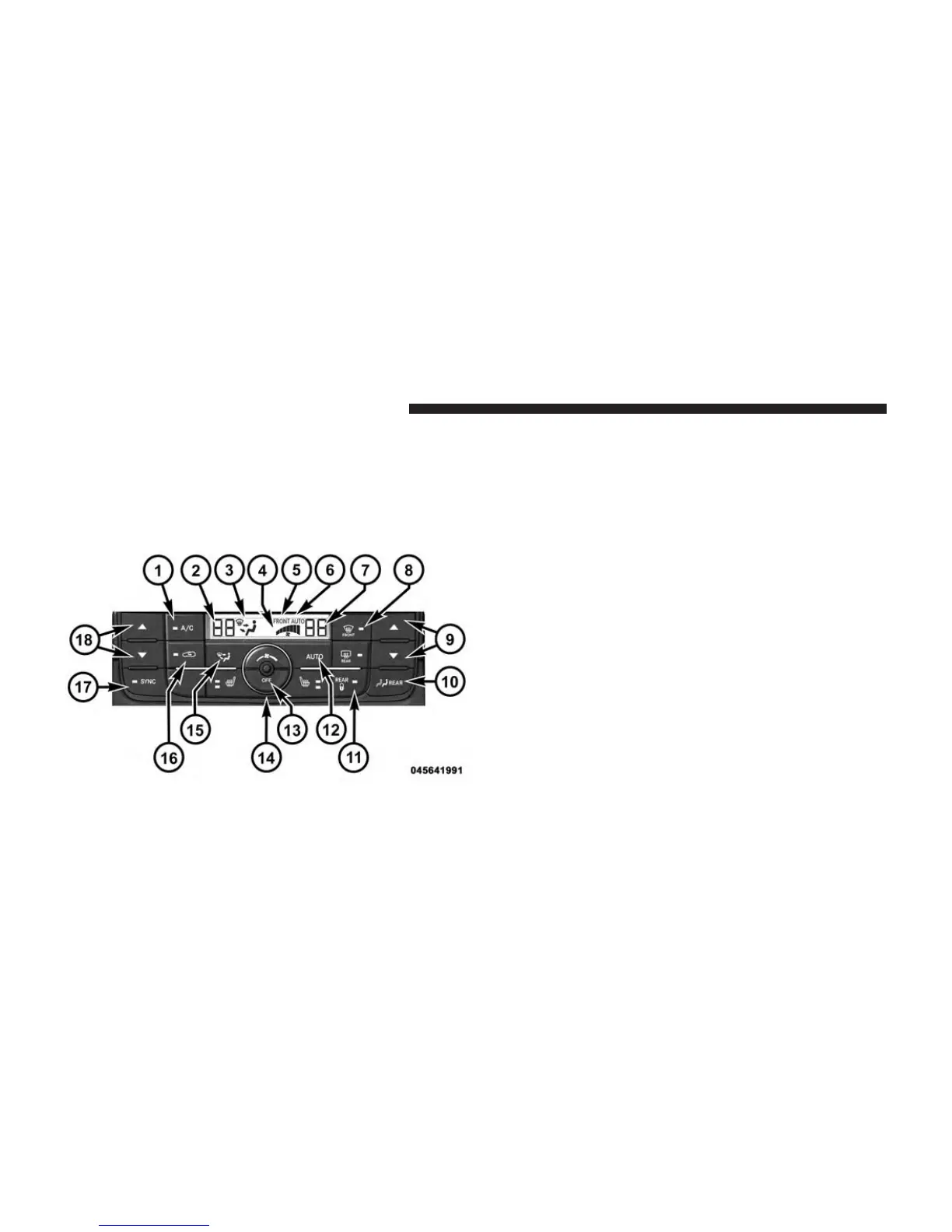
The Three-Zone ATC system automatically maintains the
interior comfort level desired by the driver and all passen-
gers. The system automatically adjusts the air temperature,
the airflow volume, amount of outside air recirculation and
the airflow direction. This maintains a comfortable tem-
perature, even under changing conditions.
1. Air Conditioning (A/C) Button
Press and release to change the current Air Conditioning
(A/C) setting, the indicator illuminates when A/C is ON.
Performing this function will cause the ATC to switch
into manual mode.
2. Left Front Seat Occupant Temperature Display
This display shows the temperature setting for the left
front seat occupant.
3. Mode Display
This display shows the current Mode selection (Panel,
Bi-Level, Floor, Mix).
4. Blower Control Display
This display shows the current Blower speed selection.
5. Front Auto Indicator
This indicates when the system is in Front Auto mode.
Front ATC Panel
424 UNDERSTANDING YOUR INSTRUMENT PANEL












 To Next Page