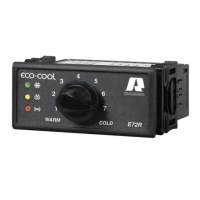
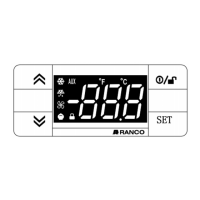
Reduced SET / Economy LED
Flashing: economy Setpoint active
Quick flashing: access to level2 parameters
Off: otherwise
Compressor LED
Permanently on: compressor active
Flashing: a delay, a protection or a locked
start-up
Off: otherwise
Alarm LED
Permanently on: alarm active
Flashing: alarm acknowledged
Off: otherwise
°C LED
Permanently on: °C setting (dro =0)
Off: otherwise
°F LED
Permanently on: °F setting (dro =1)
Off: otherwise
LEDs
Defrost LED
Permanently on: defrost active
Flashing: manual or D.I. activation
Off: otherwise
Fans LED
Permanently on: fans active
Off: otherwise
Aux LED
Permanently on: Aux output active
Flashing
: manual or D.I. activation of
Deep Cooling
*
To activate the LOC function:
- enter the “Basic Commands” menu by pressing the key
set
.
- press keys
and
within 2 seconds.
If the LOC function is Active and you try to enter the “Programming” menu, the text LOC appears. If this happens, the
parameters are still displayed but cannot be edited. To disable the keypad lock, repeat the aforementioned procedure.
3
*
To disable the keypad lock:
- press keys
within 3 seconds .


 To Next Page