7
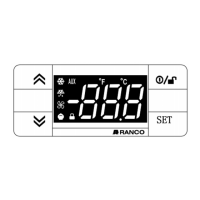
The keypad can be locked by entering the “Basic Commands” menu using
set
and pressing and within 2 seconds, or by
programming the “LOC” parameter (see “diS” folder). If the keypad is locked, the “Basic Commands” menu can be accessed and the Setpoint
displayed, but the value cannot be modified.
ACCESSING AND USING THE MENUS
Resources are organised into menus. Press and release the
set
key to access the “Machine Status” menu.
To access the “Programming” menu, press the
set
key for more than 5 seconds. If no keys are pressed for over 15 seconds (Timeout), or if the
key is pressed, the last value to appear on the display is confirmed.
LOCK SETPOINT MODIFICATION
The instrument can be switched off by pressing the key for longer than 5 seconds. In this condition, the adjustment algorithms and defrost
cycles are disabled and the text “OFF” will appear on the display.
INSTRUMENT ON/OFF
Hold down the key for longer than 5 seconds. It is only activates if the temperature conditions are fulfilled.
Otherwise, the display will flash three times to indicate that the operation will not be performed.
MANUAL DEFROST CYCLE ACTIVATION
Alarms are always indicated by the buzzer (if present)
.
To switch off the buzzer, press and release any key; the corresponding icon will continue to flash.
N.B.: If alarm exclusion times have been set (see “AL” folder) the alarm will not be signalled.
In the event of an alarm caused by a malfunctioning ambient probe (Pb1), the indication “E1” will appear on the display. For a malfunctioning
evaporator probe (Pb2), the indication “E2” will appear (
RDT-2210/3210 only
).
DIAGNOSTICS


 To Next Page