EasyManua.ls Logo

Ranco EcoCool E7 Series - User Manual

Ranco EcoCool E7 Series
32 pages
Print Icon
To Next Page IconTo Next Page
Loading...
1
Type E7 EcoCool™ Electronic Temperature and Defrost Controllers
©2008 Invensys Controls All rights reserved.
DRAFT VERSION
354-00027-001 Rev. D
Temperature and
Defrost Controller
Type E7
EcoCool
Controller and Configuration Software
Installation and Configuration

Table of Contents

Questions and Answers

  • B
    Brenda MorenoAug 4, 2025
    What to do if EcoSoft Program cannot communicate with Ranco Controller?
    • G
      greenkellyAug 4, 2025
      If the EcoSoft Program cannot communicate with the controller after connecting the interface box to your computer, check all cable connections: between the controller and interface box, between the interface box and the computer, and the power supply cable to the interface box. If everything appears okay, reboot the computer and start the EcoSoft Program again.
  • K
    Kylie NicholsonAug 10, 2025
    What to do if the display of Ranco EcoCool E7 Controller shows E1?
    • L
      Lori JohnsonAug 10, 2025
      If the display shows E1, check the control sensor, wires, and connections. If all connections appear okay, replace the control sensor.
  • S
    Samuel Allen DDSAug 16, 2025
    What does it mean when Ranco EcoCool E7 display shows E2?
    • W
      William MorganAug 16, 2025
      If the display shows E2, check the evaporator sensor, wires, and connections. If all connections appear okay, replace the evaporator sensor. If no evaporator sensor is in use, disable the evaporator sensor.
  • A
    ashlee87Aug 22, 2025
    What to do if a temperature alarm occurs soon after startup on Ranco EcoCool E7?
    • E
      Eric BaileyAug 22, 2025
      If a temperature alarm occurs soon after startup, increase the Temperature Alarm Disable Time after Startup.
  • T
    tuckerbrendaAug 28, 2025
    What to do if a temperature alarm occurs soon after defrost on Ranco EcoCool E7 Controller?
    • H
      Hayley SchmittAug 28, 2025
      If a temperature alarm occurs soon after defrost, increase the Temperature Alarm Delay after Defrost.

Summary

1 How to use this manual

3 E71 R and E72 R controllers

3.1 Overview

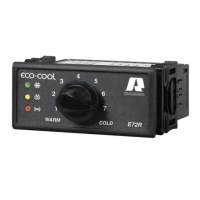
Provides a general overview of the E71R and E72R controllers, their features, and indicators.

5 Functions and features

5.1.1 User control

Explains how the adjustment knob is used to select control temperatures within the configured range.

5.1.2 Control mode

Describes how the controller cycles the compressor or solenoid valve to maintain selected temperatures.

5.1.3 Status indications

Details the meaning of the green, yellow, and red LEDs on the controller face.

5.1.4 Defrost control

Explains how the controller initiates and manages defrosting cycles based on time or temperature.

5.1.5 Alarms

Outlines how temperature alarms and sensor faults are indicated by LEDs and display.

5.1.6 Display

Describes the features and display capabilities of the optional remote digital display.

5.1.7 Sensor failure mode

Details the controller's response to sensor failures, including compressor duty cycling.

6 Device and software configuration

6.1 Controller and interface box

Explains the interface box and its role in connecting the controller to a computer for configuration.

6.2 EcoCool configuration software

Introduces the EcoCool software for controller configuration, including installation and parameter tabs.

6.3 Copy card

Describes the use of a copy card for transferring firmware and configuration files to/from controllers.

7 Troubleshooting

8 Technical specifications

8.1 Electrical rating

Lists the electrical specifications, including supply voltage, frequency, and power consumption.

8.2 Temperature control range

Specifies the operational temperature range for the controller.

8.3 Accuracy

Details the temperature accuracy of the controller.

8.4 Terminations

Describes the types and specifications of the controller's electrical terminations.

8.5 Environmental requirements

Outlines the ambient operating and storage temperature and humidity requirements.

8.6 Electromagnetic compatibility (EMC)

Provides information on the controller's emission and immunity standards.

8.7 Certifications

Lists the recognized safety and compliance certifications for the controller.

9 Responsibility and residual risks

10 Disclaimer

Ranco EcoCool E7 Series Specifications

General IconGeneral
BrandRanco
ModelEcoCool E7 Series
CategoryController
LanguageEnglish

Related product manuals