FlexFx
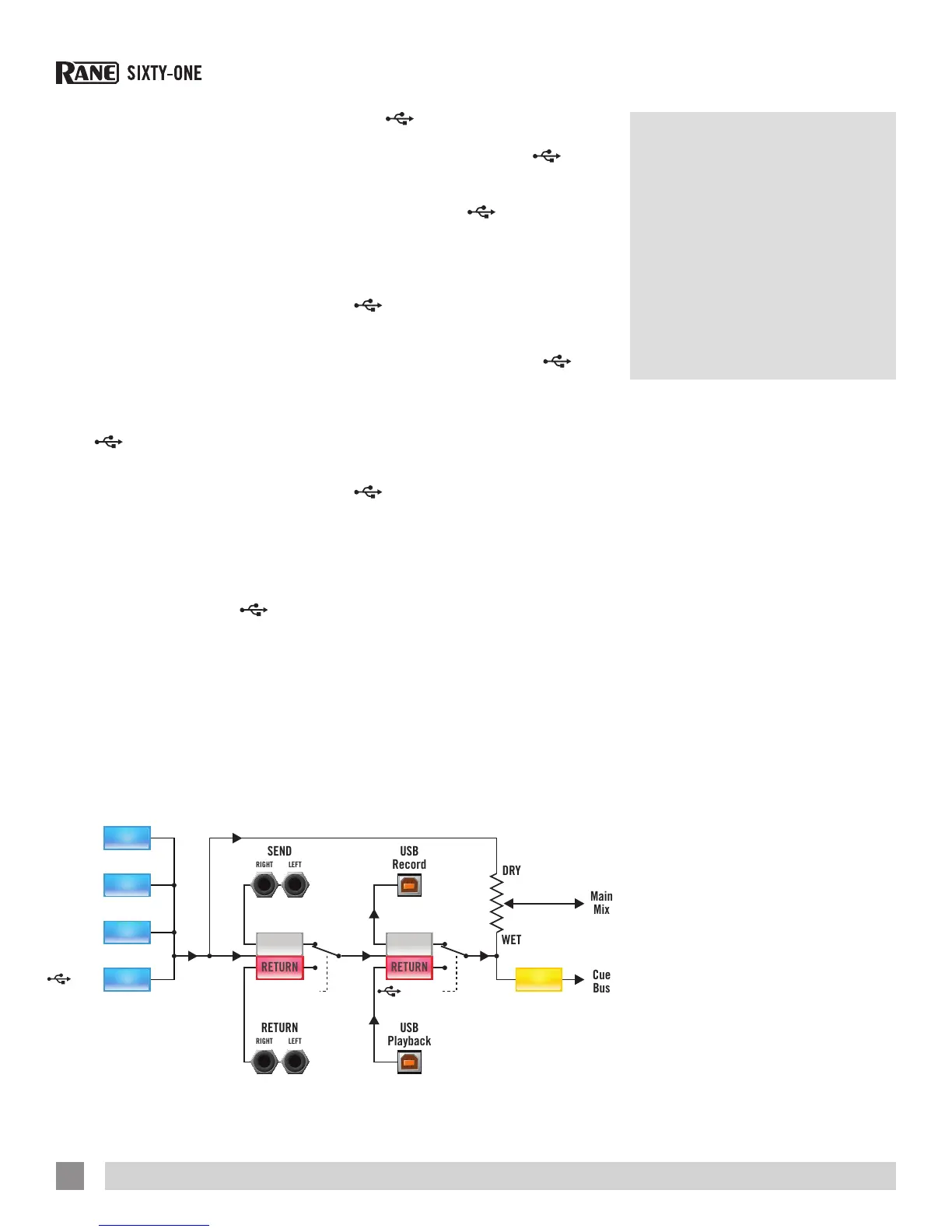
The FlexFx Bus in the Sixty-One works
differently than a typical effects insert
loop. This architecture is very exible
and opens up many new possibilities not
possible with simple effect insert designs
found on other mixers.
The FlexFx Bus is more like an auxiliary
bus that can have multiple signals
assigned to it. Signals assigned to the
bus may then have external analog effects
and external USB effects applied in any
combination. The order of processing in
the FlexFx Bus is shown in the graphic
below.
1. FLExFx buttons for PGM 1, PGM 2, MIc
and
AUx assign signals to the
FlexFx Bus (BRIGHT BLUE) or the Main
Mix (dim blue). This allows assigning
multiple inputs to the FlexFx Bus and/
or changing the assignment without
interrupting audio.
2. AnALOG InsERT is turned on/off with a
separate button. The external analog
insert can be used with the
InsERT
or independently. NOTE: If no external
connection is made to the FLExFx
LOOP RETURn jack, the signal will be
interrupted when the AnALOG InsERT
button is turned on.
3. The
InsERT is turned on/off with a
separate button, used with the AnALOG
InsERT or independently. The
InsERT
uses USB record pair 9-10 for the Send,
and USB playback pair 7-8 for the
Return. Using the
InsERT generally
requires a low latency setting. See “USB
Buffer Size (Latency)” on page 36.
NOTE: Assign a PGM channel or
signal to FLExFx before engaging the
InsERT button to avoid audible
artifacts.
Enable Mixer DJ-FX must be checked
in the setup screen to use the
InsERT with Scratch Live DJ-FX. NOTE:
If no connection is made in Scratch
Live between the USB send and USB
return or “Enable Mixer DJ-FX send”
is not checked in Scratch Live, the
signal will be interrupted when the
InsERT button is turned on.
See “Enable DJ-FX” on page 39.
See “DJ-FX Plugin” on page 27.
4. The FlexFX cUE is after the analog
external insert, USB insert and before
the WET / DRy control. This allows cueing
a Wet signal while listening to the Dry
signal before fading up to Wet.
FLEXFXPGM 1
1 2 3 4
FLEXFXPGM 2
FLEXFXMIC
FLEXFX
FLEXFX
AUX
ANALOG INSERT
SEND
RETURN
SEND
RETURN
INSERT
CUE
Core Audio
and ASIO
Drivers
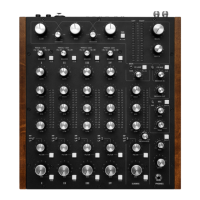
The Scratch Live installer includes drivers
that allow you to use your Rane Sixty-One
with other audio applications. The Core
Audio (Mac) and ASIO (PC) drivers can be
installed when you install Scratch Live.
See the instructions in “Installing Scratch
Live” on page 12.
Once installed, you will have the option
to use the Sixty-One with 3rd party DAWs
using ASIO or Core Audio interfaces.
NOTE: These drivers only work with audio
applications that are compatible with
these audio standards.
ASIO (Windows)
The Sixty-One uses a low-latency ASIO
device driver to interface with software
applications other than Scratch Live on
Windows operating systems. Multi-client
ASIO allows different audio software
applications to simultaneously stream
audio to and from the Sixty-One. If the
same playback channel is selected in
more than one application, the driver
mixes the audio from the applications
before streaming it to the device.
The driver Control Panel may be
launched from the Windows Control
Panel. Select Start > Control Panel > Rane
Sixty-One.
RANE SIXTY-ONE MIXER FOR SERATO SCRATCH LIVE • OPERATOR’S MANUAL 2.4.4
10


 To Next Page